
Salesforce Optimizer
Salesforce Optimizer was a free Setup tool that scanned an org's own metadata and reported the cleanup work it found.
Definition
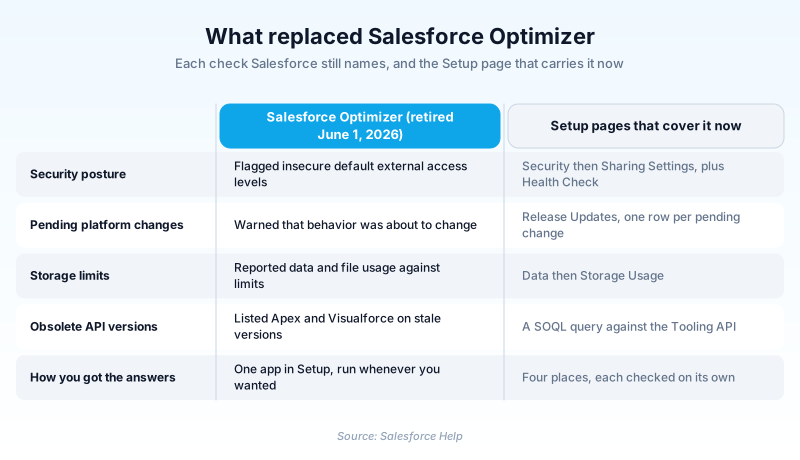
Salesforce Optimizer was a free Setup tool that scanned an org's own metadata and reported the cleanup work it found. Salesforce's migration guidance names the checks it cared about: insecure default external access levels, pending release updates, storage against limits, obsolete API versions, and inactive Chatter users.
The app is retired. Hyperforce orgs lost it in the Winter '26 release, every other org lost it in Summer '26, and Salesforce records June 1, 2026 as the retirement date. Orgs created after August 4, 2025 never had it at all.
No single feature replaced it. The old checks are scattered across Setup now.
In plain English
“Picture a free checkup for how a company set up its software. It handed back a list of things worth fixing, but never changed anything itself. Salesforce switched it off in 2026, so each area now gets checked on its own page.”
Worked example
A 400-seat logistics company ran Optimizer in early 2025, ahead of a Lightning rollout. The report came back with org-wide defaults still on Public Read/Write, file storage at 94 percent, and 11 Apex classes on API version 32.0. The admin worked that list down over two sprints. She went looking for Optimizer again in mid-2026 and found nothing, because her org had taken the Summer '26 upgrade. The version check became a Tooling API query, and the rest came from Sharing Settings and Storage Usage.
From one Setup app to a manual checklist
What a run actually gave you
You opened Optimizer in Setup, kicked off a run, and waited. It read metadata and changed nothing, which is why old runbooks told you to fire one off against production at midday. What came back was a set of findings, each with a short explanation and a pointer at the Setup page holding the fix. You applied every one by hand.
Why Salesforce switched it off
Two reasons were given. Most customers had finished the Lightning Experience migration the app was built to support, and keeping it running had become expensive. Optimizer was a migration aid with a shelf life, not a standing governance tool, and it left once that migration was done. If you were using it as an annual org health review, that was always borrowed time.
The replacements are not a straight swap
Spreading one app across several pages changed the work, not just the address. Nothing runs the checks for you, so each one happens when somebody remembers. Two destinations improve on the original: Release Updates tells you when a change activates, and Health Check scores security against a baseline. One is worse. The API version check left Setup entirely and became a query you write against the Tooling API.
The piece that stayed behind
One report outlived the app. Orgs not yet on Hyperforce keep the Hard Coded URL detection feature, because hardcoded instance URLs are migration work Salesforce still wants finished. Once an org lands on Hyperforce, that report goes too. Development moved to Lightning Experience Insights, which measures page performance instead of auditing configuration.
Trust & references
Cross-checked against the following references.
Straight from the source - Salesforce's reference material on Salesforce Optimizer.
Hands-on resources to go deeper on Salesforce Optimizer.
About the Author
Dipojjal Chakrabarti is a B2C Solution Architect with 29 Salesforce certifications and over 13 years in the Salesforce ecosystem. He writes and edits salesforcedictionary.com, published by KineticBit Inc., to help admins, developers, architects, and cert/interview candidates sharpen their fundamentals. More about Dipojjal.
Test your knowledge
+5 pts / dayQ1. When did orgs already running on Hyperforce lose access to the Salesforce Optimizer app?
Q2. Optimizer used to flag insecure default external access levels. Which Setup path does Salesforce name for that check now?
Q3. What happened to an org's configuration when an admin ran Salesforce Optimizer?
Discussion
Loading discussion…