
Classic Letterheads
Classic Letterheads are reusable branding frames that wrap HTML email templates built in Salesforce Classic.
Definition
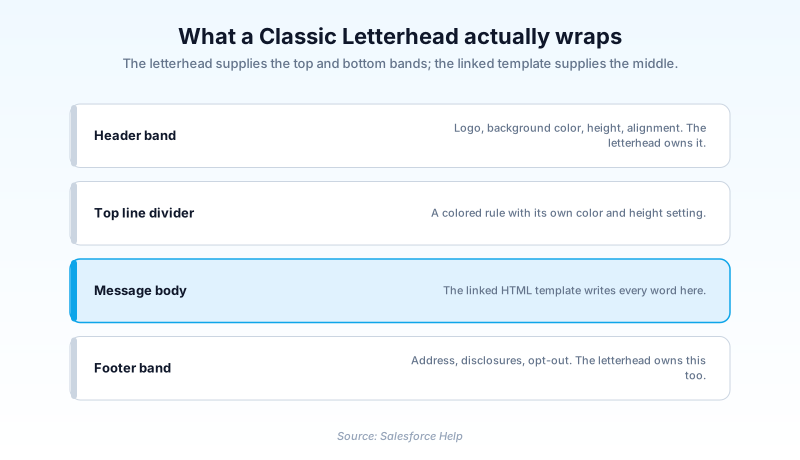
Classic Letterheads are reusable branding frames that wrap HTML email templates built in Salesforce Classic. Each one supplies the header band, the footer band, and the background colors. A single record holds the logo, the band heights, the alignment settings, and the divider lines. The template linked to it supplies everything in between.
Classic Letterheads are the older option, and Salesforce no longer positions them for new work. You can still create and edit them from Setup. But they cannot be attached to Lightning Email Templates at all, and the HTML template type that consumes them cannot be authored in Lightning Experience.
The current replacement is Enhanced Letterheads, which attach to Lightning email templates and are created from the App Launcher. Classic Letterheads survive mostly because Workflow and approval email alerts still send Classic templates that reference them.
In plain English
“Think of printed company stationery. The logo at the top and the address at the bottom are already there, and you only write the middle part. A Classic Letterhead is that stationery for email sent from older Salesforce screens. Newer email screens use a separate, updated version of the same idea.”
Worked example
A 400-seat medical device distributor keeps a letterhead labelled Corporate Blue, with the unique name Corporate_Blue. Its header band uses background color #003A70 at a height of 90 pixels, with the logo aligned Left. The logo is a 550 pixel wide PNG stored in the Documents object with Externally Available Image checked. The top line is #FFB81C at 4 pixels, and the footer band carries the registered address plus a regulatory disclosure. Six HTML templates point at Corporate_Blue, including the one a Workflow email alert sends on every shipment confirmation. When the company rebrands, the admin edits Corporate Blue once and swaps the logo. All six templates pick up the new header on their next send.
The frame, the fields, and why orgs still run it
Header, body, footer: who owns which zone
Splitting the frame from the contents is the whole reason the feature exists. Branding is stored once, and every HTML template that selects the letterhead inherits the same frame. Change the footer disclosure in one record and it lands on every template pointing at it. The cost is rigidity. You get fixed slots for colors, heights, and alignment, with no way to rearrange the layout. If your design calls for a two-column footer or a hero image, the letterhead editor will not give you one.
The fields inside the letterhead record
The Letterhead metadata type has shipped since API version 12.0, and its fields map directly onto what you see in the editor. Name is required. Description is free text you use to tell near-identical letterheads apart. The available field is the Available For Use checkbox that decides whether template authors can pick it yet. Color work splits three ways. One background color covers the whole letterhead and a body color covers the middle. The header and footer each carry their own background color plus a height. Alignment on those bands accepts None, Left, Center, or Right horizontally, and None, Top, Middle, or Bottom vertically. Then come three divider rules: a top line, a middle line, and a bottom line, each with a color and a height. That is the entire design vocabulary. Nothing else is configurable.
How an HTML template picks one up
A letterhead renders nothing by itself. It only appears when an HTML email template selects it. In the EmailTemplate metadata, the letterhead field is documented as available only when type is set to html. Text, custom, and Visualforce templates ignore letterheads entirely. Those HTML templates also carry a style value that sets the interior layout: none, freeForm, formalLetter, promotionRight, promotionLeft, newsletter, or products. Pick one, write the body, and Salesforce stitches the frame around it at send time. One detail catches people out, and it runs the opposite way to what most people assume. The style you pick at creation is the fixed part: Salesforce Help states you cannot change the layout in an existing template. The letterhead is not fixed. Open the saved template, choose a different letterhead, and save. For a rebrand spanning many templates you would still edit the letterhead record itself, since everything pointing at it updates together.
The logo rules that break the most letterheads
The logo is the single most common failure point. Salesforce expects the image to live in the Documents object, saved as a .png or .jpg, with the Externally Available Image checkbox selected. Miss that checkbox and recipients get a broken image while your own preview looks perfect, because you are authenticated and they are not. Sizing is fixed. The header is 550 pixels wide, so resize the logo to match with proportions constrained. Note the height you end up with, then set the header band height to that number. Salesforce has no built-in image editor, so the resize happens in whatever graphics tool you have. Get the height wrong and you either crop the logo or leave a band of dead color sitting under it.
Enhanced Letterheads and what changes
Enhanced Letterheads are the Lightning successor, available since API version 46.0. You create one from the App Launcher rather than Setup, give it a Name and a Description, and build header and footer content directly. A Lightning email template then picks it from an Enhanced Letterhead field. Two differences matter. First, an enhanced letterhead attaches to Lightning email templates that do not use Salesforce Merge Language. The merge syntax you write is not the Classic syntax. Second, the authoring surface is far less rigid: you place images and content instead of filling in color and height slots. The boundary between the two is hard, not fuzzy. Classic Letterheads cannot be used on Lightning Email Templates, and enhanced letterheads cannot be used on Classic HTML templates. No bridge exists between them.
Retiring one without breaking a live email
Classic Letterheads are frozen rather than scheduled for removal. They do not appear on the Salesforce Active Product and Feature Retirements list, so no date is forcing your hand. The pressure comes from elsewhere. The HTML template type that uses them cannot be created in Lightning Experience, so every new branded template pushes you toward the Lightning stack anyway. Work the dependency chain backwards. Find the Workflow or approval email alerts that send Classic templates, then rebuild those on Flow and Lightning email templates with an enhanced letterhead. Send a real test to Outlook and to a mobile client, and only then delete the Classic pair. Deleting first is what hurts. A template that loses its letterhead keeps sending, just unbranded, and nothing raises an error to warn you.
How organizations use Classic Letterheads
Keeps one Classic Letterhead behind six shipment and return templates that Workflow email alerts still send. The regulatory footer then reads identically on every automated message.
Runs Classic Letterheads for approval-process notifications while all new customer-facing mail is authored as Lightning email templates with an enhanced letterhead.
Maintains two letterheads, one for donor receipts and one for volunteer notices, so finance reviews each acknowledgement footer once instead of template by template.
Trust & references
Cross-checked against the following references.
- Change the Classic Letterhead Logo in an Email Template (opens in new tab)Salesforce
- Recommended Logo Size for HTML Email Letterheads (opens in new tab)Salesforce
- Salesforce Active Product and Feature Retirements (opens in new tab)Salesforce
- EmailTemplate | Metadata API Developer Guide (opens in new tab)Salesforce
- Create Enhanced Letterheads in Lightning Experience (opens in new tab)Salesforce
Straight from the source - Salesforce's reference material on Classic Letterheads.
Hands-on resources to go deeper on Classic Letterheads.
About the Author
Dipojjal Chakrabarti is a B2C Solution Architect with 29 Salesforce certifications and over 13 years in the Salesforce ecosystem. He writes and edits salesforcedictionary.com, published by KineticBit Inc., to help admins, developers, architects, and cert/interview candidates sharpen their fundamentals. More about Dipojjal.
Test your knowledge
+5 pts / dayQ1. An admin needs a Classic Letterhead header logo to render for external recipients. Where must the image live, and what must be enabled?
Q2. A team wants to reuse an existing Classic Letterhead on a brand new Lightning email template. What actually happens?
Q3. An HTML email template was saved months ago pointing at the wrong Classic Letterhead. What is the supported fix?
Discussion
Loading discussion…