
Workflow Email Alert
A Workflow Email Alert is an email alert action fired by a Workflow Rule, the trigger-plus-action pairing Salesforce relied on before Flow took over.
Definition
A Workflow Email Alert is an email alert action fired by a Workflow Rule, the trigger-plus-action pairing Salesforce relied on before Flow took over. The rule watched an object and evaluated criteria. The alert supplied the template, the recipient list, and the From identity, then sent the message.
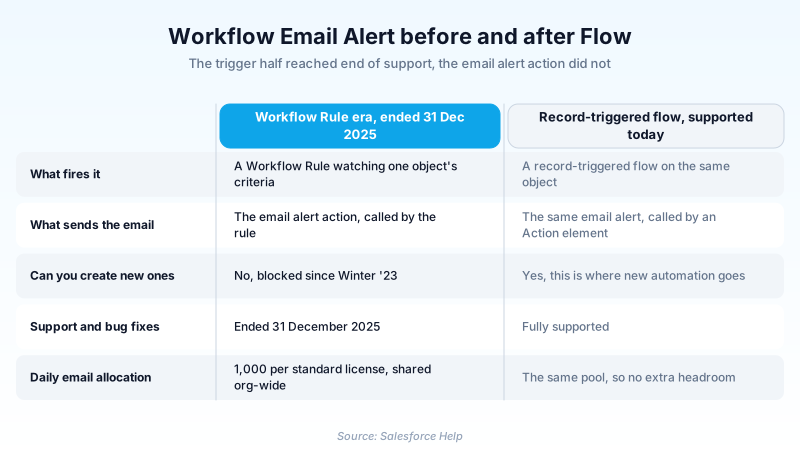
That pairing is the older option. Salesforce blocked new Workflow Rule creation in Winter '23 and ended support for Workflow Rules on 31 December 2025. Existing rules keep running and you can still edit or deactivate them, but nobody at Salesforce is fixing their bugs.
The email half survived intact. Email alerts are workflow actions rather than workflow rules, and Salesforce never deprecated them. A record-triggered flow calls the same alert through an Action element, so migrating usually means rebuilding the trigger and leaving the email alone.
In plain English
“Picture an office with two clerks. One watches a filing cabinet for changes. The other keeps a stack of pre-written letters with blanks in them. When a file changes, the watcher taps the letter clerk, who fills in the blanks and mails it. Salesforce retired the watcher but kept the letter clerk, and a newer watcher now does the tapping.”
Worked example
A regional insurance brokerage runs a Workflow Rule on Case called Escalated Case Notice. It fires when Priority equals High and Status changes to Escalated. Its only action is an email alert named Case_Escalation_Notice, which uses the HTML template Case Escalation, sends to the Case Owner and the public group Service Leads, and adds claims-desk@example.com as one of its five extra addresses. The From is a verified org-wide address called Support Notifications. In January the admin opens Migrate to Flow, converts the rule, and clicks Switch Activations. The new record-triggered flow runs after save on Case, checks the same two conditions, and passes the record ID into an Action element pointing at Case_Escalation_Notice. Recipients notice nothing, because the template and the recipient list never changed.
The half that retired and the half that did not
Two objects everyone talks about as one
A Workflow Rule and an email alert are separate records that happen to get used together. The rule is the trigger: it sits on one object, evaluates criteria, and decides when to act. The alert is one of four classic actions the rule could call, alongside field updates, tasks, and outbound messages. The same alert can be called by several rules, by steps inside an approval process, and by flows. In the Tooling and Metadata APIs it is its own type, WorkflowAlert, carrying a TemplateId, a SenderType, and a CC list. That independence is exactly why the alert outlived the rule. When you plan a cleanup, treat the two halves separately. Count your rules, then count which alerts have no caller left. The answer is usually smaller than the panic suggests.
What end of support actually changed
Salesforce stopped new Workflow Rule creation in Winter '23, so every rule in your org today was built before that. Support ended on 31 December 2025. The official wording is blunt: the tools may continue to function and execute existing automation, but customer support is not available and bugs will not be fixed. Nothing switched off at midnight. You can still open a rule, edit its criteria, activate it, and deactivate it. What you lost is recourse. If a rule starts misfiring after a release, there is no case to open and no patch coming. That is the real cost of leaving one in place, and it is why an alert whose only caller is a Workflow Rule belongs on a migration list rather than a shrug list.
Recipients, and who the message appears to come from
Recipient selection is where most of the configuration time goes. You can address a specific user, a role, a role and its subordinates, a public group, the record owner, or a related user or contact lookup on the record. Team roles are available on objects that have teams, so a whole case team can be one recipient entry. On top of those you get up to five plain email addresses for a distribution list or an outside partner. The From identity comes from SenderType. CurrentUser sends as whoever triggered the automation. DefaultWorkflowUser sends from the org default workflow user, which keeps the triggering person out of the header. OrgWideEmailAddress sends from a verified shared address, and that is the option worth defaulting to, because replies then land in one monitored inbox.
The alert holds no words of its own
An email alert stores a pointer to a template, never body text. Classic text and HTML templates are quick to build, Visualforce templates let a developer loop over related records, and Lightning templates use the modern builder. Merge fields do the personalizing, so a subject line containing a case number resolves per record at send time and one alert serves thousands of sends. The shared template is a double-edged arrangement. Edit it once and every alert, approval step, and flow that references it changes with no further warning. Check the dependencies before you touch the wording, especially on templates that predate you. Pairing templates with a letterhead keeps header, footer, and color consistent, which matters more than it sounds when most of your outbound mail is automated.
The allocation that fails quietly
Email alerts draw on a shared daily allocation, and busy orgs do reach it. The ceiling is 1,000 emails per standard Salesforce license per organization per day, with an overall organization cap of 2,000,000. Free Developer Edition and trial orgs get 15 per standard license. The window runs midnight to midnight GMT, not your local business day. Workflow rules, approval processes, flows, processes, and the REST API all spend from the same pool, so moving a rule into Flow buys you no headroom. The part that catches teams out is the failure mode. Once the allocation is gone, leftover messages in the queue are discarded and Salesforce does not try to resend them later. No bounce, no retry, no error written on the record. Schedule bulk loads accordingly.
Migrating the trigger and keeping the email
From Setup, search Quick Find for Migrate to Flow, pick the rule, and let the tool generate a record-triggered flow. It copies the entry criteria into the flow's start conditions and drops in an Action element that calls your existing alert, then offers Switch Activations to swap the two over in one step. Trailhead still names the Email Alert action as the recommended way to send mail from a flow, on the grounds that it has the most features and reuses what you already built. The Email Alerts list in Setup shows which flows reference each alert, which makes the audit quick. Then triage. Alerts driven only by an approval process stay untouched, because approvals remain a supported caller. Alerts driven by a Workflow Rule get a new flow trigger. Alerts that need dynamic recipients or conditional content get replaced by a Send Email action or Apex.
How organizations use Workflow Email Alert
Keeps a decade of escalation and renewal alerts running while the automation team rebuilds each trigger as a record-triggered flow, reusing every alert so the wording never changes.
Leaves its approval-driven alerts alone, since approval processes still call email alerts as a supported action, and spends the migration budget on the workflow-rule half instead.
Trust & references
Cross-checked against the following references.
- Salesforce Workflow Rules & Process Builder End of Support (opens in new tab)Salesforce
- WorkflowAlert | Tooling API (opens in new tab)Salesforce
- Proactive Alert Monitoring: Daily Workflow Email Limit (opens in new tab)Salesforce
- Email Alert Actions | Actions Developer Guide (opens in new tab)Salesforce
Straight from the source - Salesforce's reference material on Workflow Email Alert.
Hands-on resources to go deeper on Workflow Email Alert.
About the Author
Dipojjal Chakrabarti is a B2C Solution Architect with 29 Salesforce certifications and over 13 years in the Salesforce ecosystem. He writes and edits salesforcedictionary.com, published by KineticBit Inc., to help admins, developers, architects, and cert/interview candidates sharpen their fundamentals. More about Dipojjal.
Test your knowledge
+5 pts / dayQ1. Support for Workflow Rules ended on 31 December 2025. What happened to the email alerts those rules called?
Q2. An org holds 40 standard Salesforce licenses. Roughly how many workflow and approval email alert messages can it send in a day?
Q3. A record-triggered flow needs to send an existing email alert. What does the Action element require as input?
Discussion
Loading discussion…