
Flow Builder's Winter '27 Rewrite
The Winter '27 feature documentation went round the ecosystem this week, and the largest single change for most orgs is Flow Builder. A redesigned canvas, a new element menu, two new Split elements, version edit history, and a Test mode in beta. Preview opens August 28, and the refresh cutoff is the day before.

Open [Flow Builder](/terms/flow-builder) in a Winter '27 environment and the canvas will not look like the one you left. The element cards are tighter and less rounded, and the plus button no longer opens the modal you have clicked through a thousand times. It opens a panel on the right, with elements grouped by type and your frequent ones floated to the top.
That is the headline of a quiet week. The Winter '27 feature documentation started circulating across the ecosystem on Thursday, and for most orgs the biggest change in the release is not an AI feature. It is the tool your admins spend their day inside.
The Calendar That Binds You
Five dates matter between now and October, and only one of them is a hard stop.
Salesforce's Admin release countdown puts pre-release Developer Edition org signup at August 13 and the release notes going fully live on August 19. Preview instances upgrade over the weekend of August 28 and 29. Testing opens August 30. Production upgrades run across three weekends, finishing in the second week of October.
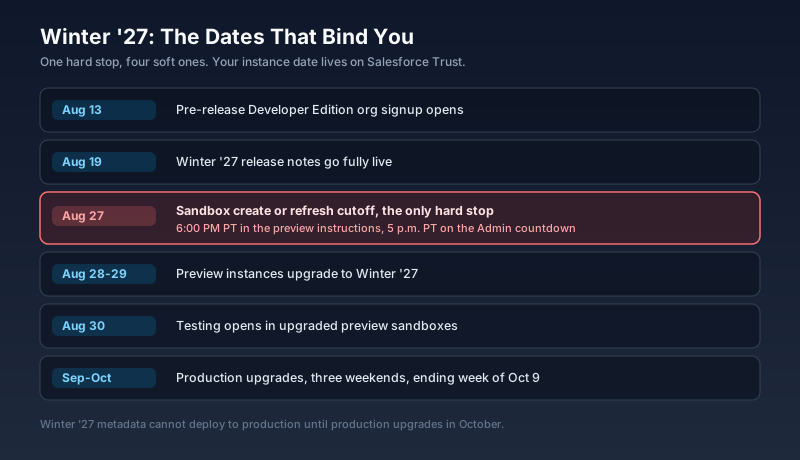
The hard stop is August 27. To land a sandbox on a Winter '27 preview instance, you have to create or refresh it before that evening. Salesforce's sandbox preview instructions publish the cutoff as 6:00 PM PT on August 27; the Admin countdown says 5 p.m. PT the same day. Treat the earlier of the two as your deadline and you cannot be wrong. A refresh started on August 28 is a refresh that gives you a Summer '26 sandbox for another six weeks.
One constraint people rediscover every year: metadata built against Winter '27 features or the Winter '27 API version cannot be deployed into production until production is upgraded in October. Keep your preview sandbox out of the deployment pipeline, or your release train stops.
Your instance date is the only one that governs you, and it is on Salesforce Trust. Check the Release Type column under Sandboxes in Setup to see whether a given sandbox is Preview or Non-Preview, because the two get different dates and admins routinely test in the wrong one.
The Canvas Moved
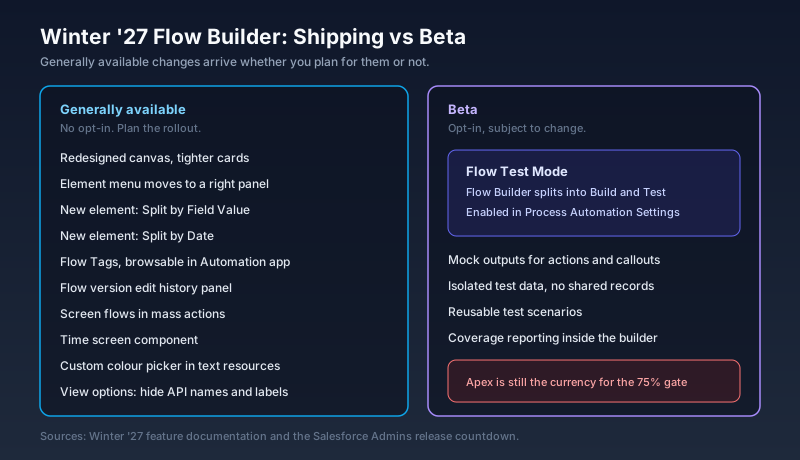
The Flow Builder redesign ships generally available. There is no toggle to decline it.
Cards take less space and their corners are less rounded. The element picker becomes a right-side panel with elements grouped into Decision Split, Manage Data, Flow Logic, Interaction, and Actions, with frequently used elements promoted to the top. Display Text and Text Template resources get a colour picker with custom colours rather than a fixed set. There is a new Time screen component that captures a time input with a configurable range, interval, and custom error messages, which removes one of the more tedious custom LWC builds in the ecosystem.
There is also a set of view options: hide API names, collapse labels and descriptions, hide labels and descriptions. Useful on a canvas with sixty elements, and a small trap for anyone whose documentation assumes API names are visible by default.
That is the part to plan for. Nothing in a UI refresh breaks a running flow. What it breaks is every screenshot in your runbooks, every click path in your onboarding deck, and the muscle memory of the person who builds flows fastest on your team. If your admin training materials were recorded against the current canvas, they age out on your production upgrade weekend.
Two Elements That Replace Half Your Decisions
Winter '27 adds Split by Field Value and Split by Date. Both are simplified Decision elements aimed at the two branches admins build most often.
Split by Field Value branches on the value of a field without making you write an outcome for each condition set. Split by Date branches on a date with a small operator set: Before, Between, After, and Is On, accepting a literal date or a resource.
Nothing here is new capability. You can build both today with a Decision and a handful of formula resources. What changes is the amount of scaffolding standing between the intent and the flow, and that matters more than it sounds. A Decision element with four outcomes and three formulas behind it is four things to read and three things to maintain. Most of the ugliest flows in production are ugly because a simple branch got expressed in a general-purpose element.
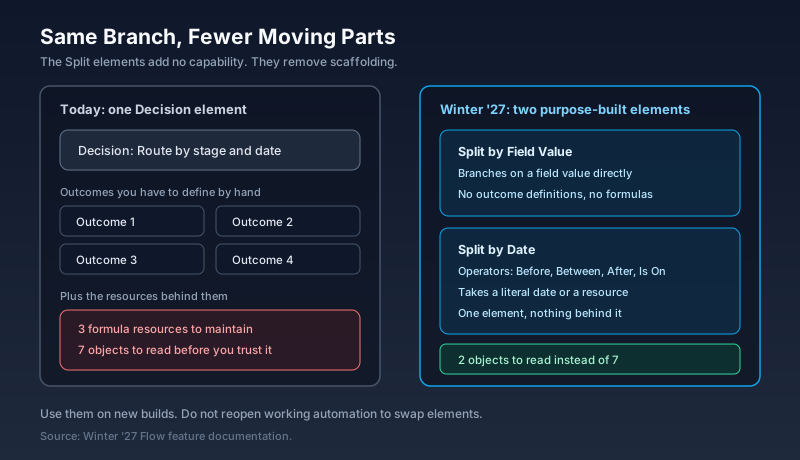
The caution is the same one that applies to every convenience element. Do not open working automation to swap a Decision for a Split. Use them on new builds and let the old ones age out on their own schedule.
Governance Gets Two Real Additions
Flow Tags let you apply multiple tags to a flow across categories, and the tags plus their associated flows are viewable in the Automation app. Anyone running an org with 300 flows and a naming convention that three people have quietly disagreed about since 2022 will understand the value immediately.
Version edit history is the better of the two. A new button opens a panel showing every change made to a specific flow version. Click an individual edit and it takes you to the element and highlights what changed. From there you can save as a new version, save as a new flow, or restore.
That is the first time the platform answers "who changed this and what did they change" inside Flow Builder rather than through a metadata diff in source control. It does not replace source control, and anyone running a proper pipeline should keep the pipeline. For the large number of orgs whose Flow change history currently lives in someone's memory, it closes a real gap.
Screen flows in mass actions also reaches general availability: launch a screen flow for multiple records selected from a list view or a related list, with the selected record IDs passed into a text collection variable and the parent record ID available when launched from a related list. That one has been requested for years, and it removes a category of custom LWC list buttons from the ecosystem.
Test Mode, Briefly
Flow Test Mode arrives as a beta. Flow Builder splits into Build and Test modes, and Test carries code coverage, mock outputs, isolated test data, and reusable scenarios.
Mock outputs are the piece that changes what is testable, because a flow that calls an Apex action or an external service can finally be exercised without the dependency running. Yesterday's guide to Salesforce Flow testing in 2026 has the full picture, including the part most teams get wrong: declarative Flow Tests earn no credit toward the 75 percent deployment gate, and nothing published so far says Test Mode coverage will either.
It is a beta, which means opt-in, subject to change, and not a thing to put on a production timeline. Evaluate it in the preview sandbox and keep Apex as the currency for coverage until Salesforce says otherwise.
For Developers: Data 360 SQL Gets an Apex Namespace
Away from Flow, the Winter '27 change log added the sfsqlquery namespace for running Data 360 SQL queries from Apex. It carries SqlStatement, SqlRowIterator, Row, QueryHandle, and SqlQueueable, and Salesforce's documentation names it as the recommended path for all new development.
The shape is familiar: build with SqlStatement.create(), run it synchronously with execute(), read typed values off Row with accessors like getString(), or hand large result sets to SqlQueueable, which processes each page in processDataChunk() and chains the next job automatically so paging does not walk you into a governor limit.
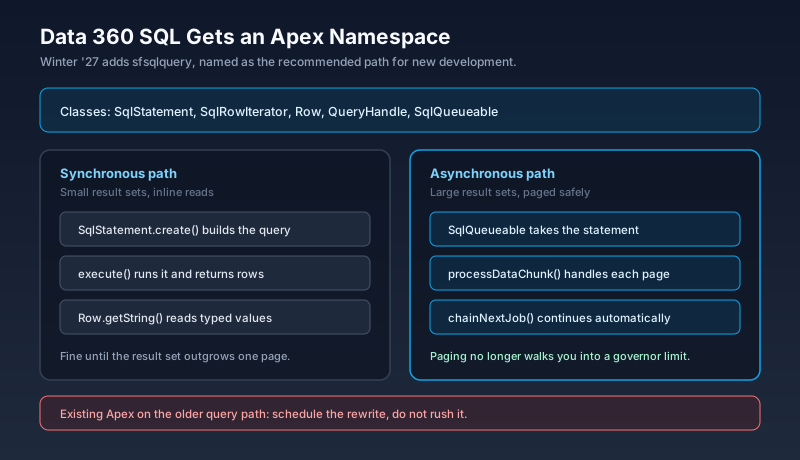
If you have Apex calling Data 360 through the older query path, this is a rewrite you should schedule rather than perform. The recommendation language is the signal that the older path stops receiving investment, and the async paging alone is worth the change on any query returning more than a page.
Also Landing: Australia Clears Contentful
Two deal-desk items moved this week and neither made headlines.
The Australian Competition and Consumer Commission cleared Salesforce's acquisition of Contentful on August 4, finding minimal horizontal overlap between the two in the supply of content management systems. That deal was signed June 1 and is expected to close in Q3 of Salesforce's fiscal 2027.
The same regulator is reviewing the Intercom acquisition, the one Salesforce announced at $3.6 billion for the business now trading as Fin, and its window for submissions closed August 5. Neither review is a threat to either deal. Both matter if you have a content or service roadmap that assumes either product is inside Salesforce by a specific quarter, because the close date is the date the product roadmap starts moving, not the announcement date.
What This Changes For Your Org
Three things are worth doing before August 27, and they are all cheap.
Refresh or create the sandbox you intend to preview in, and do it this week rather than on the 27th. Refresh queues get long in the final 48 hours, and a refresh that finishes after the cutoff misses the window entirely. Pick a sandbox that is not on your deployment path.
Pull a list of your Flow-related documentation and mark anything that contains a screenshot of the canvas or a click path through the element picker. That is your rework list for October, and it is far smaller if you find it now than if you find it when a new admin follows a stale runbook.
Decide your position on the two new Split elements before anyone asks. The answer that ages well is new builds only, with existing Decision elements left alone. Write it into your automation standards while the release is still in preview, because the alternative is discovering in December that four people made four different calls.
What To Do Next
Open Setup, go to Sandboxes, and read the Release Type column. Pick one Preview sandbox that is not in your deployment pipeline, start its refresh today, and put August 30 in your calendar as the day you open Flow Builder in it. Then take the three flows you would least like to break, and rebuild one of them in the new canvas as a dry run. You will know within an hour whether your team needs an hour of retraining or a day of it, and you will know it six weeks before production upgrades rather than the Monday after.
About the Author
Dipojjal Chakrabarti is a B2C Solution Architect with 29 Salesforce certifications and over 13 years in the Salesforce ecosystem. He writes and edits salesforcedictionary.com, published by KineticBit Inc., to help admins, developers, architects, and cert/interview candidates sharpen their fundamentals. More about Dipojjal.
Share this article
Sources
- New Flow Features of Winter '27 Release (Salesforce Time, August 6 2026)
- Admin Release Countdown: Get Ready for Winter '27 (Salesforce Admins)
- Salesforce Sandbox Preview Instructions (Salesforce Help)
- Salesforce Winter '27 Preview Guide (Port and Starboard)
- Salesforce Winter '27 Release Date + Preview Information (Salesforce Ben)
- Query Data 360 Data with Apex (Salesforce Developers)
- Release Note Changes, Winter '27 (Salesforce Help)
- Salesforce-Contentful deal cleared by Australian antitrust watchdog (MLex, August 4 2026)
- Salesforce's bid for Intercom faces regulatory review in Australia (MLex)
Related dictionary terms
Practise it
Five questions on Administrator
Exam-style questions with an explanation after each one. No account needed, and your answers build a weak-topic map once you have one.

Comments
No comments yet. Start the conversation.
Sign in to share your take on this article. Your account works across every page.