
Agentforce Vibes and React on Salesforce
How vibe coding and the Multi-Framework runtime let you build native React apps on the Agentforce 360 Platform, and where the beta still bites
You describe the screen you want in plain English: "a pipeline board grouped by stage, with a drag handle to move Opportunities, and a side panel that shows the contact roles for whatever card I click." Forty seconds later there is a running React app in your preview pane. Real cards. Real Opportunities from your sandbox. The drag handle works. You did not write a single line of JSX, a single GraphQL query, or a single field mapping.
That is Agentforce Vibes building a native Salesforce app on the Multi-Framework runtime. And it is the biggest change to how you build UI on the platform since Lightning Web Components shipped.
Whether that change is good or terrifying depends entirely on what you do in the next five minutes after the app appears. Let me walk you through the whole thing.
What actually got announced at TDX 2026
Two things, and people keep conflating them.
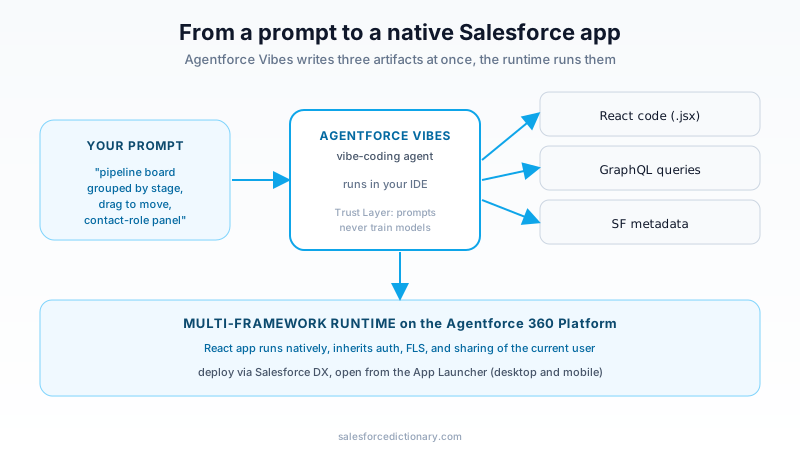
The first is Agentforce Vibes 2.0, the vibe-coding tool. It is the agent that turns natural language into working code. It runs in your IDE, watches your prompts, and produces React components, GraphQL queries, and Salesforce metadata together.
The second is Salesforce Multi-Framework, the runtime that lets those React apps actually run on the platform. This is the deeper piece. For years your only first-class option for custom UI was LWC. Multi-Framework is a framework-agnostic runtime on the Agentforce 360 Platform. React is supported first, in open beta. Other frameworks are slated to follow.
You can use one without the other. You can hand-write React against Multi-Framework and never touch Vibes. You can use Vibes to generate LWC and never touch React. But the headline demo, the one everyone screenshotted, is the two together: vibe-coded React running natively in your org.
The reason this matters is reach. Salesforce has roughly twenty million developers in its orbit, but React has tens of millions. Multi-Framework is Salesforce admitting that asking every front-end engineer to learn a proprietary component model was a tax it could no longer charge. So now you bring React. The platform brings auth, data, and governance.
The Multi-Framework runtime, concretely
Here is what you get when you generate a project. The CLI command is short:
sf template generate ui-bundle
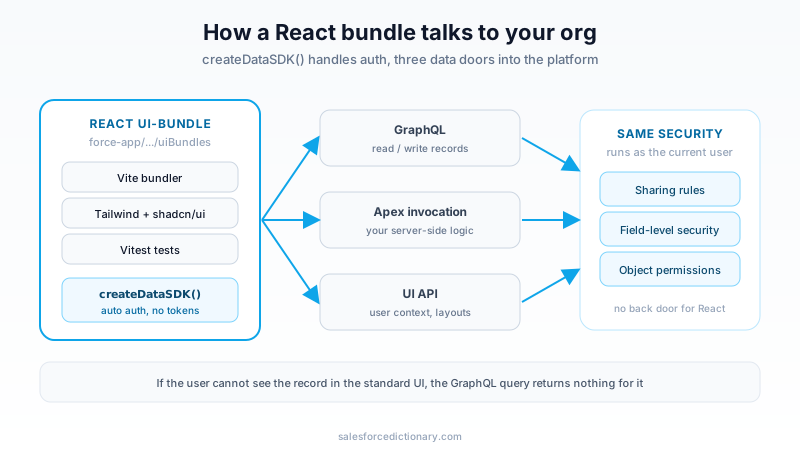
That scaffolds a React app into force-app/main/default/uiBundles. The bundle ships preconfigured with a stack any modern front-end developer will recognize on sight: Vite for bundling, Vitest for tests, Tailwind CSS for styling, and shadcn/ui for components. No proprietary build step. No bespoke template syntax. It is a real Vite app that happens to deploy to Salesforce.
Data access is the part that earns the word "native." The runtime exposes three doors into your org:
- GraphQL for reading and writing records. This is the primary data path, and it is what Vibes generates by default.
- Apex method invocation for server-side logic you already wrote or need to write. Your existing Apex classes are callable from the React layer.
- UI API for user context, layouts, and metadata about the running session.
You do not manage tokens. The createDataSDK() utility handles authentication automatically. There is no OAuth dance in your component code, no refresh-token logic, no secrets in the bundle. The SDK is issued an identity tied to the running user, and every query inherits that user's permissions.
That last point is the one to underline. When your React component runs a GraphQL query, it runs with the current user's sharing rules, field-level security, and object permissions. If the user cannot see the Opportunity in the standard UI, the GraphQL query returns nothing for it either. The runtime does not hand React a back door around your security model. It hands React the same locked doors everyone else uses.
Once the app builds, you preview it, deploy it through the same Salesforce DX workflows you already use, and access it from the App Launcher on desktop or the Salesforce mobile app. The deployment artifact is metadata. It version-controls, it moves through sandboxes, it goes through your release process. From a DevOps standpoint, a ui-bundle behaves like any other metadata type.
How vibe coding actually feels
Vibe coding is a term that sets off alarm bells, and it should. The fear is obvious: a junior dev types a vague sentence, an agent emits a thousand lines of code nobody reviews, and that code ships to production. So let me describe what the loop actually is, because the reality is more controllable than the buzzword suggests.
You open Agentforce Vibes in your IDE. You describe the component or app you want. The agent does three things at once: it writes the React code, it writes the GraphQL queries that feed it, and it writes the Salesforce metadata the app needs. Then it renders the result in a live preview.
The phrase Salesforce uses is "see as you build." You change the prompt, the preview updates. You ask for a darker header, the header darkens. You ask to group the board by owner instead of stage, the data model adjusts and the cards re-sort. The feedback loop is tight enough that you iterate on the running app, not on a spec document.
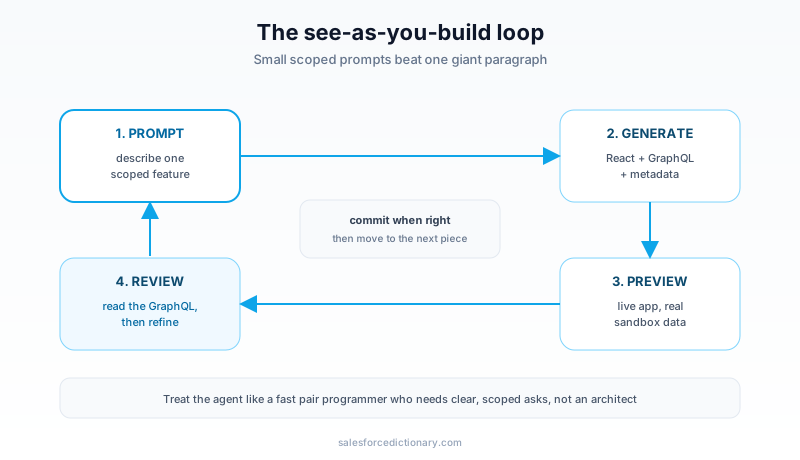
The first time you use it, you will overshoot. You will type a paragraph describing the entire app, get back something 80 percent right, and then spend twenty minutes nudging the wrong 20 percent. The skill you develop is the opposite: small prompts, frequent previews, commit when a piece is right, then move to the next piece. Treat the agent like a fast pair programmer who needs clear, scoped asks. It is not a mind reader and it is not an architect.
Everything passes through the Einstein Trust Layer. Your prompts and the generated responses are not used to train future models, which is the assurance an enterprise legal team needs before letting this anywhere near a real org.
React app or LWC: which one, when
Multi-Framework does not retire LWC. Salesforce has been clear that LWC remains the default for most platform UI, and you should believe them. So how do you choose?
Reach for React on Multi-Framework when:
- You have an existing React team or a React design system you want to reuse.
- The UI is genuinely complex: heavy client-side state, drag-and-drop, canvas work, rich interactions that fight against a component model designed for forms.
- You want a specific look that does not bend to Lightning Design System, and you are willing to own that styling.
- You are building a standalone app, not a small widget dropped onto a record page.
Stay with LWC when:
- You are adding a component to a Lightning record page, App Builder layout, or community page. During beta, the React runtime does not support App Builder drag-and-drop, so LWC is still the only first-class citizen there.
- The component is small and form-shaped. A field, a related list, a quick action. LWC does this with less ceremony.
- You need every platform API today. Some are not yet exposed to the React runtime in beta.
- You are deploying to production this quarter. See the next section.
If you already know LWC, the mental model transfers. You wrote components that called Apex and queried data. Now you write React components that call Apex and query data. The data layer is conceptually the same. The view layer is the part you are swapping. If LWC is brand new to you, our LWC first-component walkthrough is the faster on-ramp, and the data concepts you learn there carry straight into Multi-Framework.
The beta limits that will actually bite you
This is open beta. That word is doing a lot of work, and skipping this section is how you end up demoing something on Friday that you cannot ship the following Monday. Here is the honest list as of the 2026 release window.
No production deployment. The React runtime is available in scratch orgs and sandboxes only, with English as the default language. You cannot deploy a Multi-Framework app to a production org during beta. If your plan was to vibe-code a customer-facing app and ship it next sprint, stop and rebuild that plan. This is for prototyping, internal tooling in sandboxes, and getting your team fluent before GA.
No Lightning App Builder drag-and-drop. You cannot drop a React bundle onto a record page through App Builder yet. That removes the single most common way admins compose pages. If the deliverable is "a component on the Account layout," React is the wrong tool right now.
Micro-frontend support is gated. Embedding a React micro-frontend inside Lightning Experience was in closed pilot for the Spring window. Do not assume you can stitch React into existing Lightning pages until that lands broadly.
Some platform APIs are missing. The runtime does not yet expose everything LWC reaches. Before committing to React for a given feature, confirm the specific API you need is available. Discovering the gap mid-build is the expensive way to learn this.
The pattern across all four limits is the same: this is a build-and-learn release, not a build-and-ship release. Use the beta to train your team, prototype the apps you will want, and pressure-test the data layer. Plan production work for after GA.
A realistic first project
Do not start with the customer portal. Start with something where the blast radius is a single sandbox and the audience is you.
A good first project is an internal dashboard that nobody outside your team will ever see. Something like a sales-ops console: a board of open Opportunities, filters by owner and stage, a side panel that pulls contact roles and recent activities for the selected record. It exercises the parts you need to learn: GraphQL reads across related objects, a bit of client state, and a non-trivial layout that would be awkward in a standard list view.
The workflow looks like this:
- Spin up a fresh scratch org or a sandbox. Generate the bundle with
sf template generate ui-bundle. - Open Agentforce Vibes. Prompt it for the board first, just the board, reading open Opportunities grouped by stage. Preview it. Confirm the data is real and respects your permissions by logging in as a restricted user and checking that hidden records stay hidden.
- Add the filters as a second prompt. Add the side panel as a third. Keep each prompt scoped to one feature so you can actually review what the agent wrote.
- Read the generated GraphQL. This is the step people skip and the step that matters most. You want to know what your app is querying, how often, and whether it is pulling more fields than it displays. The agent writes correct queries, not always efficient ones.
- Deploy to the sandbox through your normal DX flow. Open it from the App Launcher. Click around as a real user would.
By the end you will know three things you cannot learn from a keynote: how good the generated code actually is, where the runtime's edges are, and whether your team's React skills are ready for it. That is worth far more than a polished demo.
Where this fits in the bigger 2026 picture
Multi-Framework is not a standalone curiosity. It is one expression of the Headless 360 direction Salesforce committed to at TDX: everything on the platform becomes an API, an MCP tool, or a CLI command, and the UI layer stops being mandatory. React on Salesforce is what that philosophy looks like when you do want a UI but you want to build it your way.
The same instinct shows up in how you build. Vibe coding sits alongside the agentic IDE workflows many developers already run. If you are pairing an AI assistant with VS Code on Salesforce projects, our Claude Code and VS Code setup guide covers the surrounding tooling that makes a vibe-coding loop productive rather than chaotic.
The throughline is that Salesforce is betting AI changes who can build and how fast. Multi-Framework lowers the skill barrier for the view layer. Vibes lowers the time barrier for everything. The risk, and it is a real one, is teams shipping code they never read. The discipline that protects you has not changed since long before any of this: review the output, test against real data, and respect the limits of a beta.
What to do this week
Three steps, in order, all in a sandbox or scratch org:
- Generate one ui-bundle. Run
sf template generate ui-bundle, look at what scaffolds, and confirm a plain React app builds and previews. You are checking that the runtime works in your environment before you ask an agent to build on it. - Vibe-code one small component. Open Agentforce Vibes, prompt for a single read-only view of one object, and watch the see-as-you-build loop. Read the GraphQL it generates. Decide for yourself whether the output is review-ready.
- Write down the limits you hit. Every missing API, every App Builder gap, every place the React path was harder than LWC. That list is your GA-readiness checklist, and it is the most useful artifact you will produce this week.
Do those three and you will have a grounded opinion on whether React on Salesforce belongs in your team's stack, instead of an opinion borrowed from a launch video. Start small, in a sandbox, and read everything the agent writes.
About the Author
Dipojjal Chakrabarti is a B2C Solution Architect with 29 Salesforce certifications and over 13 years in the Salesforce ecosystem. He writes and edits salesforcedictionary.com, published by KineticBit Inc., to help admins, developers, architects, and cert/interview candidates sharpen their fundamentals. More about Dipojjal.
Share this article
Sources
Related dictionary terms
Practise it
Five questions on Agentforce Specialist
Exam-style questions with an explanation after each one. No account needed, and your answers build a weak-topic map once you have one.
Keep reading
How to Set Up VS Code and Claude Code for Salesforce Development in 2026
You have a Salesforce org and nothing else. Here is the exact 2026 setup that wires VS Code, the Salesforce CLI, and Claude Code into one workflow that writes Apex with your metadata as context.
Lightning Web Components (LWC) for Beginners: Build Your First Component in 30 Minutes
A complete LWC tutorial. What it is, why it replaced Aura, environment setup, Hello World, reactive properties, @wire to Apex, events, and the cache gotchas that trip up beginners.

What Is Salesforce Headless 360? The Complete 2026 Guide for Developers, Admins & Architects
Salesforce Headless 360 exposes Salesforce capabilities as APIs, MCP tools, and CLI commands so work can happen in agents, Slack, voice, and custom apps without relying on the browser UI.
Comments
No comments yet. Start the conversation.
Sign in to join the discussion. Your account works across every page.