
Syndication Feeds
Syndication Feeds are a Salesforce Sites feature that publishes selected records as an ATOM web feed at a public URL.
Definition
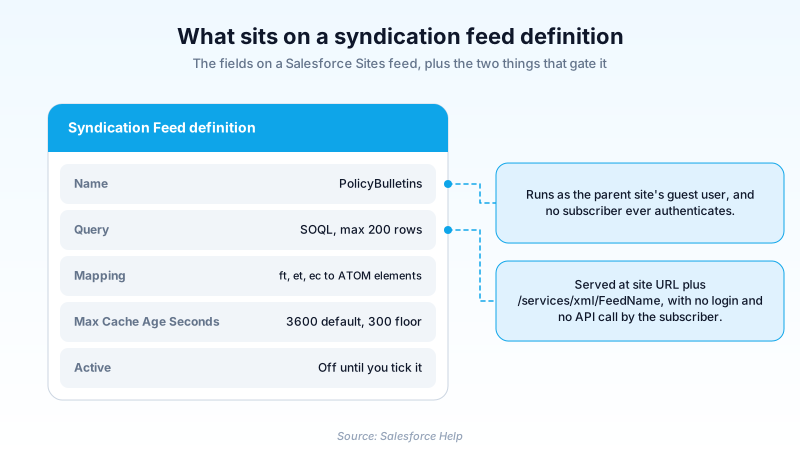
Syndication Feeds are a Salesforce Sites feature that publishes selected records as an ATOM web feed at a public URL. External news readers and scripts subscribe to it without logging in and without calling an API. You build one from a SOQL query plus a mapping that ties record fields to ATOM elements such as feed title and entry content.
Every feed runs in the guest user context of the site that hosts it. That guest user's object permissions, field-level security and sharing rules decide what a subscriber can see. Salesforce caches the rendered output for 3,600 seconds by default and will not accept a value below 300.
This is the older option. Salesforce still documents and supports it, and Syndication Feeds sit on neither the active nor the past retirement register. But the feature is bound to Salesforce Sites and has gained nothing new in years. Work that hands Salesforce data to another system now belongs on the REST API, or on Platform Events for push.
In plain English
“Imagine a noticeboard bolted to the outside wall of an office. Anyone walking past can read it, and nobody needs a key to get in. Salesforce prints a short list on that board and refreshes it every so often. Apps that watch noticeboards check back later and tell you when something new has appeared.”
Worked example
A regional insurance broker runs a public Salesforce Site for policy bulletins held in a custom object, Bulletin__c. An admin creates a feed named PolicyBulletins with the query SELECT Id, Name, Summary__c, LastModifiedDate FROM Bulletin__c WHERE Publish__c = true ORDER BY LastModifiedDate DESC LIMIT 25. The limit of 25 sits under the 200 row ceiling, so every matching row returns. The mapping reads ft: "Policy Bulletins", et: Name, ec: Summary__c, el: "/" Id, ect: html. Max Cache Age Seconds stays at 3600, so the site runs the query at most once an hour however many readers poll it. Active is ticked. Subscribers point a reader at the site URL followed by /services/xml/PolicyBulletins and see the newest 25 bulletins the guest user is allowed to read.
What a feed definition holds, and what it will refuse
The fields, and who is allowed to touch them
A feed definition carries a small set of fields. Name is the identifier that becomes part of the feed URL. It accepts letters, numbers and single underscores only, never two in a row. So a tidy-looking Policy__Bulletins fails the save before anyone has read your SOQL. Description is free text for whoever inherits this. A checkbox called Active decides whether anyone can subscribe, and it starts off. A feed can be fully configured and completely silent. The permission split is the part people forget: creating, editing or deleting a definition needs Modify All Data. Subscribing needs none at all.
The SOQL limits that bite first
Feed queries are deliberately hobbled so a public URL cannot become a data export. Leave out a LIMIT and you get 20 records. Ask for more than 200 and you still get 200. Leave out ORDER BY and Salesforce sorts by LastModifiedDate, falling back to SystemModstamp where no LastModifiedDate exists. COUNT is rejected, and so are aggregate queries carrying a nested SELECT, which rules out pulling child records alongside a parent in a single feed. The check that catches people out happens at save time: Salesforce verifies guest user sharing and field-level security before storing the query, so a feed you cannot expose is a feed you cannot save.
Mapping records onto ATOM elements
Mapping is where a row becomes a news item. Three elements are required: ft for the feed title, et for the entry title, and ec for the entry content. You also need one author, either fa at feed level or ea at entry level. The rest are optional, including fl for the feed link, fst for a subtitle, el for the entry link, es for a summary, and ect or est to declare whether content is text, html or xhtml. The ATOM updated timestamp defaults to the LastModifiedDate of the object in the main FROM clause, and eu points it elsewhere. Only string literals are permitted, so a date literal like TODAY will not parse.
Locking down what the guest user can reach
Salesforce's own Sites guidance is to set default external access to Private for objects a site grants Read on, then share on purpose. Apply that twice over for a feed. Filter on an explicit publish flag inside the query, and back it with a sharing rule that reaches only flagged records. Either control on its own fails the moment somebody creates a record without thinking. The same guidance flags a neighbouring trap: a list view set to Visible to all users can be read by your site's public users. Audit those while you are in there, because they draw on the sharing you just opened.
Caching, and why a feed is never real time
Cache age is your publishing latency, and that is the whole of it. Set the field to an hour and a bulletin posted at 9:05 can reach subscribers at 10:00. Nothing is pushed. A reader polling every five minutes against an hour-long cache receives the same stored document eleven times out of twelve. That is the design working, not a fault to chase. Salesforce stores rendered output because one popular URL can be polled by thousands of readers at once. So pick the number from the promise you want to make subscribers.
Bind variables let one feed serve many queries
A bind variable written as {!var_name} in the WHERE clause takes its value from the feed URL's query string, so a single definition can cover a whole family of feeds. Twenty is the ceiling across query and mapping combined, and a variable name stops at 100 characters. The restrictions are about safety rather than tidiness. A bind variable can sit only on the right side of a filter, wrapped in quotes, standing in for part of a string. It cannot name a field, sit on the left of a comparison, or change the query's meaning. Special characters in the supplied value are read as literal characters, which is what stops a query string from rewriting your SOQL.
Reaching for REST or Platform Events instead
Syndication Feeds solve one narrow problem well: handing genuinely public, slow-moving content to something that speaks ATOM, with no credentials to issue. For anything else, start with the REST API. It authenticates the caller and returns JSON, and a consumer asks for exactly the fields it needs. Platform Events push instead of waiting for the next poll, but check your tier first. Standard-Volume Platform Events sits on Salesforce's Active Product and Feature Retirements register with a date of October 2026. A design built on that tier today is a migration tomorrow. Treat a new feed request as a question about the consumer. If it really is a news reader, a feed is fine. If it is another system, it should be holding a token.
How organizations use Syndication Feeds
Publishes rate-change notices from a custom object as one public feed, so partner sites and staff news readers pick up each revision without a login.
Lists requisitions flagged for public posting, using a bind variable in the WHERE clause so a single feed definition serves a separate URL for every region.
Feeds published service advisories to an aggregator that polls hourly, with Max Cache Age Seconds left at 3,600 so no poll costs a wasted query.
Trust & references
Cross-checked against the following references.
- Salesforce Sites Security (opens in new tab)Salesforce
- Salesforce Sites Implementation Guide (opens in new tab)Salesforce
- About Syndication Feeds (opens in new tab)Salesforce
- Define Syndication Feeds (opens in new tab)Salesforce
- View Syndication Feeds (opens in new tab)Salesforce
- Test Syndication Feeds (opens in new tab)Salesforce
Straight from the source - Salesforce's reference material on Syndication Feeds.
Hands-on resources to go deeper on Syndication Feeds.
About the Author
Dipojjal Chakrabarti is a B2C Solution Architect with 29 Salesforce certifications and over 13 years in the Salesforce ecosystem. He writes and edits salesforcedictionary.com, published by KineticBit Inc., to help admins, developers, architects, and cert/interview candidates sharpen their fundamentals. More about Dipojjal.
Test your knowledge
+5 pts / dayQ1. A syndication feed's SOQL query has no LIMIT clause. How many records does the feed return?
Q2. Which identity does Salesforce use when it runs a syndication feed query?
Q3. What is the lowest value Max Cache Age Seconds will accept on a syndication feed?
Discussion
Loading discussion…