
Mini View
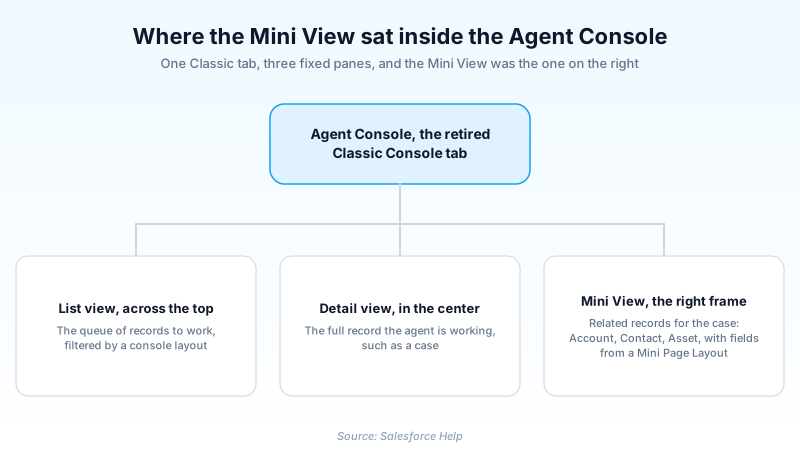
A Mini View is the right-hand frame of the retired Salesforce Classic Agent Console, a panel that displayed records related to whatever record sat in the center detail view.
Definition
A Mini View is the right-hand frame of the retired Salesforce Classic Agent Console, a panel that displayed records related to whatever record sat in the center detail view. Open a case in the middle, and the Mini View listed its Account, Contact or Asset beside it.
The Agent Console was retired in the Summer '20 release, so no org configures a Mini View today. The Lightning Service Console replaced it. What the panel showed came from a Mini Page Layout, configured object by object in Salesforce Classic.
In plain English
“Picture an old support screen split into three parts. The middle showed the problem you were fixing. The strip on the right showed who the customer was and what they had bought. That strip was the mini view.”
Worked example
A support rep at a regional appliance distributor opens Case 00042317, Subject 'Compressor failure under warranty', in the Classic Agent Console. The case fills the center detail view. On the right, the Mini View lists the parent Account, Northwind Supply, with its Phone and Owner, the Contact Priya Raman, and the Asset for the failed unit. The rep reads the serial number without opening a second tab.
Inside the Classic Agent Console's right frame
What could appear in the panel, and what could not
Not every object qualified. A related object needed a lookup or master-detail relationship to the primary record, and that lookup field had to already sit on the page layout. Salesforce advised restraint here: the fewer related objects you added, the easier the panel was to read. Some layouts were excluded outright, among them the Close Case Layout and the Self-Service Portal's Log a Case and View Cases layouts.
Two Setup links, two different jobs
Configuration split across two links in the Classic page layout header. Mini Console View picked which related objects showed in the panel. Mini Page Layout picked the fields. Salesforce Help caps a mini page layout at five related lists and recommends fewer, so agents avoid scrolling. Mini page layouts inherit record type and profile associations, related lists, fields, and field access settings from the parent layout.
The retirement, and why it took so long
Salesforce pulled the Agent Console in Summer '20. The feature had not been enhanced since Spring '11, and only orgs created before Spring '15 ever had the tab. Nine years of no investment, then the plug. The stated replacement is the Lightning Service Console, which Salesforce says contains all of the functionality the Agent Console had.
What replaced it in Lightning
Nothing in Lightning Experience is called a Mini View. The idea is split up. A Compact Layout feeds the Highlights Panel at the top of a record, and drives the lookup card you get on hover. Related Record and Related List components cover the old panel's related lists, placed by you in the Lightning App Builder.
Trust & references
Cross-checked against the following references.
- Salesforce Agent Console Retirement (Console Tab) (opens in new tab)Salesforce
- Choose Related Objects for the Agent Console's Mini View (opens in new tab)Salesforce
- Define Mini Page Layouts for the Agent Console (opens in new tab)Salesforce
- Compact Layout Limitations and Considerations (opens in new tab)Salesforce
Straight from the source - Salesforce's reference material on Mini View.
Hands-on resources to go deeper on Mini View.
About the Author
Dipojjal Chakrabarti is a B2C Solution Architect with 29 Salesforce certifications and over 13 years in the Salesforce ecosystem. He writes and edits salesforcedictionary.com, published by KineticBit Inc., to help admins, developers, architects, and cert/interview candidates sharpen their fundamentals. More about Dipojjal.
Test your knowledge
+5 pts / dayQ1. In which release did Salesforce retire the Agent Console, and with it the Mini View?
Q2. In the Salesforce Classic page layout header, which link chose which related objects appeared in the Mini View?
Q3. Where did related lists added to a Mini Page Layout actually appear?
Discussion
Loading discussion…