Skip to content
Salesforce Dictionary - Free Salesforce GlossarySalesforce Dictionary
DictionaryKKnowledge Agent
ServiceIntermediate

Knowledge Agent

A Knowledge Agent in Salesforce is a service user who creates, edits, publishes, archives, and translates Knowledge articles.

§ 01

Definition

A Knowledge Agent in Salesforce is a service user who creates, edits, publishes, archives, and translates Knowledge articles. The name is an older, informal label for the person who authors the knowledge base. Salesforce documentation today usually calls this person a Knowledge author or a Knowledge User, because "agent" now also describes Agentforce AI agents that read the same articles.

The role lives in Salesforce Knowledge, the Service Cloud feature that stores articles on the standard Knowledge object. A Knowledge Agent needs a Knowledge User feature license plus object and special permissions, granted through a permission set or profile. The label is legacy, but the work it describes (writing trusted answers that reps, customers, and AI agents reuse) is very much current.

§ 02

How the Knowledge Agent role actually works

Why the name reads as legacy now

"Knowledge Agent" was common in the Classic era, when each article format was its own custom object (an article type) and a support rep who wrote articles was loosely called the Knowledge agent. Lightning Knowledge changed the data model. Every article now lives on one standard object, Knowledge (API name Knowledge__kav), and the old article types became record types. Salesforce Help and Trailhead pages dropped the "Knowledge Agent" phrasing in favor of Knowledge author and Knowledge User. The shift matters for a second reason. Agentforce introduced autonomous AI agents that retrieve answers straight from published articles. So the word "agent" inside a Knowledge context is ambiguous today: it can mean the human author or the AI that grounds its replies in that author's content. If you see "Knowledge Agent" in older runbooks, training decks, or a legacy permission-set name, read it as the human author role. When you build something new, use the current vocabulary (Knowledge author, Knowledge User license, and a clearly named permission set) so the next admin is not guessing whether a record refers to a person or a bot.

License and permissions the role needs

Reading articles is free for everyone. Internal users, community members, partners, and unauthenticated guests can all view published content without a special license. Authoring is the gated part. A Knowledge Agent needs the Knowledge User feature license, set on the user record or assigned through a permission set. The license alone is not enough. The user also needs object permissions on Knowledge (Create, Read, Edit, Delete) and the special permissions that govern the lifecycle: Manage Articles, plus the finer rights to publish, archive, and submit articles for translation. Salesforce recommends granting these through a permission set rather than editing profiles directly, so you can hand the same access to many users and revoke it cleanly. A common pattern splits the work. Junior reps get Create and Edit so they draft articles from resolved cases. A smaller group of senior authors or Knowledge Managers gets the publish and archive rights, so customer-facing content passes through a reviewer. Salesforce Go can shortcut the setup by enabling Knowledge, assigning author licenses, and creating starter data categories in one pass.

The authoring workflow, step by step

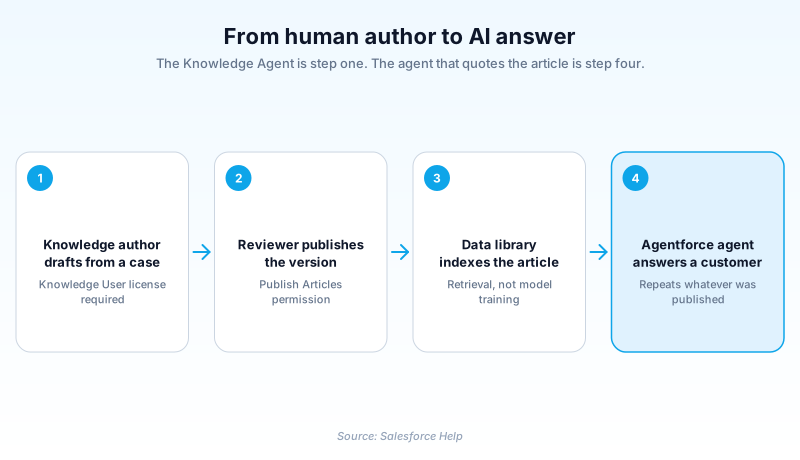
A Knowledge Agent starts on Knowledge home and selects a record type (the modern replacement for the Classic article type), for example FAQ, How-To, or Known Issue. The record type controls which fields and layout appear. The author fills in a title, a URL name, a summary, and the rich-text body, then sets metadata: data categories for visibility, channel selections, and a validation status if the org tracks one. Saving creates a draft version. Drafts are private to authors and never appear to customers, which gives writers room to refine wording before anything goes live. When the article is ready, the author publishes it, immediately or on a scheduled date. A worked example: a rep closes a case about a recurring login error, clicks to draft an article from that case so the context carries over, writes clean reproduction and fix steps, tags it to the Product and Region data categories, sets the channel to Public Knowledge Base, and submits it for review. A Knowledge Manager approves and publishes. The article now surfaces in agent-side search, in the self-service site, and as grounding for Agentforce replies.

Versioning and the article lifecycle

Knowledge tracks every article through three states: Draft, Published, and Archived. Each state maps to a version on Knowledge__kav. When a Knowledge Agent edits a live article, Salesforce does not overwrite it. It spins up a new draft version while the current version stays published and visible. Publishing the new version moves the previous one to Archived. That design keeps a clean audit trail and gives authors a safe rollback path: if a fresh edit causes confusion, you can restore an earlier version. It also has a practical effect on reporting. A SOQL query against KnowledgeArticleVersion counts only the versions in the states you filter for, so archived versions do not inflate a "how many live articles" number unless you ask for them. Understanding this is part of the Knowledge Agent skill set, because it explains why an article can have one public face and a separate work-in-progress draft at the same time. It is also why publish rights are guarded. Pushing a half-finished draft live replaces good content with worse content until someone notices and republishes the prior version.

Data categories and channels control who sees what

Two settings decide an article's audience, and tagging them correctly is core Knowledge Agent work. Data categories are a hierarchy (think Product, Region, Customer Tier) that maps to profiles and permission sets through category group visibility. They answer "who is allowed to see this article." Channels answer "where does it appear": the internal app for agents, the Customer or Partner community, and the Public Knowledge Base for unauthenticated visitors. A single article can be internal-only, so only reps see a sensitive troubleshooting note, or public, so customers find it through self-service. Get the taxonomy right and search works well, because filters narrow results to what a reader can actually access. Get it wrong, with a sprawling or inconsistent category tree, and both agents and customers abandon the knowledge base after a few dead-end searches. Strong Knowledge Agents treat data categories as deliberate information architecture, not an afterthought. They keep the tree shallow, name categories the way readers think, and audit tags periodically so articles do not drift into the wrong audience as products and regions change.

Translation and multilingual knowledge

Global service organizations publish articles in more than one language, and the Knowledge Agent role extends into translation. With a multilingual Knowledge base enabled, an author submits a published article for translation into the locales the org supports. The work routes to the Translation Workbench, where in-house translators or an external vendor such as Smartling or Lionbridge process the text. Each translated article publishes per locale and carries its own version history, so the English source and the German translation can advance independently. Submitting articles for translation is itself a guarded permission, separate from publishing the source language. That separation lets a master-language author hand off localization to a translation team without giving every author the right to push content into every market. For a Knowledge Agent, the practical habit is to finalize the source article before submitting it for translation. Sending a draft that still needs edits multiplies rework across every locale, because each fix has to flow back through the same translation queue. Plan the source content carefully, then localize once it is stable.

Feeding self-service, agent assist, and Agentforce

Articles a Knowledge Agent writes are not a static library. They power three live surfaces. Self-service sites let customers find answers without opening a case, which is the deflection that justifies the program. Agent assist shows reps suggested articles inside the Service Console while they work a case, so answers stay consistent. And Agentforce service agents now ground their generated replies in published Knowledge, retrieving the most relevant articles to answer customer questions. That last channel raises the stakes on article quality. An AI agent will confidently surface whatever the knowledge base says, so a stale or vague article becomes a wrong answer at scale. Mature programs treat authoring as an ongoing editorial operation, not a one-time content load. They watch the standard Knowledge reports (article views, attachments to cases, helpful votes, search clicks), retire low performers, improve the middle, and copy the structure of top performers. The closed loop is what separates a knowledge base that deflects cases and feeds reliable AI from a folder of forgotten documents nobody trusts.

§ 03

Set up a Knowledge author (the modern Knowledge Agent)

An admin turns a standard service user into a Knowledge Agent by enabling Knowledge, granting the Knowledge User feature license, and assigning a permission set with the right object and lifecycle permissions. Here is the path in Lightning Experience.

  1. Enable Lightning Knowledge

    In Setup, open Knowledge Settings and turn on Lightning Knowledge. Note that once enabled it cannot be disabled, so confirm the org is ready. Salesforce Go can do this step and the next ones automatically for designated authors.

  2. Grant the Knowledge User license

    On the user record (Setup, Users), select the Knowledge User checkbox, or assign a permission set that includes the Knowledge User feature license. Readers do not need this; only people who create or publish articles do.

  3. Build an authoring permission set

    Create a permission set granting object permissions on Knowledge (Create, Read, Edit, and Delete as needed) plus the special Manage Articles permission. Add publish, archive, and submit-for-translation rights only for the senior authors who should have them.

  4. Set category group visibility and channels

    Map data category groups to the permission set or profile so authors can see and tag the right categories. Confirm the channels (internal, communities, Public Knowledge Base) match the audiences the team will publish to.

  5. Assign and test

    Assign the permission set to the user, then log in as them or use a sandbox to confirm they can draft, save, and (for reviewers) publish an article. Verify a reader without the license can view published articles but cannot author.

Knowledge User feature licenseremember

The gatekeeper for authoring. Without it a user can read articles but cannot create, edit, or publish them.

Manage Articles permissionremember

The special permission that turns on the authoring lifecycle, including access to archived versions and the draft-and-republish flow.

Publish and Archive rightsremember

Lifecycle permissions worth restricting to reviewers, so customer-facing content passes through a check before going live.

Data category group visibilityremember

Controls which categories an author can apply, which in turn controls who can read the resulting article.

Gotchas
  • The feature license is separate from object permissions. Granting Edit on Knowledge without the Knowledge User license still blocks authoring.
  • Lightning Knowledge cannot be turned off after you enable it, so pilot in a sandbox first.
  • Without the Manage Articles permission, a user cannot see or restore archived versions, which breaks the rollback path.
  • Publishing a fresh draft archives the prior published version immediately, so a half-finished edit can replace good content until someone republishes.

Prefer this walkthrough as its own page? How to Knowledge Agent in Salesforce, step by step

§

Trust & references

Sources

Cross-checked against the following references.

Official documentation

Straight from the source - Salesforce's reference material on Knowledge Agent.

Was this entry helpful?
Help us write better definitions. Quick reactions or detailed edit suggestions.

About the Author

Dipojjal Chakrabarti is a B2C Solution Architect with 29 Salesforce certifications and over 13 years in the Salesforce ecosystem. He runs salesforcedictionary.com to help admins, developers, architects, and cert/interview candidates sharpen their fundamentals. More about Dipojjal.

§

Test your knowledge

Q1. Who is a Knowledge Agent in Salesforce Service Cloud?

Q2. What controls which audiences can see which articles a Knowledge Agent publishes?

Q3. What happens to a Published article's version when a Knowledge Agent edits it?

§

Discussion

Loading…

Loading discussion…