
Intraday Management
Intraday Management is a Salesforce Workforce Management dashboard that contact center planners use to find and close staffing gaps during the current business day.
Definition
Intraday Management is a Salesforce Workforce Management dashboard that contact center planners use to find and close staffing gaps during the current business day. It compares how many agents are actually scheduled against how many the forecast says you need, hour by hour, so you can move people before service levels slip.
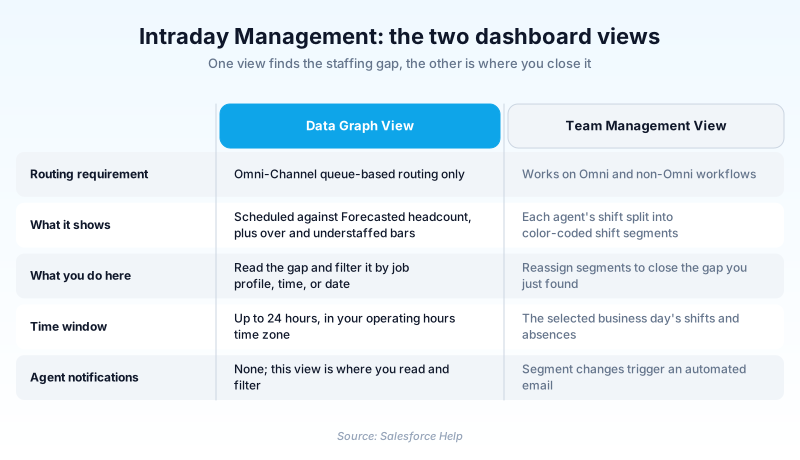
The dashboard has two views. The Data Graph View charts scheduled against forecasted headcount and flags overstaffed and understaffed windows. The Team Management View lists each agent's shift as color-coded segments, and that is where a planner moves someone from email to voice.
Salesforce rebuilt this area in Summer '26, when Workforce Engagement transitioned to Workforce Management. New builds should target the component you add to Service Cloud Command Center. The legacy Real-Time Adherence experience went away in that release. Winter '27 brings adherence back in the WEM Console App, on an Intraday Schedule dashboard. One caveat has not moved. The Workforce Engagement retirement is still on Salesforce's active retirements list, so a legacy subscription still ends at its Order End Date.
In plain English
“Picture a shift manager at a busy coffee shop watching the clock. Six people are on the floor, but the lunch rush needs nine. This is the screen that shows that gap while the day is still happening, so the manager can pull someone off a break.”
Worked example
A 90-seat outdoor gear support center runs Omni-Channel queue-based routing. The planner opens Intraday Management, selects a short-term capacity plan named Q3 Peak Support, and the Data Graph View loads the next 24 hours. At 14:00 the Scheduled key reads 42 agents while Forecasted reads 51, so the Understaffed bar shows a gap of 9 in the Tier 1 Voice job profile. The planner filters to that profile, opens the Team Management View, and finds 11 agents in shift segments categorized as Non-Work for training. She converts 9 of them to a Work category voice segment and saves. Each affected agent gets an automated email about the change.
How Intraday Management reads your operating day
The two views, and what each one needs
The dashboard splits into the Data Graph View and the Team Management View. The Data Graph View runs only on an Omni-Channel queue-based routing workflow, because it needs a capacity plan to supply the forecast line. That plan has to be short term and cover at least the next 24 hours. The Team Management View works on both Omni and non-Omni setups, where a non-Omni org points the dashboard at a service territory instead. Email notifications work either way. So a non-Omni org gets the schedule grid and nothing that compares today against a forecast. Check which Omni stack you are on before you build. Salesforce scheduled Standard Omni-Channel for retirement in Summer '26, the same release that rebuilt this dashboard.
What the Scheduled number actually counts
Scheduled is not a headcount of everyone rostered. An agent counts only when their shift is published, is assigned to them, and at that point either carries a Work category shift segment or no segment at all. Segments categorized as Non-Work or Break are stripped out of scheduled capacity. That rule explains most confused first readings. A 12:30 slot where half the floor is at lunch shows a deep understaffed bar even though nobody has gone home.
The dependency chain you build first
This dashboard does not stand alone. On the Omni path the admin checklist runs eleven steps, most of them upstream. You set up the workload and forecast features, create a workload history, generate an intelligent forecast, configure capacity planning, then build a short-term capacity plan. Only then do you turn on the dashboard. Shifts and shift segments follow, and they must sit on the same service territory as the dashboard. Non-Omni setups skip the forecast half of the list.
Real-Time Adherence, gone and then back
Real-Time Adherence compared what an agent was doing against the shift segment they were scheduled into, then flagged anyone out of sync. The dashboard drew a red-line indicator on the offending segment, and the agent saw a matching message in Agent Home. It read Omni presence and routing data, which is why it never worked outside a queue-based Omni workflow. Summer '26 dropped that legacy experience along with the previous machine learning forecasting model. Winter '27 reintroduces it. You turn on Real-Time Adherence in the WEM Console App, then read it on the Intraday Schedule dashboard.
The Summer '26 move into Command Center
Summer '26 replaced the legacy intraday screen with an Intraday component for Service Cloud Command Center. It shows scheduled, required, and net staffing in one grid, and tracks shifts, shift activities, and resource absences against demand. Turning it on takes two things: Enhanced Omni-Channel, and the component dropped into Command Center. Workforce Engagement Planner can monitor and adjust there, while Workforce Engagement Analyst can only look. One limit is product-wide, not specific to this grid. Workforce Management supports whole-hour time zones only, so GMT+9:00 works and GMT+9:30 does not.
The retirement notice is still live
Salesforce published a Workforce Engagement retirement notice, KB 000395130. It retired the intelligent forecasting, capacity planning, and intraday management modules, and kept shift scheduling. It honored existing subscriptions to their contract end date and pointed buyers at Playvox. Treat that as a current position, not a historical one. The Active Product and Feature Retirements list, updated 17 August 2026, still carries Workforce Engagement keyed to Order End Date. So two things are true at once. A legacy subscription still expires at its Order End Date. Summer '26 brought the same jobs back under the Workforce Management name, rebuilt rather than restored.
Stand up the Intraday Management dashboard
Two paths exist here. A new build should add the Intraday component to Service Cloud Command Center, which requires Enhanced Omni-Channel. Steps 2 through 4 are the legacy Omni-Channel queue-based path, where enablement lands near the end because the dashboard reads a plan you build first.
- Turn on Workforce Management in Setup
From Setup, enter Workforce Engagement in the Quick Find box and select it. Switch on the Turn on Workforce Management toggle, then select Turn on Workforce Engagement and Show historical adherence metrics.
- Build the capacity plan
Create a capacity plan marked short term that covers at least the next 24 hours. Generate the intelligent forecast it reads before you get here, since the plan will not build without one.
- Open the app and pick your basis
From the App Launcher, find and select Intraday Management, then click Let's Go. Choose your capacity plan. On a non-Omni setup, choose No Plan instead and select a service territory.
- Create shifts and shift segments
Create shifts against the same service territory as the dashboard, then split them into shift segments. Segments carry the Work, Non-Work, and Break categories that the staffing math depends on.
- Add the Intraday component to Command Center
For a new build, turn on Enhanced Omni-Channel and add the Intraday component to Service Cloud Command Center. That grid shows scheduled, required, and net staffing, and it stands in for step 3.
- Refresh at the start of each day
Click refresh in the Data Graph View every morning. That single action pulls the current business day into both views.
Master toggle on the Workforce Engagement Setup page. Nothing else there takes effect until it is on.
Adds historical adherence reporting next to the intraday view for comparison against the longer pattern.
Sets the forecast baseline for the Data Graph View. Change it with Edit above the graph.
The dashboard basis in a non-Omni workflow, picked after you choose No Plan.
Prerequisite for the Command Center intraday component. Standard Omni-Channel is scheduled for retirement in Summer '26.
- If the app never appears in the App Launcher, check Tab Settings on your profile and your planners' profiles.
- Shifts and the dashboard must sit on the same service territory. A mismatch leaves the Team Management View looking empty.
- The Data Graph View covers 24 hours only, in your operating hours time zone, so follow-the-sun needs one dashboard per region.
- Workforce Management supports whole-hour time zones only, so a site on GMT+5:30 or GMT+9:30 is out of scope on either surface.
Prefer this walkthrough as its own page? How to Intraday Management in Salesforce, step by step
How organizations use Intraday Management
Planners watch the Data Graph View through the morning peak and pull agents out of coaching segments when the understaffed bar opens past five.
Runs non-Omni, so it uses the Team Management View against a service territory to see who is on lunch and reshuffle after a storm.
Builds a short-term capacity plan for each December week, then refreshes the dashboard every morning so the forecast reflects yesterday's actual volume.
Trust & references
Cross-checked against the following references.
- Intraday Management (opens in new tab)Salesforce
- Workforce Engagement Transitions to Workforce Management (Summer '26) (opens in new tab)Salesforce
- Monitor Staffing in Real Time with the Intraday Component in Command Center for Service (opens in new tab)Salesforce
- Optimize Intraday Staffing with Real-Time Adherence (Winter '27) (opens in new tab)Salesforce
- Standard Omni-Channel Retirement (Summer '26) (opens in new tab)Salesforce
- Active Product & Feature Retirements (opens in new tab)Salesforce
- Workforce Engagement Retirement (opens in new tab)Salesforce
Straight from the source - Salesforce's reference material on Intraday Management.
- Admin Checklist for Intraday Management Setup (opens in new tab)Salesforce
- Create Your Intraday Management Dashboard (opens in new tab)Salesforce
- Enable Intraday Management and Real-Time Adherence (opens in new tab)Salesforce
- Workforce Management Limits and Considerations (opens in new tab)Salesforce
- Workforce Management User Permission Sets (opens in new tab)Salesforce
Hands-on resources to go deeper on Intraday Management.
About the Author
Dipojjal Chakrabarti is a B2C Solution Architect with 29 Salesforce certifications and over 13 years in the Salesforce ecosystem. He writes and edits salesforcedictionary.com, published by KineticBit Inc., to help admins, developers, architects, and cert/interview candidates sharpen their fundamentals. More about Dipojjal.
Test your knowledge
+5 pts / dayQ1. In an Omni-Channel queue-based routing workflow, what does the Intraday Management dashboard use as its baseline?
Q2. Which shift segments does the Data Graph View leave out of the Scheduled count?
Q3. What changed for Intraday Management in the Summer '26 Workforce Management transition?
Discussion
Loading discussion…