
Einstein Case Routing
Einstein Case Routing is a Service Cloud setting that reruns your case routing logic after Einstein Case Classification writes a predicted field value.
Definition
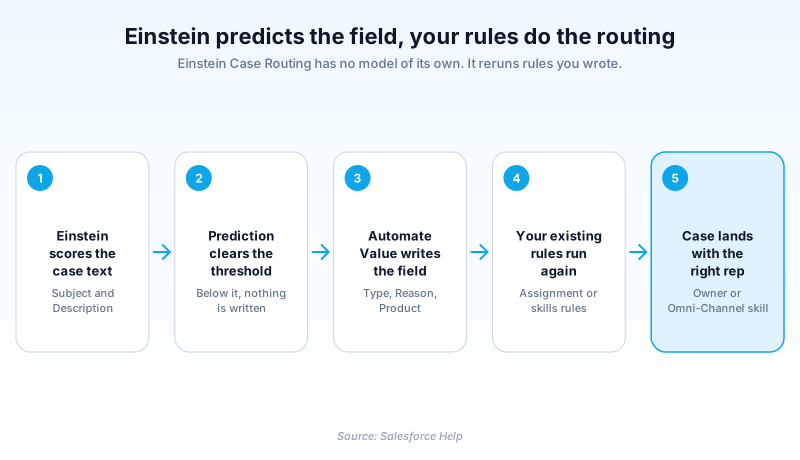
Einstein Case Routing is a Service Cloud setting that reruns your case routing logic after Einstein Case Classification writes a predicted field value. It trains no model of its own and it never picks a queue or an agent by itself. It waits for a field to be filled, then hands the case back to your case assignment rules, your skills-based routing rules, or both.
The problem it solves is one of timing. Assignment rules fire the moment a case is created. At that instant the fields Einstein will predict are still blank, so a rule keying on Type or Reason has nothing to match. Einstein Case Routing fires that logic a second time once the predicted values are actually sitting on the record.
Using it takes an active Einstein Case Classification model with Automate Value on for at least one prediction field. It also takes the Einstein for Service add-on license. The free Try Einstein version builds one model per app, but automated field completion and routing come only with the add-on. Leave the predictions as console recommendations and nothing reruns, because no field ever changes.
In plain English
“Picture a mailroom. A machine stamps a department name on each new letter. The sorting shelf sorts by department, so it can only work after the stamp lands. Einstein Case Routing is the step that puts the letter back on the shelf.”
Worked example
A regional utility runs one general Support queue and three specialist queues. Its Einstein Case Classification model predicts Type and Product from the case Subject and Description. Automate Value is on and the confidence threshold sits at 80 percent. A customer emails to say a meter reading looks doubled since the new install. The case arrives with Type blank, so the catch-all assignment rule drops it into Support. Einstein then predicts Type equals Billing Inquiry and Product equals Smart Meter at 91 percent confidence and writes both values. Einstein Case Routing reruns the assignment rules and the third entry matches Type equals Billing Inquiry. The case lands in the Metering Billing queue about a minute after it arrived. A second case scoring 62 percent gets no predicted value, so it stays in Support for a human to triage.
The mechanics behind a case that gets routed twice
Read the predicted field to find the fault
There are only three suspects when a case lands in the wrong place, and the predicted field on the case tells you which one. Blank means the prediction missed the threshold or the write failed, so start on the Einstein side. Populated with a wrong value means the model needs better training data for that field. Populated correctly and still sitting in the wrong queue means the fault is in your rules, not in anything Einstein did.
Assignment rules, skills-based rules, or both
The Einstein Classification setup page is where you choose which logic to rerun. Case assignment rules change ownership, moving the case to a user or a queue. Skills-based routing rules translate field values into skills so Omni-Channel can match a rep who holds them. You can select both, but Salesforce is explicit that the two should stay mutually exclusive in practice. Selecting an option and never writing the underlying rules is a silent no-op: nothing routes, nothing errors.
Your threshold quietly sets your routing volume
Most teams tune the threshold for accuracy and miss the second thing it controls: how much of your volume gets a second routing pass. A field set at 95 percent moves almost nothing, and your catch-all queue stays as full as it was. Set the same field at 50 and you are routing on coin flips. Decide the number by asking how many cases you are willing to leave in the catch-all, then move it as the model earns trust.
What the underlying model needs first
Salesforce publishes hard floors. You need at least 400 closed cases created in the past six months, and 10,000 or more is the comfortable number. The model also needs at least one string field to read. Each prediction field needs 400 closed cases carrying a value and at least two distinct values. Picklists over 100 values drag accuracy down. Vague entries like Other or General are worse than useless, because they teach the model to be vague too.
Handing off to a routing system outside Salesforce
If your routing lives somewhere else, subscribe to the AIUpdateRecordEvent platform event. It fires when Einstein has generated a prediction and possibly updated the case. Consume it from an Apex trigger, a Flow, Pub/Sub API, or CometD. Read IsUpdated to tell a real write apart from a prediction that missed. Read ErrorCode when the write failed, which covers locked records, missing permissions, and validation rule violations.
Where this breaks once real volume hits it
Four failures account for most of the tickets. Your rules key on a field Einstein was never configured to predict. A validation rule rejects Einstein's update, so the field stays blank and nothing reruns. Records lock during an email-to-case burst and the write is dropped. Or the assignment rule entry that matches first is a broad catch-all sitting above the Einstein-aware entry, so the case never reaches it.
Turn on Einstein Case Routing
Routing is a setting inside an existing Einstein Case Classification app, not a separate feature you install. Get the model working first, then flip the routing options.
- Confirm a model is built and active
Einstein Case Routing does nothing without a live Einstein Case Classification model. Build it and activate it before you touch any routing setting.
- Open the setup page
From Setup, enter Einstein Classification in the Quick Find box, then select Einstein Classification. Everything for this feature lives on that page.
- Automate the fields your rules read
Set Automate Value on each prediction field your routing rules actually reference. A field left on recommend only shows in the console and triggers no rerun.
- Choose the routing logic to rerun
Under the app settings, pick case assignment rules, skills-based routing rules, or both. Keep the two mutually exclusive so they are not fighting over one case.
- Test above and below the threshold
Create one case the model scores confidently and one it does not. The first should change queues, the second should stay where the creation rules put it.
Reruns the standard case assignment rules so ownership moves to the matching user or queue.
Reruns skills-based routing rules so Omni-Channel can match the case to a rep holding the required skills.
- A rerouted case reruns your assignment rule notification email, so one case can alert two different owners.
- Validation rules and record locks can block Einstein's write, and a field that never changes never triggers a rerun.
- Sandbox classification configuration cannot be copied to production, so plan to rebuild the app there.
Prefer this walkthrough as its own page? How to Einstein Case Routing in Salesforce, step by step
How organizations use Einstein Case Routing
Predicts Product Family on inbound cases so skills-based routing rules hand warranty questions to the reps trained on that line instead of the general queue.
Runs one shared support inbox and uses predicted Case Reason to split donation problems from event logistics without hiring a triage coordinator.
Feeds predicted Type into assignment rules so billing disputes skip tier one and land with the finance-facing queue within a minute of arrival.
Trust & references
Cross-checked against the following references.
- Run Assignment Rules for Einstein Case Classification (opens in new tab)Salesforce
- Einstein Classification Key Concepts (opens in new tab)Salesforce
- Prepare for Einstein Classification Apps (opens in new tab)Salesforce
- AIUpdateRecordEvent (opens in new tab)Salesforce
- Autofill Case Fields with Einstein Case Classification Apps (opens in new tab)Salesforce
- Salesforce Active Product and Feature Retirements (opens in new tab)Salesforce
Straight from the source - Salesforce's reference material on Einstein Case Routing.
Hands-on resources to go deeper on Einstein Case Routing.
About the Author
Dipojjal Chakrabarti is a B2C Solution Architect with 29 Salesforce certifications and over 13 years in the Salesforce ecosystem. He writes and edits salesforcedictionary.com, published by KineticBit Inc., to help admins, developers, architects, and cert/interview candidates sharpen their fundamentals. More about Dipojjal.
Test your knowledge
+5 pts / dayQ1. What does Einstein Case Routing actually do once a prediction clears the confidence threshold?
Q2. A team selected case assignment rules under Einstein Classification, but no case ever changes owner. The model is active and predictions show in the console. What is the most likely cause?
Q3. You need to trigger a routing system outside Salesforce when Einstein updates a case. What do you subscribe to?
Discussion
Loading discussion…