
Document Library
A Document Library is a folder on the Salesforce Classic Documents tab that holds files such as logos, brochures, and templates.
Definition
A Document Library is a folder on the Salesforce Classic Documents tab that holds files such as logos, brochures, and templates. Those files are not attached to any single record. Every document sits inside a folder, and that folder's settings decide who can see or change what it holds.
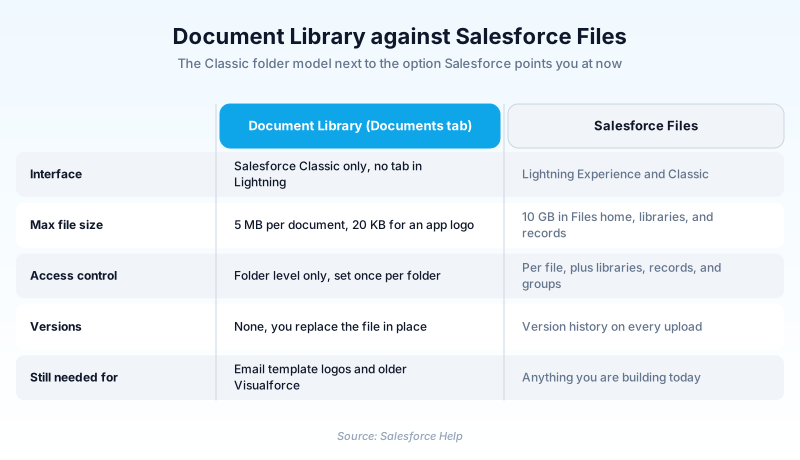
It is the older of the platform's shared file models. The Documents tab exists only in Salesforce Classic, so a user working in Lightning Experience cannot browse it at all. Salesforce points new work at Salesforce Files instead.
Nothing here has been retired. Salesforce still tells admins not to delete these documents, because HTML email templates and older Visualforce pages reference images that live in them.
In plain English
“Think of a filing cabinet drawer in a shared office. Anyone with a key to that drawer can take out whatever is inside. The lock is on the drawer, not on each piece of paper. Salesforce built a much better cabinet years later, but the old one still holds the company letterhead, so nobody has thrown it out.”
Worked example
A regional insurance brokerage keeps a folder named Marketing Assets on its Documents tab. An admin uploads brokerage-logo.png at 42 KB and sets Public Folder Access to Read Only. Ticking Externally Available Image lets the logo load in customer email without a login. A second folder, Internal Rate Sheets, uses the accessible-only-by-named-users option and is shared with the Underwriting public group. Its files go up with Indicate Document is Internal ticked. Months later the marketing team builds a new email template, and the logo still resolves from its document URL. The 6 MB product catalogue PDF is rejected on upload, so that one goes into a Salesforce Files library instead.
How the platform's oldest file store still works
A folder with documents in it, and nothing else
A library here is a folder with documents filed inside it. There is no deeper structure. A document can be an uploaded file or a reference that points at a URL or a network path. Some orgs use the second form to link out to assets they never wanted stored in Salesforce. When you add one you name it, up to 255 characters including the extension, and choose a folder. Setting an API name needs Customize Application. Description and keywords are the only search hooks the record gets. An untagged file is effectively lost once someone forgets which folder it went into. Salesforce Help lists the tab as available in every edition except Database.com, and only inside Salesforce Classic. Because the contents belong to the org rather than to a record, this suits shared assets like a brand mark reused across templates.
The folder is the only access control you get
Creating or editing a public document folder requires the Manage Public Documents permission. Inside, you set Public Folder Access to Read/Write or Read Only. Then you pick one of three visibility options: open to everyone, hidden from everyone, or limited to named users, roles, and public groups. That is the entire model. Per-document sharing does not exist, and neither do sharing rules. Version history amounts to replacing the file in place. Moving an item between folders quietly changes who can reach it, which makes bulk reorganizing riskier than it looks. One quirk catches people out: a public group's manager gets no access unless they are also a member of that group. Keep the folder list short and named after teams or content types, since users browse this tab rather than filter it.
The 5 MB ceiling, and where the storage goes
Most documents are capped at 5 MB each. That number has not moved in years. It rules out almost any modern asset, from a product video to a slide deck full of screenshots. Salesforce Files now takes uploads up to 10 GB in Files home, in libraries, and on a record's Files related list. That is a difference of three orders of magnitude. Content on this tab also draws on the org's file storage allocation. That is the same pool as attachments, Files home, Salesforce CRM Content, Chatter files including user photos, and Site.com assets. An abandoned folder of six-year-old brochures is not free simply because nobody opens it.
Externally Available Image, and what it really exposes
Externally Available Image is the checkbox with teeth. Ticking it marks the image as non-confidential and drops the login requirement. That is what lets a recipient's email client fetch the file and render your logo inside an HTML template. The trade is that the image becomes reachable by anyone holding its URL. A brand mark is a fair candidate for that; a signed price list or an internal org chart is not. Nothing publishes a directory of those URLs, but a link that leaks in a forwarded email keeps working until you clear the flag. The box is also mutually exclusive with the internal-use flag, so each document is one or the other.
Why it never reached Lightning Experience
The Documents tab predates Lightning and never crossed over. Someone working in Lightning Experience has no way to browse document folders, because the tab is simply not there. Salesforce Files took the job instead, pulling files, documents, libraries, and attachments into one place with previews, per-file sharing, following, and version history. On capability there is no contest. What Salesforce has not done is retire anything. The Document object still sits in the API next to ContentDocument and ContentVersion. A Lightning-only org can still read and manage this content in code, with no tab to click. Treat the tab as maintained but frozen. It is fine for the narrow jobs it still does, and a bad place for anything you build this year.
Getting content into Files without breaking your email
There is no button that turns a document folder into a Files library, so this is a project rather than a click. Salesforce Help names three routes: the org's weekly export, a third-party data export tool from AppExchange, or an API path. The export route means pulling the files out, then loading them back in. Connect REST API supports uploading asset files, which is what makes the third route work. Whichever you pick, audit dependencies first. An HTML template that embeds a logo by document URL breaks the moment that document goes away. The broken image lands in a customer's inbox, not in your sandbox. Move everyday reusable content into Files, where people can find and version it. Leave the small set of template graphics and externally available images where they are. Record which document each template points at before anyone starts deleting.
How organizations use Document Library
Files each carrier's rate card as a reference document pointing at the carrier's own URL, so nothing large ever lands in Salesforce storage.
Migrated product PDFs and spec sheets into Salesforce Files so Lightning users can reach them, leaving only email graphics behind on the Classic tab.
Uses a hidden folder shared with a single public group to hold grant letter templates that should not surface for the wider staff.
Trust & references
Cross-checked against the following references.
- Document Library Overview (opens in new tab)Salesforce
- Moving Documents to Salesforce Files (opens in new tab)Salesforce
- Upload and Replace Items on the Documents Tab (opens in new tab)Salesforce
- Create and Edit Document Folders (opens in new tab)Salesforce
- File Size and Sharing Limits (opens in new tab)Salesforce
- View Document Lists (opens in new tab)Salesforce
- Data and File Storage Allocations (opens in new tab)Salesforce
- Create Custom Apps for Salesforce Classic (opens in new tab)Salesforce
Straight from the source - Salesforce's reference material on Document Library.
Hands-on resources to go deeper on Document Library.
About the Author
Dipojjal Chakrabarti is a B2C Solution Architect with 29 Salesforce certifications and over 13 years in the Salesforce ecosystem. He writes and edits salesforcedictionary.com, published by KineticBit Inc., to help admins, developers, architects, and cert/interview candidates sharpen their fundamentals. More about Dipojjal.
Test your knowledge
+5 pts / dayQ1. A user in Lightning Experience asks why they cannot find the Documents tab. What is the correct answer?
Q2. An 8 MB training deck fails to upload to a document folder. What is the most likely cause?
Q3. An admin ticks Externally Available Image on a company logo. What actually changes?
Discussion
Loading discussion…