
Customers, Chatter
Chatter customers are outside people invited into a private Chatter group.
Definition
Chatter customers are outside people invited into a private Chatter group. Their email addresses sit beyond your company domains, and that comparison is the entire test. The object reference states the boundary plainly. Customers see only the groups they are invited to. They interact only with members of those groups, and they cannot see any Salesforce information.
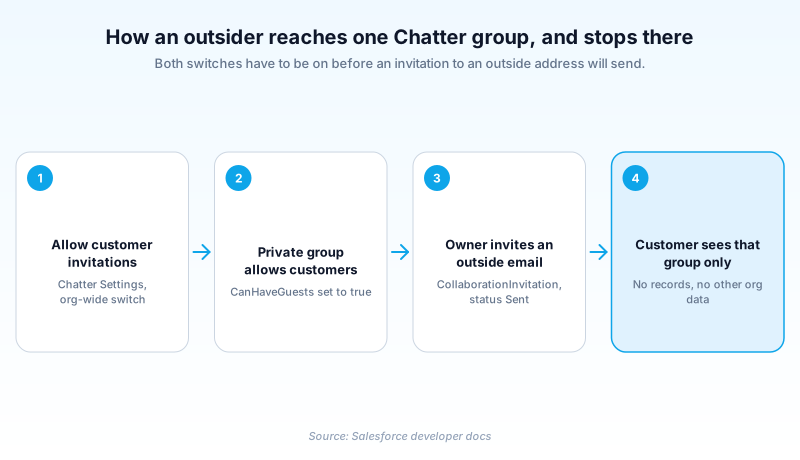
Two settings have to line up before one can exist. Your org has to allow customer invitations at all, and the specific private group has to be flagged as one that accepts customers. Neither switch is enough on its own.
This is the smallest form of external access the platform offers. There is no portal behind it and no record visibility. A customer gets a conversation and the people in it.
In plain English
“Think of one locked meeting room in your office. You hand a visitor a key card that opens that room and nothing else. They can talk to everyone inside it. They never see the rest of the building, and they cannot read a single thing filed away in it.”
Worked example
A regional insurance broker hires an outside actuary for a nine-week pricing review. An admin confirms Allow customer invitations is on in Chatter Settings, then grants the project lead the Invite Customers to Chatter permission. The lead creates a private group called Q3 Pricing Review, turns on Allow Customers, and invites actuary@northpointrisk.example with a short message. Salesforce writes a CollaborationInvitation row with SharedEntityId pointing at that group and Status set to Sent. The actuary accepts, posts rate tables, and comments on the lead's threads. She never sees an Account, an Opportunity, or any other group in the org. In week ten the lead removes her from the group and the admin deactivates her user record.
What a Chatter customer can actually reach
The domain cap and its one exception
Ordinary Chatter invitations are capped by the allowed domains your administrator maintains. A private group with customers turned on is the documented exception to that cap, which is the whole reason the feature exists. Two limits still catch teams out. You cannot invite an address that already belongs to a user in the org sending the invitation, so those people join the ordinary way instead. And an invitation sent from anywhere other than a customer group falls straight back under the domain cap, however external the recipient looks.
Two switches and one permission
At org level, Chatter Settings in Setup carries Allow customer invitations, exposed to the Metadata API as enableInviteCsnUsers on ChatterSettings. At group level, a private group carries CanHaveGuests, shown in the UI as Allow Customers and available since API version 23.0. Query a group through anything older than that and the field is absent, so a customer group is indistinguishable from any other private group. Salesforce's own workaround is blunt: name the group so the word customers appears in it. The sender also needs the Invite Customers to Chatter permission, and has to be the group's owner, a manager, or a system administrator.
What the invitation record looks like
Each invitation is stored as a record you can query. CollaborationInvitation has been available since API version 21.0. It holds who was invited, who sent it, the optional message, and a Status of Sent, Accepted, or Canceled. SharedEntityId is the field that matters. For a customer it stores the ID of the private group with Allow Customers on. Point it at a user ID instead and you have invited someone to Chatter itself rather than to your group. The object supports create and delete but not update, so cancelling means deleting the row.
The boundary holds inside the group too
A customer's access is the sum of their groups. Add them to three and they see three conversations, with no setting underneath the group to tune. That bluntness is what makes the model safe to hand to people you do not employ. It also creates an internal habit worth teaching once. A colleague who links a record into a group post has shared a link, not a record. The customer reads the post and gets nothing when they follow it.
Where customers and Experience Cloud collide
Experience Cloud is the answer when outsiders need records or a branded login of their own, and the two features deliberately do not blend. Site membership normally follows profiles and permission sets, and NetworkMemberGroup is the object behind that. Its documentation carves customers out. Assign a Chatter customer a permission set that is also tied to a site, and the customer is not added to the site. The assignment itself succeeds, so nothing errors and nothing warns. Anyone who needs more than a group conversation gets provisioned properly as an external user.
Auditing before access drifts
Customer access does not expire. A project ends, the group goes quiet, and the outside account keeps its seat until somebody acts. CanHaveGuests is filterable, so a single SOQL query over CollaborationGroup lists every group in the org that accepts outsiders. Run it quarterly and work down the membership of each result. Setup also has a Group Triggers page for adding Apex triggers on CollaborationGroup if groups appear faster than you can watch them.
Turn on Chatter customers and invite one
Work top to bottom. Until every piece above it is in place, the invite option does not appear on the group. That reads like a missing feature rather than a missing setting.
- Open the org-level switch
From Setup, enter Chatter in the Quick Find box and open Chatter Settings. Confirm Allow customer invitations is selected. The Metadata API calls this same flag enableInviteCsnUsers.
- Grant the sending permission
Add Invite Customers to Chatter to a permission set and assign it to the people who run outside projects. Without it, a group owner sees no invite option at all.
- Flag the group
Create or open a private group and turn on Allow Customers, which writes CanHaveGuests on the CollaborationGroup record. A public group is not a valid target.
- Send the invitation
As the owner, a manager, or an admin, enter the outside email addresses and add an optional message. Salesforce writes a CollaborationInvitation row with Status set to Sent.
- Write down the end date
Note when the engagement finishes. Removing the member and deactivating the user is manual, and nothing in the platform will prompt you to do it.
The org-wide switch on Chatter Settings. Nothing about customers works while it is off.
Per-group, stored as CanHaveGuests. Only a private group can carry it.
The permission that lets an owner or manager send the email. Assign it deliberately, not broadly.
- You cannot invite an email address that already belongs to a user in the same org. Those people join the group directly instead.
- CollaborationInvitation supports delete but not update, so a mistaken invitation is cancelled by deleting the record rather than editing it.
- A permission set that grants Experience Cloud site membership will not pull a Chatter customer into that site. They stay outside it.
Prefer this walkthrough as its own page? How to Customers, Chatter in Salesforce, step by step
How organizations use Customers, Chatter
Runs one private group per tooling vendor so engineers and the supplier can trade drawings and revision notes. No vendor ever sees an Account or an Opportunity.
Brings pro bono legal advisers into a single grant-review group for one season, then removes them and deactivates the accounts once the review closes.
Trust & references
Cross-checked against the following references.
- CollaborationGroup: the CanHaveGuests field (opens in new tab)Salesforce
- CollaborationInvitation: access rules and SharedEntityId (opens in new tab)Salesforce
- NetworkMemberGroup: Chatter customers are not added to a site (opens in new tab)Salesforce
- ChatterSettings: enableInviteCsnUsers (opens in new tab)Salesforce
- User: the UserType field (opens in new tab)Salesforce
Straight from the source - Salesforce's reference material on Customers, Chatter.
Hands-on resources to go deeper on Customers, Chatter.
About the Author
Dipojjal Chakrabarti is a B2C Solution Architect with 29 Salesforce certifications and over 13 years in the Salesforce ecosystem. He writes and edits salesforcedictionary.com, published by KineticBit Inc., to help admins, developers, architects, and cert/interview candidates sharpen their fundamentals. More about Dipojjal.
Test your knowledge
+5 pts / dayQ1. What has to be true before you can invite an outside person into a Chatter group?
Q2. Outside the groups they were invited to, what can a Chatter customer see?
Q3. You assign a Chatter customer a permission set that is also tied to an Experience Cloud site. What happens?
Discussion
Loading discussion…