
Snap-ins
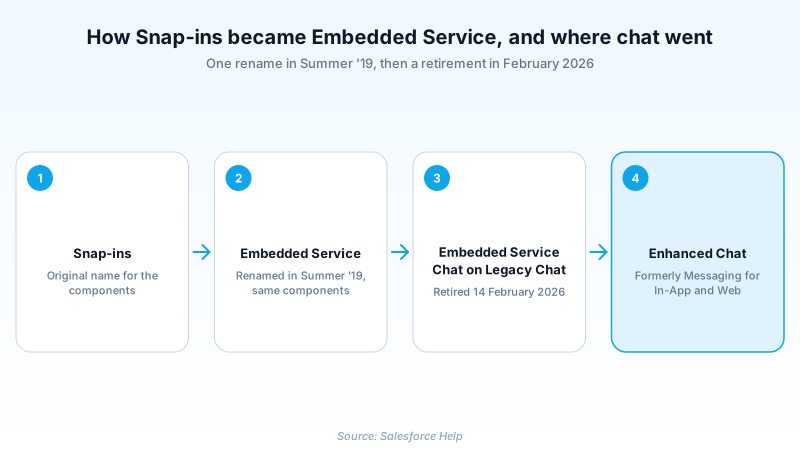
Snap-ins is the former name for Salesforce Embedded Service.
Definition
Snap-ins is the former name for Salesforce Embedded Service. Those are the components you drop into a website or mobile app so customers can chat, book appointments or file a case without opening Salesforce. Salesforce replaced the name in the Summer '19 release, and it no longer appears anywhere in Setup.
The name lingers because Salesforce changed the branding without changing the plumbing. Old article addresses, developer guide paths and years of community posts still carry it, which is why the term keeps surfacing for a product that dropped it.
There is a second wrinkle worth knowing before you touch an old implementation. The chat component of the Snap-ins family ran on Legacy Chat, which Salesforce retired on 14 February 2026. Anything new belongs on Enhanced Chat, the product previously sold as Messaging for In-App and Web.
In plain English
“Snap-ins was the old name for a set of ready-made help widgets you could paste onto your own website. Salesforce changed the name to Embedded Service. Same widgets, different label. If a guide still calls them Snap-ins, the guide is old.”
Worked example
A regional insurance broker inherits a website with a chat bubble nobody documented. The admin types Snap-ins into Setup Quick Find and gets nothing back. Typing Embedded Service instead surfaces a deployment named Claims_Support_Chat, with Conversation Type set to Embedded Chat and a Site Endpoint pointing at a Digital Experiences site. That combination identifies it as an Embedded Service Chat deployment, the runtime that rode on Legacy Chat. It stopped accepting conversations after 14 February 2026, which explains the tickets about a bubble that spins and never connects. The rebuild is a fresh Enhanced Chat deployment rather than a repair. The old record is worth keeping open just long enough to copy the branding colours and the offline case form field list.
How to read a Snap-ins reference in 2026
Summer '19: Snap-ins becomes Embedded Service
Salesforce ran a batch rename across the Service Cloud channels in Summer '19. Live Agent became Chat, LiveMessage became Messaging, and Snap-ins became Embedded Service. The release note heading is blunt about it: a new name for Snap-ins. Nothing about the components changed that day. Same deployments, same code snippet, same branding options. The reasoning was that a snap-in described how you installed the thing rather than what it did for a customer. Reasonable, if you ignore the decade of documentation it stranded.
Why the old name still dominates search results
Salesforce renamed the product and left the article IDs alone, so the slugs outlived the branding and search engines still rank them. Which means the address of a page tells you nothing, and you have to triage the body instead. Two signals do that work. A retirement banner at the top is the first. The conversation type named in the steps is the second: Embedded Chat is the runtime that was switched off, Enhanced Chat is not. A page can pair the old slug with current instructions, or the old slug with a dead procedure. Only the body says which.
The chat half was retired, not renamed
Embedded Service Chat was the chat member of the family and it ran on Legacy Chat, so the retirement took it down too. Here is what replacing it actually costs. Enhanced Chat sits on Messaging, so the data model underneath changes. Legacy Chat wrote Live Chat Transcript records. Enhanced Chat writes Messaging Session records, with a separate Messaging Session Metrics object holding response time and message count. Every report built on the old objects has to be rebuilt on the new ones, and the APIs for sending and receiving messages differ as well. The reporting rebuild is the part teams underestimate. Pasting in the new code snippet is the easy half.
What actually survived the rename
Embedded Service Deployment is still a live record and still the thing you configure. Enhanced Chat for Web uses one, and adding a business hours record to its settings hides the chat button outside those hours. The Setup path holds its shape: enter Embedded Service in Quick Find, then pick Embedded Service. Appointment booking, Knowledge and case capture delivered through embedded components all carried across the rename intact. Only the chat runtime beneath them was torn out and replaced.
Trust & references
This term has been renamed to Embedded Service.
View current pageCross-checked against the following references.
Straight from the source - Salesforce's reference material on Snap-ins.
Hands-on resources to go deeper on Snap-ins.
About the Author
Dipojjal Chakrabarti is a B2C Solution Architect with 29 Salesforce certifications and over 13 years in the Salesforce ecosystem. He writes and edits salesforcedictionary.com, published by KineticBit Inc., to help admins, developers, architects, and cert/interview candidates sharpen their fundamentals. More about Dipojjal.
Test your knowledge
+5 pts / dayQ1. What is the product formerly called Snap-ins known as today?
Q2. You land on a Salesforce Help page whose URL contains snapins_. What should you conclude?
Q3. You inherit a site whose chat bubble was built on Embedded Service Chat. What is the correct move in 2026?
Discussion
Loading discussion…