
Audience Channel
An Audience Channel is the delivery surface an audience gets activated against.
Definition
An Audience Channel is the delivery surface an audience gets activated against. The list runs email, SMS, push notification, web and in-app personalization, paid advertising, and a file drop to a partner system. Every activation has a population, a surface and a send time, and the channel is the surface. Change it and nothing about the audience changes, but almost everything about the delivery does.
The idea spans Marketing Cloud Engagement and Salesforce Data 360, which was called Data Cloud until Salesforce rebranded it on 14 October 2025. In Marketing Cloud Engagement, Email Studio covers email, Mobile Studio covers SMS, push and messaging apps, and Journey Builder sequences them. In Data 360 you publish a segment to an activation target and choose contact points. That is how a person ends up on a surface you can actually reach them on.
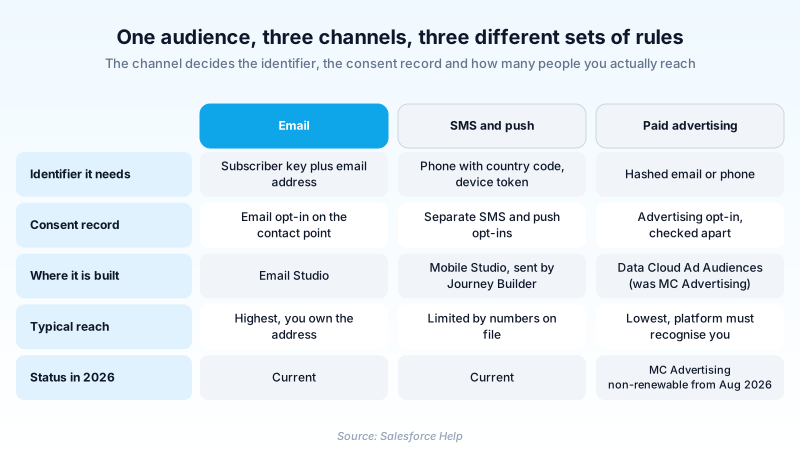
Channels are not interchangeable. Each one carries its own connector, its own identifier requirement, its own consent record and its own frequency expectations.
In plain English
“Think of a mailing list and all the ways you could reach the people on it. You could email them, text them, ping their phone app, or pay to show them an ad. The list never changes. The channel is which door you knock on, and every door has a different key and its own rules about how often you may knock.”
Worked example
A regional outdoor gear retailer builds a segment in Data 360 called Lapsed_Winter_Buyers. The rule: unified individuals with Last Purchase Date before 2025-11-01 and Lifetime Order Value above 400. It resolves to 62,000 people. Activated to the email channel, contact point filtering keeps only records with a valid Contact Point Email and no email opt-out, leaving 58,400. The same segment activated to SMS reaches 19,700. That is how many carry a Contact Point Phone with a country code and an active SMS subscription. Pushed to Meta as hashed email, roughly 30,000 match. One segment, three channels, and three reachable populations that barely resemble each other. Plan the campaign around the smallest, not the headline 62,000.
What picking a channel actually commits you to
The channel list, and what just changed in it
Marketing Cloud Engagement gives you email through Email Studio and mobile through Mobile Studio. Mobile Studio splits into MobileConnect for SMS and MMS, MobilePush for app notifications, and GroupConnect for messaging apps such as LINE and Facebook Messenger. Marketing Cloud Personalization covers web and in-app. Data 360 adds file storage targets: Amazon S3, SFTP, Google Cloud Storage and Azure Blob Storage. It also activates back into Marketing Cloud Engagement business units. Paid advertising is the piece that moved. Advertising Studio became Marketing Cloud Advertising. Salesforce has now announced that Marketing Cloud Advertising, Ad Studio and Active Audiences are retiring, with subscriptions no longer renewable from 15 August 2026. Data Cloud Ad Audiences is the named successor. Lead Capture apps are unaffected. If your paid channel still runs on Marketing Cloud Advertising, that is a dated migration rather than a rumour.
Every channel wants a different identifier
The same person shows up under a different name on every surface. Email needs an address tied to a subscriber key. SMS needs a phone number with a country code and an active subscription. Push needs a device token that the MobilePush SDK registered when the app was installed. Advertising platforms match on hashed values, normally email or phone, and never on your internal keys. Send a Marketing Cloud subscriber key to Meta and you match nobody, because that string means nothing outside your org. Data 360 solves this with contact points, the per-surface addresses hanging off a unified individual. The built-in controls do not always reach far enough. Trailhead's own guidance says some scenarios need a Calculated Insight to isolate a single channel contact point before you activate.
Consent is recorded per channel, not per person
There is no single opt-in flag on a person. Someone can be subscribed to email, have never agreed to SMS, and have opted out of advertising, all at the same moment. A correct activation checks the state that matches the surface it is about to use, not an average of the three. Data 360 does this with contact point filtering at activation time, so people without permission for that channel never leave the platform. Get it wrong and the consequence is not a bounced send. It is a regulatory problem with your company name on it. Frequency belongs in the same place. Three emails a week reads as normal. Three texts a week reads as harassment, because a text interrupts and an email waits. Cap per channel, and let the strict channel stay strict.
Match rates fall off, and that is normal
Reach shrinks the further you get from channels you own. Email usually matches high, because you hold the address and the address is the identifier. SMS is capped by how many valid phone numbers you actually collected, which for most orgs is a thin slice of the email list. Hashed matching on an ad platform lands lower again, since the platform can only confirm people it already recognises. A low match rate on a paid surface is rarely a broken connector. It is the connector reporting the real overlap. Size the source segment upward to absorb the loss, then read the returned audience size before committing budget against it.
Sequence the channels instead of firing them at once
One audience usually deserves several surfaces, in order. Email first. SMS after a wait, but only for the people who did not open. A paid impression last, for anyone still silent. The population never changes. Only the surface and the timing do. Journey Builder is where that ordering lives in Marketing Cloud Engagement. It holds the waits, the decision splits and the entry criteria, while the channel is simply the destination at each step. That separation is the whole reason the concept earns a name: build the audience once, then reuse it across many channel mixes. Salesforce also moved where you author push. From Spring '26 you create Journey Builder push notifications inside Journey Builder rather than in MobilePush. MobilePush still owns the app registration, the SDK and the device tokens.
Native surfaces versus partner destinations
Two kinds of channel behave very differently once they are live. Native surfaces, meaning email, mobile and personalization, stay inside Salesforce. Identity, consent and reporting all move through systems you already administer, so there are fewer seams and fewer surprises. Partner destinations are a contract with somebody else's platform. Meta, Google, a storage bucket or a custom endpoint each take your data out of your environment. You inherit their identifier rules, their retention terms and their audience deletion requirements. Stop using an ad integration and you may be obliged to delete the uploaded audiences and deauthorise the ad account. Neither kind is better. They cost different amounts to run. A native channel is a feature you switch on. A partner channel is an integration someone has to own and re-check whenever the partner changes its API.
How organizations use Audience Channel
Runs one lapsed-buyer segment across three surfaces: email first, then SMS to anyone with an opted-in number, then paid retargeting a week later.
Reserves SMS for fraud and payment alerts with a one-a-day cap, keeping promotional offers on email so the alert channel keeps its urgency.
Uses push for trial users because a device token is the only identifier it holds, then adds email once someone registers.
Trust & references
Cross-checked against the following references.
- Retirement of Marketing Cloud Advertising Studio (opens in new tab)Salesforce
- Marketing Cloud Advertising (opens in new tab)Salesforce
- Get Started with Data 360 Development (opens in new tab)Salesforce
- Create a File Storage Activation Target (opens in new tab)Salesforce
- Checking Consent Preferences at Activation (opens in new tab)Salesforce
- Send Push Notifications with Journey Builder (opens in new tab)Salesforce
- Marketing Cloud Certification Maintenance for Spring '26 (opens in new tab)Salesforce
- Personalize Your Omnichannel Journeys (opens in new tab)Salesforce
Straight from the source - Salesforce's reference material on Audience Channel.
- Marketing Cloud Engagement (opens in new tab)Salesforce
- Mobile Studio (opens in new tab)Salesforce
Hands-on resources to go deeper on Audience Channel.
About the Author
Dipojjal Chakrabarti is a B2C Solution Architect with 29 Salesforce certifications and over 13 years in the Salesforce ecosystem. He writes and edits salesforcedictionary.com, published by KineticBit Inc., to help admins, developers, architects, and cert/interview candidates sharpen their fundamentals. More about Dipojjal.
Test your knowledge
+5 pts / dayQ1. Which product does Salesforce name as the successor to the retiring Marketing Cloud Advertising products?
Q2. A Data 360 segment holds 62,000 people, but only 19,700 activate to the SMS channel. What is the most likely cause?
Q3. Why does sending a Marketing Cloud subscriber key to Meta return no matches?
Discussion
Loading discussion…