
Advertising Studio
Advertising Studio is the Salesforce Marketing Cloud product that pushed CRM and Data Extension audiences into paid advertising platforms, including Facebook, Instagram, Google Ads, LinkedIn, X, Pinterest, and Snapchat.
Definition
Advertising Studio is the Salesforce Marketing Cloud product that pushed CRM and Data Extension audiences into paid advertising platforms, including Facebook, Instagram, Google Ads, LinkedIn, X, Pinterest, and Snapchat. You built an audience once, published it as a Custom Audience or Customer Match list, and the platform targeted only those people.
The name changed before the product did. Salesforce renamed Advertising Studio to Marketing Cloud Advertising, and the Help documentation still opens by warning that you may see the old label.
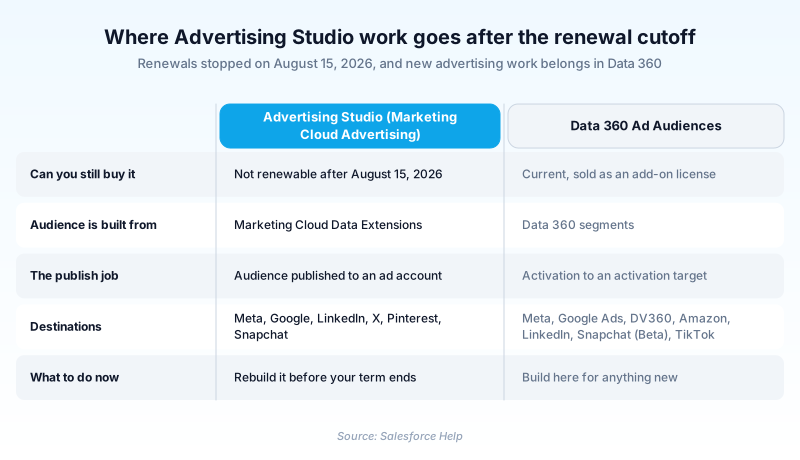
It is now being retired. Renewals stopped on August 15, 2026, and Salesforce points advertisers at Data 360 Ad Audiences instead. Existing subscriptions run through their current term, so the screens stay live for now, but nothing new belongs here.
In plain English
“Imagine handing a scrambled copy of your customer list to Facebook or Google so your ads only reach those people. Advertising Studio was the Salesforce tool that did that. Salesforce has stopped selling it.”
Worked example
A regional outdoor gear retailer runs a winter clearance push. In Marketing Cloud Engagement it builds a Data Extension called DE_Winter_Lapsed holding 84,000 subscribers whose LastPurchaseDate is older than 540 days. In Advertising Audiences the team publishes that Data Extension to a connected Facebook ad account as a Custom Audience refreshing daily. A second audience, DE_Active_Customers, goes to the same account as a suppression list so current buyers never see clearance creative. Facebook reports a 52 percent match on the first upload. At renewal in 2027 both must be rebuilt as Data 360 segments.
From Active Audiences to the August 2026 renewal cutoff
Three names, one product
Salesforce shipped this as Active Audiences. It became Advertising Studio, then Marketing Cloud Advertising. The retirement notice adds a fourth name, Marketing Cloud Advertising Studio, to cover all of them. Read an old runbook, a Help article, and your org navigation together and you will see three labels for the same screens.
What a publish actually sent
Salesforce hashed email and phone before anything left the platform, and the destination matched those hashes against its own users. Match rates between roughly 40 and 70 percent were ordinary, and the destination set that number, not the connector. Audiences refreshed on a schedule, so the ad list tracked the underlying Data Extension.
Suppression was the half people skipped
Two audiences did most of the work. A seed list of good customers fed the platform lookalike model to find prospects like them. A suppression list of current customers kept acquisition budget off people who had already bought. Teams built the first and forgot the second, which is how acquisition cost looks healthy on a dashboard and ugly in the ledger.
Moving to Data 360 Ad Audiences
The replacement is an add-on license called Ad Audiences on Data 360, which is what Data Cloud was renamed to in October 2025. You rebuild the audience as a segment, create an activation target for Meta or Google Ads, and activate. Google's connector runs incrementally through the Audience Partner API and supports a full refresh. Lead Capture is the one piece the retirement does not touch.
Trust & references
Cross-checked against the following references.
Straight from the source - Salesforce's reference material on Advertising Studio.
Hands-on resources to go deeper on Advertising Studio.
About the Author
Dipojjal Chakrabarti is a B2C Solution Architect with 29 Salesforce certifications and over 13 years in the Salesforce ecosystem. He writes and edits salesforcedictionary.com, published by KineticBit Inc., to help admins, developers, architects, and cert/interview candidates sharpen their fundamentals. More about Dipojjal.
Test your knowledge
+5 pts / dayQ1. What changed for Marketing Cloud Advertising Studio on August 15, 2026?
Q2. Where does Salesforce now direct customers who need to activate audiences to paid media?
Q3. A marketer sees a 48 percent match rate on a hashed email audience sent to Meta. What is the right read?
Discussion
Loading discussion…