
Custom Lightning Types Go GA
Summer '26 takes Custom Lightning Types to GA and pairs them with the Headless Experience Layer, so one UI definition renders natively across Lightning, mobile, Slack, and any MCP client. This is the piece that makes the agentic front door actually usable.

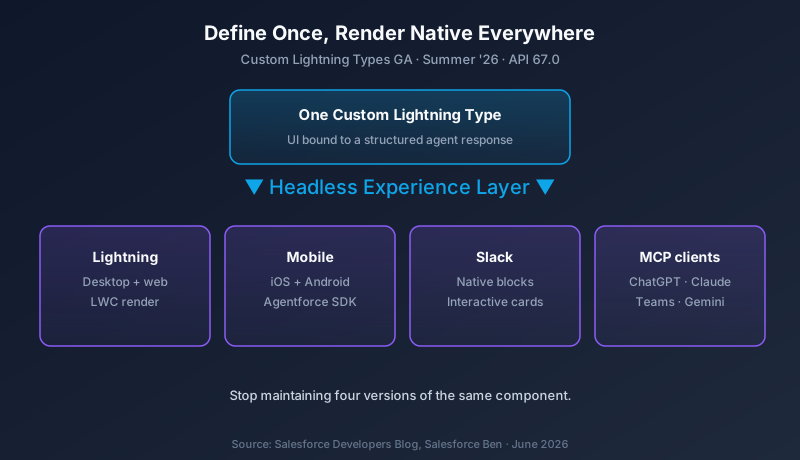
Custom Lightning Types reached general availability in the Summer '26 developer guide this week, and the feature is small to describe and large in consequence. You define one UI component bound to a structured response, and that same definition renders natively on the desktop, in the mobile app, inside Slack, and through any MCP client. One definition. Every surface. No per-channel rebuild.
That is the engine that has been missing from the agentic story Salesforce has been telling all spring.
What Custom Lightning Types do now
Custom Lightning Types began as a way to attach a designed component to a piece of structured data. An agent action returns a record, a quote, a flight status, and instead of dumping JSON or a wall of text at the user, you bind a purpose-built UI to that output. In Spring '26 the feature was scoped and previewed. In Summer '26, at API version 67.0, it is GA across surfaces.
The "across surfaces" part is what changed. The same type definition renders as a Lightning Web Component on desktop and web, as native UI in the iOS and Android apps through the Agentforce Mobile SDK, and as native blocks inside Slack. Salesforce calls the routing layer that does this the Headless Experience Layer, and it sits on top of the broader Headless 360 strategy the company has been building since TDX in April.
The promise to developers is direct. Define the intent of a piece of UI once. The platform renders it natively wherever the agent response surfaces, including Slack, mobile, Teams, ChatGPT, Claude, Gemini, or anything that speaks MCP. You stop maintaining four versions of the same component for four channels, and you stop watching them drift apart over time.
Why this matters more than it sounds
Read last week's coverage of Slack becoming the front door, and this is the piece that makes that vision survivable. Slackbot can orchestrate agents all day. But if every agent response in Slack arrived as a chat dump, nobody would trust it for real work. A rebooking flow that returns a paragraph asking you to click back into Lightning is not a workflow. It is a detour.
Custom Lightning Types are how that rebooking flow shows up as an actual interactive card in Slack, with buttons that do the thing, rendered the same way it would render in the mobile app. The interaction lives where the user already is. That is the difference between an agent that feels like a product and an agent that feels like a chatbot bolted onto a CRM.
There is a quieter benefit for teams that have lived through channel sprawl. For years, shipping a feature to web, mobile, and a partner surface meant three implementations, three test passes, and three places for a bug to hide. The cross-surface model collapses that into one definition. You still test the rendering on each surface, but the logic and the data binding live in a single place.
Headless 360 is the bigger frame
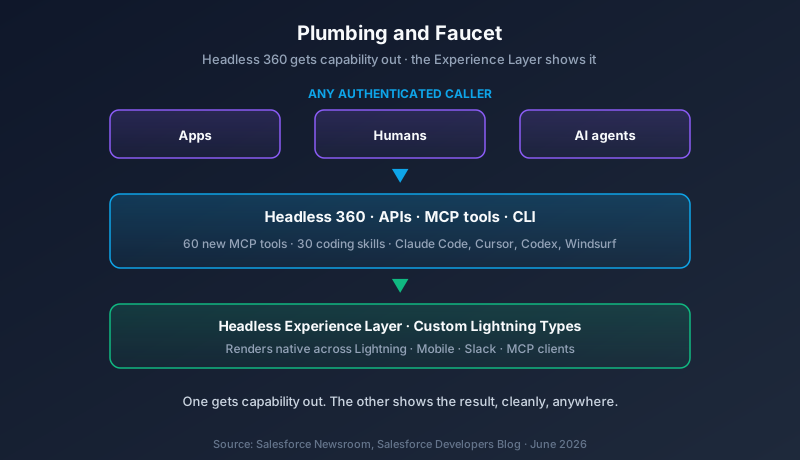
Custom Lightning Types are one tile in a larger mosaic. Headless 360 is Salesforce's stated direction to expose every major platform capability as an API, an MCP tool, or a CLI command, reachable by any authenticated caller. The newsroom phrasing was blunt: an app, a human, or an autonomous AI agent, all hitting the same surface, no browser required.
The numbers are concrete. Salesforce shipped 60 new MCP tools and 30 preconfigured coding skills in this wave, aimed squarely at coding agents like Claude Code, Cursor, Codex, and Windsurf. The pitch is that an agent can read your data model, your flows, and your business logic, then build against them without ever opening a tab.
Put the two pieces together and the shape is clear. Headless 360 is how capability gets out of Salesforce. Custom Lightning Types are how the result of that capability gets shown to a person, cleanly, on whatever surface they happen to be using. One is the plumbing, the other is the faucet.
What you actually build
A Custom Lightning Type is a pairing of a data shape and a rendering. You declare the structure of what an action returns, and you supply the component that draws it. On the desktop that component is an LWC. On mobile the Agentforce Mobile SDK renders the native equivalent, and the SDK now supports React Native, which means a single TypeScript codebase can target both iOS and Android instead of two separate builds.
The official examples lean on the kind of UI that agents produce constantly: flight status cards, rebooking workflows, decision tiles, and structured data layouts. None of these are exotic. They are the everyday outputs of a service or operations agent, and the point is that they now look like designed product instead of formatted text.
There is one practical gate. To pick up the new Lightning Web Component capabilities at all, you update your component's .js-meta.xml to declare <apiVersion>67.0</apiVersion>. Until you do, your components stay on their old behavior. For once, the safe default is also the do-nothing default, so there is no surprise here unless you opt in.
The security context you cannot skip
There is a string attached, and it is the same string we covered in the June 9 piece on Apex flipping to with sharing. When a Custom Lightning Type renders an agent response in Slack or ChatGPT, there is no Lightning UI in front of the data doing the quiet filtering it used to do.
For a decade, field-level security, sharing rules, and page layouts shaped what a user saw, and Apex underneath often ran in system mode because the surface above had already gatekept. In a headless world, the caller might be Claude Code or a third-party MCP client. No trusted UI sits in between. That is exactly why API 67.0 makes user mode the default for database operations. The platform stops assuming the surface already filtered the data.
The connection to Custom Lightning Types is direct. The data your component renders on a non-Lightning surface is only as safe as the run mode of the Apex that produced it. If you ship a beautiful decision tile to Slack that quietly surfaces fields the running user should never see, the pretty card has become a data leak. Build the UI, but audit the run mode of the action behind it. The full breakdown of the user mode change lives in the June 9 article, and it is required reading before you push cross-surface components to production.
Agentforce Vibes 2.0, still a preview
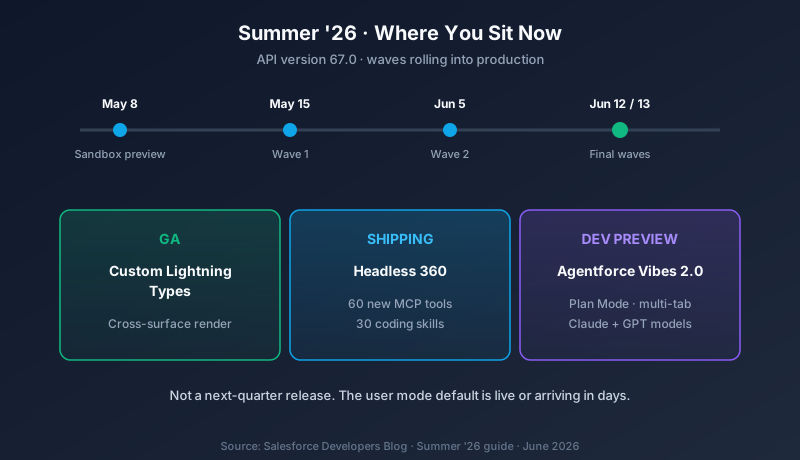
The same developer guide covers Agentforce Vibes 2.0, which is in developer preview rather than GA. Worth a flag because Vibes moved to a paid tier earlier this month, and this is the next version of the tool, not a rollback of that pricing.
Vibes 2.0 is the redesigned agentic development environment. The additions that matter: a multi-tab chat experience, a Plan Mode that builds a structured implementation plan before touching code, deeper MCP integration with built-in Skills and Rules, live Lightning Web Component previews, and model selection across the latest Claude and GPT releases. It runs reasoning through complex tasks and keeps you in control with approvals and native VS Code diffs.
The live LWC preview is the relevant part for this story. If you are authoring a Custom Lightning Type, seeing the component render as you build it shortens the loop considerably. You are no longer deploying to a sandbox just to find out the card looks wrong.
Dates and where you sit
Summer '26 is API version 67.0. Sandbox preview opened May 8. Production rollouts run in waves across May 15, June 5, June 12, and June 13, depending on your instance. For most orgs reading this, the release is already in production or arriving within days. This is not a plan-for-next-quarter feature. Custom Lightning Types are GA right now.
What to build this week
Pick one agent action and turn its output into a Custom Lightning Type. Choose a high-traffic action where the response is structured: a case summary, an order status, a recommendation. Define the type, supply the LWC, and confirm it renders cleanly in Lightning. That is the first hour.
Then take the same type and render it in Slack. This is the real test, because Slack is where the cross-surface promise either holds or falls apart. If your card shows up native and interactive, you have proof the model works for your org. If it does not, you have found the gap before a user did.
Before any of this reaches production, check the run mode of the Apex behind the action. A component is only as trustworthy as the data it draws. Build the UI once, but verify the security every time. The flashy part of this release is one definition rendering everywhere. The part that keeps you out of trouble is what that definition is allowed to show.
About the Author
Dipojjal Chakrabarti is a B2C Solution Architect with 29 Salesforce certifications and over 13 years in the Salesforce ecosystem. He writes and edits salesforcedictionary.com, published by KineticBit Inc., to help admins, developers, architects, and cert/interview candidates sharpen their fundamentals. More about Dipojjal.
Share this article
Sources
- The Salesforce Developer's Guide to the Summer '26 Release (Salesforce Developers Blog)
- Summer '26 Release: Top Development & Security Features (Salesforce Blog)
- Salesforce Headless 360 and Agentforce Vibes 2.0 Revealed at TDX 2026 (Salesforce Ben)
- What Salesforce Headless 360 Means For Developers (Salesforce Developers Blog)
- Introducing Salesforce Headless 360. No Browser Required. (Salesforce Newsroom)
Related dictionary terms
Practise it
Five questions on Agentforce Specialist
Exam-style questions with an explanation after each one. No account needed, and your answers build a weak-topic map once you have one.
More news

Agentforce Vibes Goes Paid
Salesforce moved Agentforce Vibes to a paid model on June 1, 2026. Paid orgs now need Flex Credits or a permission set license, and Developer Edition keeps a capped free tier. Here is the breakdown and a four-step plan.

Salesforce Summer '26 New Features
Salesforce's Summer '26 release lands 17 features including Multi-Agent Orchestration, Agentforce Self-Service, Tableau MCP, and agents in Flow Builder. Production waves begin May 15.
Comments
No comments yet. Start the conversation.
Sign in to share your take on this article. Your account works across every page.