
Opt out of customer data access in Salesforce
What the Setup toggle actually controls, who should turn it off, and the exact steps to do it.
Legal forwards you a vendor AI questionnaire from the customer's procurement team. Question four reads: "Does the vendor use your tenant data to train AI models, and if so, how do you opt out?" Your stomach drops a little because nobody on your side has ever opened that page. You log into the Salesforce production org, open Setup, and search for "opt". Two minutes later you have the answer, and the answer is one toggle.
That toggle is "Allow Salesforce Access to Customer Data". This guide explains what it actually decides, what it does not touch, who should switch it off, and how to do it. By the end you will know enough to fill out question four without checking Slack and enough to defend the decision in your next governance review.
What the toggle actually controls
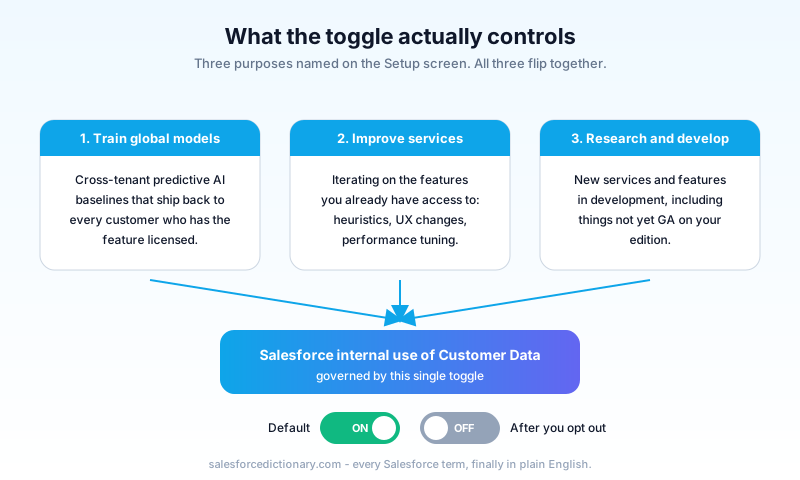
Read the Setup screen line by line. Salesforce names three purposes for which it claims your consent when the toggle is on:
- Training global predictive AI models for use by the services and features you have access to.
- Improving the services and features you have access to.
- Conducting research into and development of new services and features.
That is the scope, and it is narrower than people assume. The toggle governs Salesforce's internal use of your Customer Data for product work. It is not a switch on the Einstein features that run inside your org. It is not a switch on Agentforce prompt-time data flow either, which is governed separately by the Einstein Trust Layer and your org's Data Cloud consent posture.
The wording on the screen makes this explicit. When you turn the toggle off, Salesforce commits that its employees cannot view your Customer Data outside a support case, a pilot, or as otherwise described in your legal agreements. That is the actual contract you flip. It is a permission boundary on Salesforce-the-company, not a feature flag on Salesforce-the-product.
Two terms here matter. "Customer Data" is the legal definition from your Master Subscription Agreement: the data your org has uploaded, plus the data your users have created inside your org. "Global predictive AI models" means the cross-tenant models Salesforce builds for everyone, such as next-best-action and lead scoring baselines. Org-specific models trained on your data alone are a different beast and are not what this toggle is about.
What it does not control
People walk into this toggle expecting an off switch for Einstein, and it is not that. Here is what stays on when you flip it.
- Einstein features in your org keep working. Lead Scoring, Opportunity Scoring, Forecast Insights, Einstein Activity Capture, Einstein Bots, all of it. Those are licensed features you pay for and configure. They run independently.
- Agentforce and the Einstein Trust Layer are separate. Prompt grounding, masking, zero-retention with the LLM, audit logs, all of that is governed by the Trust Layer and by your Data Cloud and Agent settings, not by this toggle.
- Support engineers attached to an open case can still help. Login access for a case, a pilot you opted into, or a contractual arrangement is preserved. The toggle is about uninvited internal use, not contracted use.
- Integrations and APIs do not change. Your Apex callouts, your Connected Apps, your middleware, none of it touches this setting.
If you flip the toggle expecting your AI features to dim, nothing visible will happen in your org. That is the design. The toggle changes what Salesforce-the-company can do with the bytes sitting in your tenant for its own product work. Your day-to-day Salesforce keeps running.
How to opt out
Two clicks. Setup permission required: Modify All Data or Customize Application, which most full admins already have.
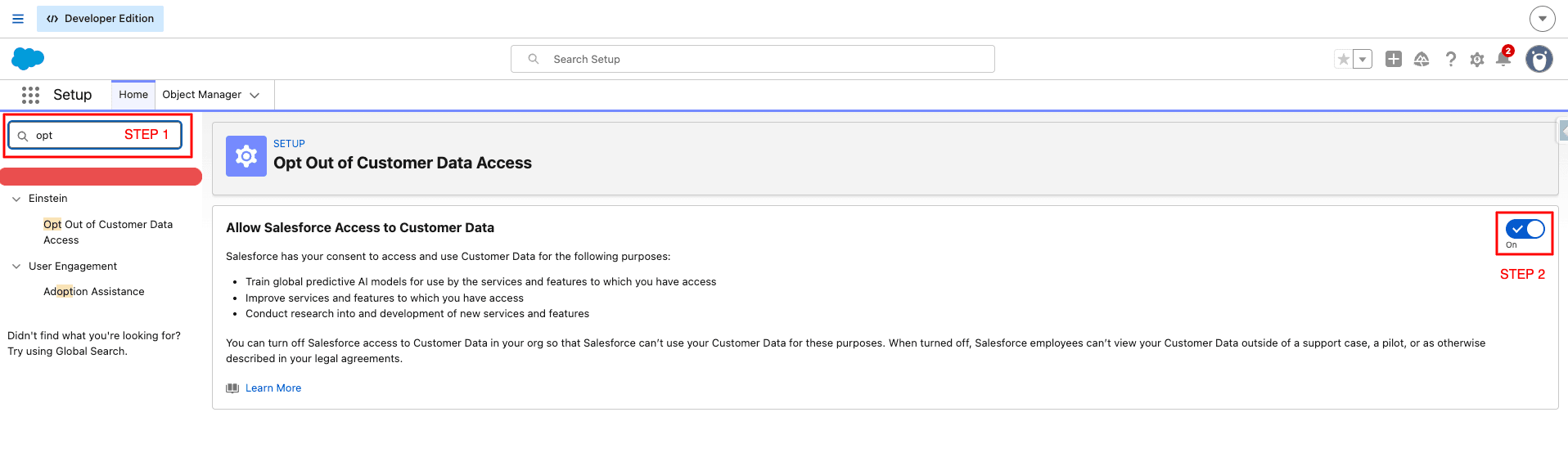
The steps:
- In Salesforce Setup, use the Quick Find box on the left and type "opt". The result list will surface Opt Out of Customer Data Access under the Einstein heading. Click it.
- On the right pane you will see the Allow Salesforce Access to Customer Data card. The toggle currently reads On. Click the toggle. It flips to Off. No confirmation modal, no save button. The change is immediate.
That is the whole procedure. There is no PR to file, no Case to open, no API call to issue. The toggle is a per-org setting and it persists across your sandbox refreshes only if your sandbox copy includes Setup metadata of this kind (most do).
A note on the path. The link sits under the Einstein navigation group in Setup. That placement is a historical artifact of when Salesforce introduced this control alongside the Einstein platform. Do not let the location confuse you about the scope. The toggle still governs Salesforce's use of all your Customer Data, not just Einstein-adjacent data.
If your Quick Find returns no result, you are either on an edition or release that does not expose this control yet, or your user does not have the permission to see the Setup node. Check edition first, then check your profile or permission set.
What changes the moment you flip it off
The change is forward-looking and quiet. Here is what actually shifts.
Salesforce employees lose default visibility into your Customer Data for product purposes. That covers internal research, model training, and feature improvement work. It does not retroactively remove your data from models already trained on prior contributions. The toggle is a future-tense commitment; it is not a right-to-be-forgotten request. If you need data deleted, that is a separate workflow under your legal agreement and the privacy procedures Salesforce publishes.
The global predictive AI models stop ingesting fresh data from your tenant going forward. Existing baselines remain in service to other customers, but your future contributions are excluded.
Support and contracted access stays the same. An engineer attached to a Case, a customer in a pilot, and any access path your MSA already permits, all continue to work. The toggle is not a wall against legitimate, contracted assistance.
You should expect to see no visible change in your org. No banner, no feature gating, no degraded Einstein performance. If something does change in user-visible behavior, that is unrelated and you should investigate separately.
Who should opt out
The decision is not one-size-fits-all. Walk through this short tree.
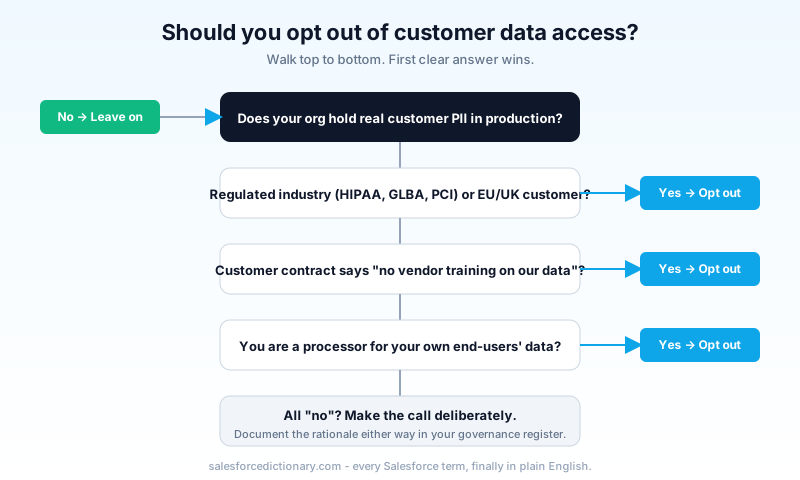
The cases where the answer is clearly yes:
- Regulated industries. Healthcare under HIPAA, financial services under GLBA or PCI, anyone with a customer questionnaire that explicitly forbids vendor training on tenant data. The opt-out is the cleanest way to document "no vendor training" on your annual SIG.
- EU and UK customers. Your processing posture under GDPR is materially simpler when the vendor is not using your data for cross-tenant model work. The opt-out narrows the data-use surface area in the way your DPO will want.
- Public sector and government cloud customers. If your contracts already include "no AI training on our data" language, the toggle aligns your technical posture with the contract.
- Anyone with a "no AI training" clause in their order form. Whether you signed the standard MSA or a custom rider, if the rider says no, the toggle should be off. Misalignment between contract and control is an audit finding waiting to happen.
A subtler case where the answer is yes: organizations that handle their own customers' personal data as a processor. If you are a SaaS vendor whose Salesforce org stores your end-users' data, your downstream commitments to those end-users probably exclude vendor AI training. Flip the toggle to keep your processor contracts aligned.
Who can leave it on
The opt-out is not free in a strict sense. The features and products Salesforce builds with broad data access tend to come back to all customers as improvements. Whether that benefit outweighs the privacy trade is a judgment call, but here are the cases where leaving the toggle on is defensible.
- Developer Edition orgs and Trailhead playgrounds. No real data, no contractual exposure, no reason to flip it.
- Sandbox-only orgs holding masked or synthetic data. Same reasoning.
- Internal-tooling orgs that hold no customer PII. A Salesforce instance used purely for project tracking or internal HR with no external customer data has low privacy exposure.
- Customers who deliberately want to contribute to platform improvement and whose contracts and legal posture allow it. This is a real and defensible stance; flag it in your security register so future auditors do not flag it for you.
If you are running a real production org that holds real customer data and you have not made a deliberate decision either way, the default should be to flip the toggle off and revisit. The cost of switching it back later is zero if you decide otherwise.
Common misconceptions
A few of these come up every governance review.
- "Opting out disables Einstein in my org." No. Einstein keeps running. The toggle is about Salesforce-the-company's use of your data, not the features your org consumes.
- "Opting out covers Agentforce prompts." No. Prompt-time data flow to the underlying LLM is governed by the Einstein Trust Layer, the model contracts Salesforce holds with model providers, and your Data Cloud and Agent settings. Read those separately if Agentforce matters to your posture.
- "EU customers are opted out by default." No. The default for new orgs is on. The admin has to switch it off. If you assumed otherwise on a regional rollout, check now before your next DPIA.
- "The toggle deletes my data from existing models." No. It is forward-looking. If you need historical data scoped out, that is a separate legal request.
- "This is the same as the Einstein generative AI settings." No. Those are about feature behavior. This toggle is about Salesforce's internal data use rights.
How to verify and how to reverse it
Verification is a refresh away. After flipping the toggle, reload the Setup page and confirm the Allow Salesforce Access to Customer Data card now reads Off. Screenshot it, attach the image to your governance ticket or vendor risk register, and log the date and the user who made the change. Setup Audit Trail captures the change too if you want a second source of truth.
Reversing is the same path in reverse. Setup, Quick Find "opt", click the node, toggle on. Again, no save button, no confirmation. If you reverse it after the fact, document the reason. Your future self in a customer questionnaire will thank you.
What to do today
Open your production org. Setup. Quick Find "opt". Look at the toggle. Screenshot the state. Attach the screenshot to your vendor risk register or your governance Confluence space with the date. If the toggle is on and your org holds real customer data, schedule the conversation with Legal and Security this week. Make the call deliberately, with a written rationale either way, and link the rationale from the screenshot. That is the artifact you will need the next time a customer questionnaire lands in your inbox.
About the Author
Dipojjal Chakrabarti is a B2C Solution Architect with 29 Salesforce certifications and over 13 years in the Salesforce ecosystem. He writes and edits salesforcedictionary.com, published by KineticBit Inc., to help admins, developers, architects, and cert/interview candidates sharpen their fundamentals. More about Dipojjal.
Share this article
Sources
Related dictionary terms
Practise it
Five questions on Platform Developer I
Exam-style questions with an explanation after each one. No account needed, and your answers build a weak-topic map once you have one.
Keep reading
Data Cloud Is Now Data 360: What Actually Changed (and Why It Matters)
Data Cloud became Data 360 in October 2025. Beyond the rename: Zero-Copy Federation, Tableau Semantics, the Lakehouse, and a new credit model. Here's the full picture.
What Is Agentforce 360? The Complete 2026 Guide for Salesforce Admins, Developers & Architects
Agentforce 360 is Salesforce's 2025 rebrand of its agentic-AI platform - built on the Atlas Reasoning Engine, Einstein Trust Layer, and Data 360. Here's the complete admin + dev + architect guide.
Comments
No comments yet. Start the conversation.
Sign in to join the discussion. Your account works across every page.