
Custom Metadata Types vs Custom Settings vs Custom Labels: The 2026 Decision Guide
Three tools, three purposes, and the decision tree that ends the argument. CMDT for config you deploy, Custom Settings for config you flex, Custom Labels for strings you translate.

You ship a feature behind a config flag. Works in your sandbox. Survives UAT after the admin populates the rows by hand. Lands in production on a Friday and falls over Monday morning because nobody loaded the rows in prod and the Apex class is reading a null record. You blame the release process. The release process is fine. You picked the wrong config primitive.
Salesforce gives you three tools that look interchangeable on a slide: Custom Metadata Types, Custom Settings, and Custom Labels. They sit next to each other in Setup, they all store key-value pairs, and they all sound like "config." They are not interchangeable. Picking the wrong one is the kind of mistake that survives every code review because the symptom shows up months later, in a different team, on a different release. This guide is the decision tree you wish someone had handed you the first week.
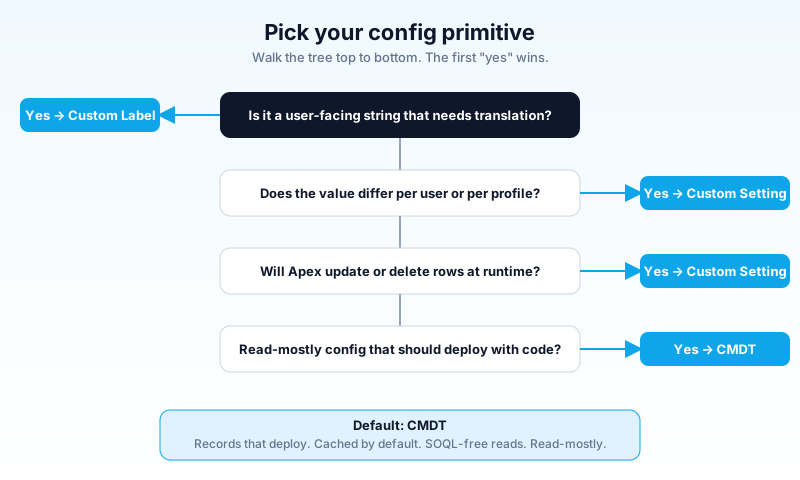
The one-line definition for each
Before the deep dive, here is the smallest possible answer.
- Custom Metadata Types (CMDT): config records that ship with your code. Deployable. Cached. Read-mostly. The default modern choice.
- Custom Settings (Hierarchy): config that varies by user or profile and changes at runtime. Old, niche, but still the right answer for a narrow set of problems.
- Custom Labels: translatable UI strings. Not config. Text that needs to appear in 14 languages when the marketing team adds Brazil.
If you remember nothing else from this post, remember the three nouns: records that deploy, values per user that flex, strings that translate. Each tool wins one of those jobs.
Side-by-side capabilities
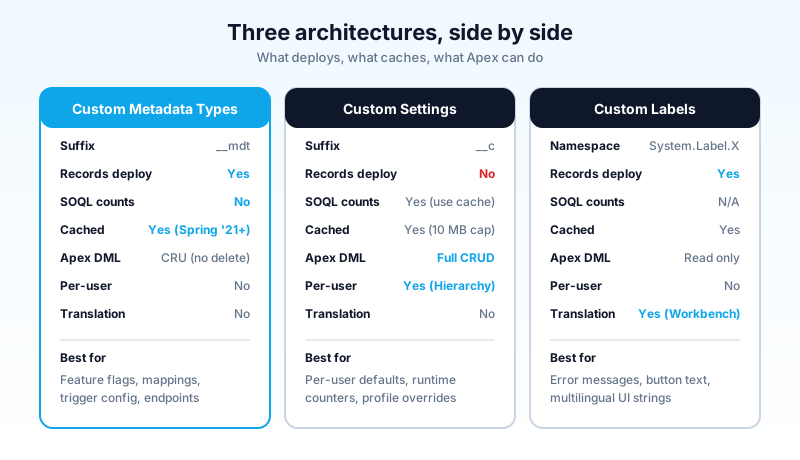
The table that matters. Read it once now, come back to it the next time you are picking.
| Capability | Custom Metadata Types | Custom Settings | Custom Labels |
|---|---|---|---|
| Object suffix | __mdt | __c | n/a (System.Label namespace) |
| Records deploy with the app | Yes (in package, change set, Metadata API) | No (header only, no rows) | Yes |
| Read in Apex via SOQL | Yes, and does not count against the SOQL limit | Yes, and counts against the SOQL limit (use cache methods instead) | No (read via System.Label) |
| Apex DML | Create, read, update. No delete. | Full CRUD | Read only at runtime |
| Cached automatically | Yes (Spring '21 onward, no SOQL on getInstance/getAll) | Yes (10 MB or 1 MB per license, whichever is less) | Yes (loaded on demand) |
| Per-user / per-profile values | No (use a lookup field if you need user-keyed CMDT) | Yes (this is the entire point of Hierarchy Custom Settings) | No |
| Translation Workbench integration | No | No | Yes (the only reason to use this tool) |
| Reference from formula fields and validation rules | Yes, via $CustomMetadata global | Yes, via $Setup (Hierarchy only) | Yes, via $Label |
| Reference from Flow | Yes (Get Records on a CMDT) | Yes (Get Records on the custom setting object) | Yes (via formula or resource) |
| Reference from LWC | Yes (@salesforce/customMetadata) | Yes (Apex bridge) | Yes (@salesforce/label/c.X) |
| Records per type | Soft limit (effectively unlimited under cache limits) | 300 fields per setting, total bound by 10 MB org cache | Up to 5,000 labels, 1,000 chars each |
| Lookup relationships | Yes, to other CMDT | No | No |
Three things in that table do the heavy lifting in real decisions. CMDT records deploy. Custom Settings do not. Only Custom Labels run through the Translation Workbench. Memorize those three rows.
Custom Metadata Types: the modern default
A CMDT is a custom object that lives in the metadata layer. The structure (the type) and the rows (the records) both deploy. You build a Payment_Gateway__mdt with fields for endpoint URL, retry count, and timeout. You add three records: Stripe, Adyen, PayPal. The whole thing, type and records, lands in your next change set. The admin in prod never has to touch it.
That single property fixes the Friday-night bug at the top of this post.
What CMDT gets right
Records deploy. This is the headline. You build a config-driven feature in dev, you sandbox-test it, and the same records show up in UAT, staging, and prod with no manual data load. Your release notes never need a line that says "load these 12 rows by hand." Onboarding a new sandbox is sfdx force:source:deploy and you have a working feature flag.
SOQL on __mdt does not consume your SOQL limit. This sounds like a footnote and it is actually a load-bearing wall when you are designing a trigger framework or a bulk batch process that needs config in a hot loop. You can have a handler that queries Trigger_Config__mdt on every transaction and never worry about hitting 100 SOQL queries.
Spring '21 added the static methods getInstance(developerName), getAll(), and [CMDT].SObjectType.getDescribe().getName(). These access cached metadata without a SOQL query at all. Faster than SOQL, lower cost, zero SOQL count. If you have not migrated your CMDT reads to the cache methods, that is a free perf win sitting in your codebase.
Lookups between CMDT records work. You can have a Region__mdt and a Country__mdt and link each country to a region. This is how you build a small, deployable reference table without dragging in a real custom object.
What CMDT does not do
Apex cannot delete CMDT records. You can create and update them in Apex (since Spring '17, via the Metadata API enqueue pattern), but you cannot delete. If you need to wipe rows from code, this is a hard wall.
You cannot personalize a CMDT value by user or profile. There is no hierarchy lookup. If you need "the default tax rate is 8 percent but this user's profile gets 6.5 percent," CMDT is the wrong shape. You either need a Hierarchy Custom Setting or a custom object with user lookup fields.
You cannot translate CMDT picklist or label values through Translation Workbench. If your config record itself needs to render in five languages, that is a Custom Label job feeding into the CMDT field.
When to reach for CMDT
The mental model: read-mostly config that ships with the app.
- Feature flags.
Feature_Flag__mdtwith one record per flag, a boolean for enabled, and a deployment that turns it on per environment. - Mapping tables. Country to region. SLA tier to response time. Picklist value to internal code.
- Validation thresholds. Maximum discount per product category. Triggers for escalation. The kind of number a senior architect picks and the business confirms quarterly.
- Integration endpoints. URL and auth scheme per environment, deployed alongside the named credential.
- Trigger handler routing. Which handler class fires for which sObject, externalized so the framework code never changes.
If your reaction to a config change is "the developer will deploy it next sprint," it is CMDT.
Custom Settings: hierarchy is the one trick
Custom Settings are older than CMDT and the platform has been quietly steering you off them for half a decade. List Custom Settings are, in practice, dead. Anything you would have built as a List Custom Setting in 2017 is a CMDT in 2026. There is no real reason to start a new List Custom Setting unless you specifically need Apex to delete rows, which is the one capability CMDT lacks.
Hierarchy Custom Settings are different. They have one feature CMDT does not, and that feature is the entire reason they still exist.
The hierarchy trick
A Hierarchy Custom Setting stores three layers of values: organization, profile, and user. When you call My_Setting__c.getInstance() from Apex, the platform walks the hierarchy for you. It checks the current user, then the user's profile, then the org default, and returns the first value it finds.
This is genuinely useful for one class of problem: configuration that legitimately differs by user or profile.
A real example. Your sales reps in Asia-Pacific should see prices in USD, your reps in EMEA should see prices in EUR, and the default is GBP. You set the org default to GBP, override the profile "EMEA Rep" to EUR, override the profile "APAC Rep" to USD, and let the Apex code call getInstance(). One call, three layers checked, the right currency comes back.
You could build this with a CMDT, but you would write the hierarchy walk yourself: query by user, then by profile, then by org. The Hierarchy Custom Setting bakes that walk into the platform.
What Custom Settings get wrong
Records do not deploy. Every environment needs the rows loaded separately. This is the single biggest reason teams are abandoning Custom Settings: the operational tax of remembering to populate prod, then UAT, then the staging refresh, then the next sandbox spin-up.
The cache is small. 10 MB total, or 1 MB per Salesforce license, whichever is less. A 3-license dev org has 3 MB of Custom Setting cache. You hit that ceiling faster than you think when you stuff configuration into a list setting that grows unbounded.
SOQL against Custom Settings counts against the governor limit. The cache helps if you use the platform methods (getInstance, getAll, getOrgDefaults), but if a developer writes SELECT ... FROM My_Setting__c directly, they pay the SOQL cost. CMDT does not have this footgun.
When to reach for Custom Settings
Two situations.
- Per-user or per-profile config that must run at user-current behavior. Currency display, default record type, regional preferences, behavior toggles that vary per team. CMDT cannot do this natively.
- Config that the running application needs to update. Per-user dashboards remembering last-viewed values, throttle counters, retry state. CMDT records cannot be created or modified inside the same transaction that reads them, and they cannot be deleted at all. Custom Settings can.
If neither of those applies, you are reaching for the wrong tool. Use CMDT.
Custom Labels: the only translation game in town
Custom Labels are not config. They are text. The fact that the menu lives under "Custom Code" in Setup tricks people into thinking it is the same family as CMDT and Custom Settings. It is not.
A Custom Label is a strongly named, deployable, translatable string. You define it once, reference it everywhere (Apex, Visualforce, LWC, formula fields, validation rules), and when the marketing team adds Spanish to the supported language list, the Translation Workbench lets a translator fill in the Spanish text without touching code.
What Custom Labels get right
Translation. If you have ever shipped a Salesforce app to more than one language market and tried to do it with hardcoded strings, you have lived through the pain that Custom Labels solve. With Custom Labels, every user-facing string lives in one place, every translation pass is a workflow inside Salesforce, and the deploy story is the same package that ships everything else.
Reference syntax is clean. From Apex it is System.Label.My_Label. From LWC it is import myLabel from '@salesforce/label/c.My_Label'. From a formula field it is $Label.My_Label. Nothing leaks; you cannot accidentally read a Custom Label as a record.
Generous limits. 5,000 labels per org, 1,000 characters per label, and zero impact on cache budget or SOQL limits.
What Custom Labels do not do
They are not key-value config. Stop using them to store toggles and feature flags. You will see this anti-pattern in older codebases: if (System.Label.Feature_X_Enabled == 'true'). Two reasons that is wrong. First, it is a string compare for a boolean. Second, the moment marketing translates the org to French, "true" becomes "vrai" and the flag silently turns off.
They are read-only at runtime. You cannot update a label from Apex. They deploy from version control, that is the only way.
They are not structured data. One label, one string. No fields, no relationships. If you need to associate a label with a status, a tier, or another label, you are reaching for the wrong tool again.
When to reach for Custom Labels
Exactly one situation: a user-facing string that needs to be deployable and translatable.
Error messages in validation rules. Email template subject lines. LWC button text. Toast messages. The five-language version of "Please contact your administrator."
If the string never leaves Apex (a logger format, an internal error message captured to a debug log), do not bother with a label. Hardcode it. Custom Labels are for the UI.
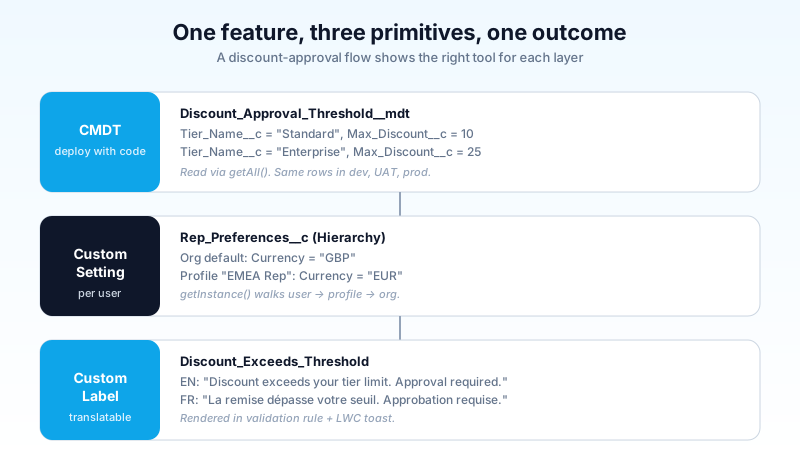
Six scenarios with the right answer for each
The decision tree is the framework, but the practice is in the scenarios. Here are six common ones with the right pick and the reasoning.
Scenario 1: Feature flag that turns a new approval flow on per environment. Pick: CMDT. The flag value differs per environment (off in prod, on in UAT), and you want the row to deploy with the change set so the flag is visible the moment the code lands. A Hierarchy Custom Setting org-level default would work too, but the moment you want the flag visible in version control alongside the Flow, CMDT wins.
Scenario 2: Per-user dashboard preference for "default report period." Pick: Hierarchy Custom Setting. This is the textbook hierarchy case. Different users want different defaults, and the value updates from a Lightning component when the user changes it. CMDT cannot personalize per user without a custom lookup, and that lookup adds a SOQL hop you do not need.
Scenario 3: Error message that appears in a validation rule, used in English, French, and Japanese orgs. Pick: Custom Label. The Translation Workbench is the only path here. CMDT picklists do not translate. Hardcoded strings do not translate. The label is the right tool.
Scenario 4: A mapping table from State to Sales Region used by a trigger that fires on 10,000 records per bulk insert.
Pick: CMDT. Read-mostly, deployable, and the getAll() cache method means the trigger reads the entire mapping table with zero SOQL queries. Hierarchy Custom Setting cannot lookup-walk on a State value. A custom object would burn SOQL on every bulk insert.
Scenario 5: A retry counter for an outbound integration that needs to track how many times a record has been pushed. Pick: Custom Setting (List). You need Apex to update the record on every retry. CMDT cannot do that inside the same transaction. A custom object would be cleaner if the counter is per-record (use a counter field on the record itself), but if it is org-wide, the list setting is the smallest answer.
Scenario 6: API endpoint URL that differs between sandbox and production. Pick: CMDT. Or better: a Named Credential, which is the modern Salesforce way to externalize endpoint configuration with built-in auth. CMDT is acceptable for the URL itself if you have legitimate reasons to avoid Named Credentials. Custom Settings here would mean populating the URL by hand in every sandbox, which is the operational tax you are trying to avoid.
The migration question: should I move my List Custom Settings to CMDT?
You have an older org with a dozen List Custom Settings. They work. Migration costs time. Is it worth it?
The honest answer: not always.
Move when any of these apply:
- The setting is hit in a hot Apex loop and you are burning SOQL queries you do not need to spend.
- A sandbox refresh has caused an outage at least once because nobody re-populated the setting.
- You are about to ship an Apex trigger framework and the trigger config belongs alongside the framework code in deployment.
Leave alone when:
- The setting is rarely read.
- Your team has a documented data-load script and runs it as part of every refresh without incident.
- The setting has Apex updating it (delete operations especially).
Migration is mechanical: build the matching __mdt type, write a one-time Apex job to copy records, rewrite the read paths to use getAll() or getInstance(developerName), deprecate the setting. Plan for two sprints, not two days. Most orgs do not finish the migration in one go and end up with both for a while, which is fine.
The 2026 default
Default to CMDT for config. Reach for Hierarchy Custom Setting only when you actually need per-user or per-profile values. Reach for Custom Labels only when you need a translatable UI string. Do not use Custom Labels for boolean flags. Do not use CMDT for runtime-mutable state. Do not use Custom Settings for anything new unless you have read the previous two sentences and ruled out CMDT.
The three nouns again: records that deploy, values per user that flex, strings that translate. Each tool wins one of those jobs. If your current code crosses the streams (using CMDT for translation, or Custom Labels for feature flags, or List Custom Settings for static config that never changes), you have a tech-debt item worth booking into the next refactor.
Pick one config primitive in your codebase that you suspect is wrong, look at it tomorrow morning, and decide whether it survives the table at the top of this post. If it does not, you have your next sprint's smallest correct refactor.
About the Author
Dipojjal Chakrabarti is a B2C Solution Architect with 29 Salesforce certifications and over 13 years in the Salesforce ecosystem. He writes and edits salesforcedictionary.com, published by KineticBit Inc., to help admins, developers, architects, and cert/interview candidates sharpen their fundamentals. More about Dipojjal.
Share this article
Sources
Related dictionary terms
Practise it
Five questions on Platform Developer I
Exam-style questions with an explanation after each one. No account needed, and your answers build a weak-topic map once you have one.
Keep reading

The Apex Trigger Framework: Best Practices for Bulk-Safe, Scalable Triggers (2026)
The complete 2026 trigger framework guide. Logic-less triggers, bulk safety, recursion control, framework comparison (Kevin O'Hara vs interface vs virtual), and CRUD/FLS enforcement.

Salesforce Flow vs Apex in 2026: A Decision Matrix for Admins, Developers & Consultants
Flow vs Apex is not a religious war anymore. Here is the 2026 decision matrix. Capability gaps, governor limits, the 70/30 rule, and 12 worked scenarios with the right answer for each.

Salesforce Governor Limits Explained: The 2026 Cheat Sheet (with Examples)
The canonical 2026 cheat sheet: SOQL/DML/CPU/heap limits, sync vs async, the most-hit limits in production, and 10 patterns to keep your org out of the red.
Comments
No comments yet. Start the conversation.
Sign in to join the discussion. Your account works across every page.