
System Log
System Log is the older developer name for the debug log view inside the Salesforce Developer Console.
Definition
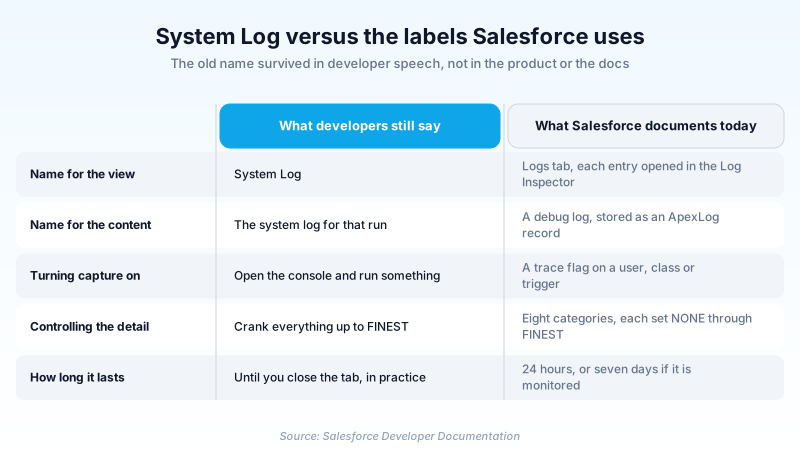
System Log is the older developer name for the debug log view inside the Salesforce Developer Console. The label no longer appears in the product or in current Salesforce documentation. The docs call the surface the Logs tab, and they call the viewer that opens each entry the Log Inspector.
What the name points at is still in daily use. A debug log records what one transaction did, line by line with timestamps. Salesforce keeps it as an ApexLog record you can query through the Tooling API.
Capture is controlled by a trace flag set on a user, an Apex class or a trigger. Opening the console does not on its own capture another user's work, which is the detail the old name tends to hide.
In plain English
“Think of it as a flight recorder for one thing your Salesforce org just did. It writes down each step in order with the time next to it, so you can read back where it went wrong. The recorder is still there. Salesforce simply stopped calling it the System Log.”
Worked example
A developer at a mid-market distributor gets a report that saving an Opportunity sometimes fails with a limit error. In the Developer Console she sets a trace flag on the affected user, with Apex Code at DEBUG and Database at FINEST. The other six categories stay at INFO. The user reproduces the save. The new entry lands on the Logs tab. Opening it in the Log Inspector shows 43 SOQL_EXECUTE_BEGIN lines inside one trigger, nearly all of them firing from a for loop. The matching ApexLog record reports a LogLength of 4,412,908 bytes and a DurationMilliseconds of 11,480. She moves the query out of the loop, reruns the save, and the next log shows two queries instead of 43.
What happened to the name, and what to say now
The label Salesforce actually ships
The current Apex Developer Guide topic is titled Working with Logs in the Developer Console. Its first line points you at the Logs tab, and the old label never appears. The giveaway is the topic's own address, which still ends in apex_debugging_system_log_console. That URL is the only trace left. One word did survive the rename. System is still a live log category, one of the eight, and it has nothing to do with the view. What each entry opens in is the Log Inspector, which the guide describes as a context-sensitive execution viewer.
A trace flag decides what gets recorded
Logging starts because a trace flag says so. Each flag points at a user, an Apex class or a trigger, and its LogType is USER_DEBUG, DEVELOPER_LOG or CLASS_TRACING. A flag cannot expire more than 24 hours after its start date. Only one can be active per traced entity. A forgotten flag on the wrong user is the usual reason a log never appears. Trace flags sit above every other logging rule. Class and trigger flags override the levels a user flag sets, but they never start a log on their own.
Eight categories, eight levels, one enormous file
You choose detail per category: Apex Code, Apex Profiling, Callout, Database, System, Validation, Visualforce and Workflow. Each takes a level from NONE through ERROR, WARN, INFO, DEBUG, FINE and FINER up to FINEST. Apex Code at FINEST goes further than most people expect: it writes out every variable assignment. Any personal data your code touches ends up in a file other users can open. Salesforce also warns you to check that setting before a deployment, since it stretches how long the deployment takes.
One limit truncates, the other deletes
Two different mechanisms cost you evidence, and they get conflated. A log over 20 MB is not rejected. Salesforce reduces it by removing older log lines, and those lines can come from anywhere in the log, not just the start. Nothing errors. You just get a gap-toothed file. Retention is the other one: system debug logs are kept for 24 hours, monitoring debug logs for seven days. There is also a shutoff. Push past 1,000 MB of logs across the org inside a 15 minute window and your trace flags are disabled. Query ApexLog for LogLength, Operation and Status, then archive the bodies you care about.
How organizations use System Log
Sets a trace flag on one claims adjuster before a scheduled reproduction. The failing quote calculation is captured once, instead of logging the whole org.
Pulls ApexLog rows through the Tooling API every night and archives the bodies, because the log is usually gone before anyone triages the ticket.
Trust & references
Cross-checked against the following references.
Straight from the source - Salesforce's reference material on System Log.
Hands-on resources to go deeper on System Log.
About the Author
Dipojjal Chakrabarti is a B2C Solution Architect with 29 Salesforce certifications and over 13 years in the Salesforce ecosystem. He writes and edits salesforcedictionary.com, published by KineticBit Inc., to help admins, developers, architects, and cert/interview candidates sharpen their fundamentals. More about Dipojjal.
Test your knowledge
+5 pts / dayQ1. What does current Salesforce documentation call the surface developers still refer to as the System Log?
Q2. How long does Salesforce retain a system debug log?
Q3. You set a trace flag on an Apex class, the class runs, and no log appears. Why?
Discussion
Loading discussion…