
Push Notifications, Salesforce Console
Salesforce Console push notifications are visual cues in a Salesforce Classic console app.
Definition
Salesforce Console push notifications are visual cues in a Salesforce Classic console app. They mark a record or field on screen that someone else just changed. Salesforce watches the objects and fields an admin selected, then highlights the affected list row or updates the open detail page.
An admin configures it per console app in Setup. Accounts, contacts, cases, leads, opportunities, campaigns, tasks and custom objects are eligible.
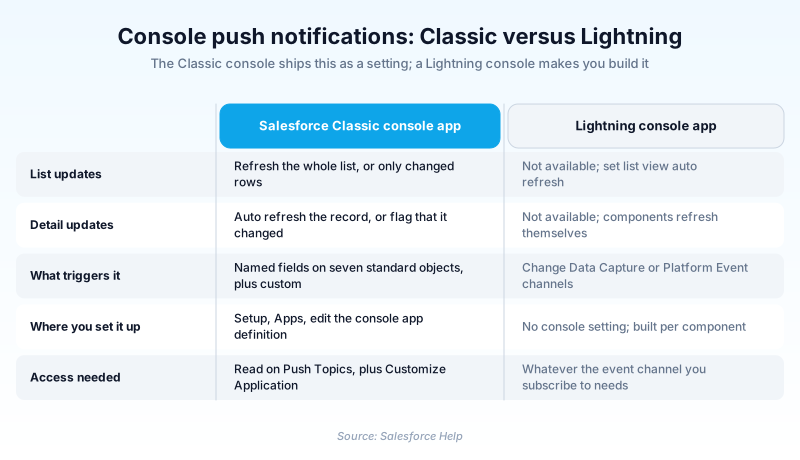
This is the older option. Lightning console apps, including the standard Service Console and Sales Console, carry no equivalent setting. New work uses list view auto refresh with Change Data Capture or Platform Events instead.
In plain English
“Two people are writing in the same shared notebook at the same time. This feature taps one of them on the shoulder when the other changes a line, and colours that line in so it is easy to spot. Nobody ends up working from an old answer.”
Worked example
A telecom support team runs a Classic console app called Support Console. The admin sets List Updates to refresh only changed rows, sets Detail Updates to Flag, then picks Case and watches Status, Priority and Owner. Agent Priya has case 00104512 open on a subtab, Status New and Priority Medium. A tier 2 engineer bumps Priority to High and moves Owner to the Escalations queue. Priya's row in her pinned list turns yellow, and Priority and Owner render in bold italic. On the open subtab a message tells her the record changed. She finishes the comment she was typing, saves it, then reloads and sees the escalation without having lost a word.
From the console app editor to the yellow row an agent sees
List updates and detail updates are two separate choices
An admin sets these independently while editing the console app. List Updates governs a list view in the navigation tab or a pinned list: do nothing, refresh the whole list, or refresh only the rows that changed. Row level refresh is kinder, because it leaves the agent's scroll position alone instead of yanking the grid back to the top. Detail Updates governs an open record. Automatically Refresh reloads the page and shows new values. Flag posts a message and lets the agent reload when ready. Flag wins in most support orgs, since a reload landing mid sentence can throw away edits nobody has committed yet.
Choosing objects and fields without making the console twitch
Nothing fires on every edit. You pick objects first, then named fields on each, and only those fields count. For a case handling team the useful picks are Status, Priority and Owner, because they answer the question an agent actually has: did this get escalated, or taken away from me? Watch a long text field or anything that changes on every save and the console starts flickering constantly. Agents learn to ignore the cues inside a week, which is worse than having no cues. The field list lives inside the app definition, so a support app and a sales app can watch entirely different things.
The colour code agents have to learn
The signals are blunt on purpose, because contact centre staff scan rather than read. A yellow row means that record changed. A blue row marks the last record the agent opened, which matters after a full refresh reshuffles a queue. Watched fields that changed render in bold italic, so attention lands on the value and not the whole row. On a detail page the behaviour follows the Detail Updates setting: the page reloads quietly, or a dialog announces the change. Every cue is visual and stays inside the console window. An agent with ten subtabs open still has to click back to find what moved.
Streaming API underneath, and the setting that kills it silently
Streaming API carries this. If the option to select objects and fields is missing from the app editor, Streaming API is off in the org. Turn it on and the section comes back. Configuring any of it takes Customize Application. Receiving anything takes Read on the Push Topics standard object, granted per agent, which is the step rollouts forget. Edition matters too, though not the way people assume. The Salesforce Console itself runs in Professional Edition. Push notifications inside it do not, so a PE org can have a working console app and no cues at all. Then there is the session setting that breaks everything with no error anywhere. Switch on Require HttpOnly attribute and notifications stop appearing. That produces genuinely miserable tickets, because the console app configuration still reads as perfectly correct.
No Lightning equivalent, and what to build instead
Salesforce publishes a parity table for Lightning console apps, and dynamic list updates and dynamic record updates both sit in the unavailable column. No screen in a Lightning console app reproduces the setting. You cannot upgrade a Classic console app into a Lightning one from Setup either, so the configuration does not travel. The replacement is several pieces rather than one switch. A Lightning list view can refresh itself on a set interval, which covers the queue side. For a specific record, subscribe to a Change Data Capture channel or fire a Platform Event from the automation that changes it. Keep an existing Classic setup running if agents live there, but write nothing new against it.
How organizations use Push Notifications, Salesforce Console
Watches Case Status, Priority and Owner in its Classic console so an agent sees the moment tier 2 escalates a ticket still open on their screen.
Uses row level list refresh on a shared claims queue so two adjusters never both start work on the same newly assigned case.
Trust & references
Cross-checked against the following references.
- Configure Push Notifications for a Salesforce Console in Salesforce Classic (opens in new tab)Salesforce
- What Features Are Available in Lightning Console Apps? (opens in new tab)Salesforce
- Push Notifications in a Salesforce Console (opens in new tab)Salesforce
- Salesforce Console in Lightning Experience (opens in new tab)Salesforce
Straight from the source - Salesforce's reference material on Push Notifications, Salesforce Console.
Hands-on resources to go deeper on Push Notifications, Salesforce Console.
About the Author
Dipojjal Chakrabarti is a B2C Solution Architect with 29 Salesforce certifications and over 13 years in the Salesforce ecosystem. He writes and edits salesforcedictionary.com, published by KineticBit Inc., to help admins, developers, architects, and cert/interview candidates sharpen their fundamentals. More about Dipojjal.
Test your knowledge
+5 pts / dayQ1. Which Detail Updates setting protects an agent's unsaved edits on an open record?
Q2. An org turns on the Require HttpOnly attribute session setting and console push notifications stop appearing. Why?
Q3. A support team moves from a Classic console app to the Lightning Service Console. What replaces push notifications?
Discussion
Loading discussion…