
Postback Request
A postback request is the HTTP POST that a Visualforce page sends to the Salesforce server when a user interaction needs server-side work done.
Definition
A postback request is the HTTP POST that a Visualforce page sends to the Salesforce server when a user interaction needs server-side work done. Clicking a command button, a command link, or any control wired to a controller action produces one. The server decodes the page's saved state, runs the Apex method behind that control, and returns refreshed markup.
Every postback rides on an apex:form tag. That tag emits a hidden field holding the encrypted view state, and without it there is nothing to post back. This is also what separates a postback from the get request that loads the page the first time.
Postback is the older, server-owned request model, and Salesforce still supports it in full. New interface work should use Lightning Web Components instead. You learn postback to keep the Visualforce already in production running, not to start something fresh with it.
In plain English
“Imagine filling in a paper form and handing it to a clerk behind a counter. The clerk keeps a copy of everything you have written so far, adds your new answers to it, does the work you asked for, and hands the form back to you. A postback is that hand-off, done over the internet, once for every button you click.”
Worked example
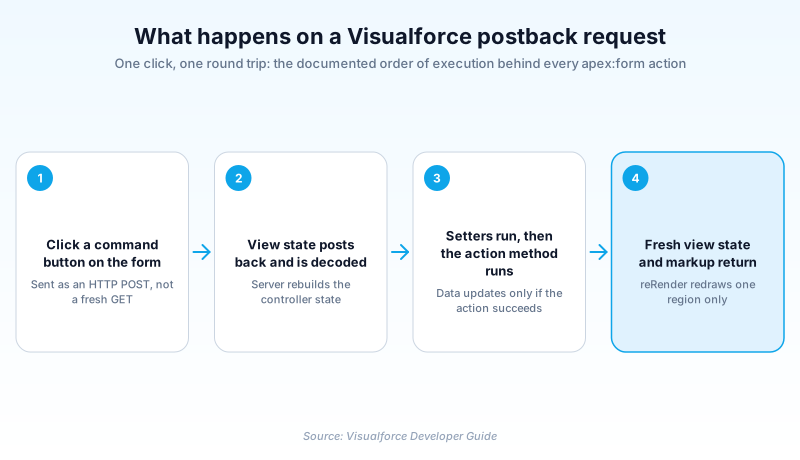
Say you have a Visualforce page that edits an Opportunity. It uses apex:form, an apex:inputField bound to Amount, another bound to StageName, and an apex:commandButton whose action is {!save}. A user opens the page, which is a get request: the constructor runs, the record is queried, and 250000 appears in the Amount field. The user changes Amount to 310000, sets StageName to Negotiation/Review, and clicks Save. That click is the postback. The browser posts the hidden view state field along with the two new values. The server decodes the view state, runs the setters so Amount becomes 310000, then executes save(). A fresh view state and the redrawn page come back in the response.
How a Visualforce page talks to the server
Get request first, postback afterwards
Visualforce splits page traffic into two kinds of request, and which one you are in changes what runs. A get request is the first load, when someone types the URL or follows a link. Salesforce constructs the controller and any extensions, instantiates custom components, evaluates assignTo attributes and expressions, evaluates the action attribute on apex:page, and ships HTML. A postback happens later, on the already-loaded page, when a control asks the server to do something. The trap is that action attribute. It fires on the get and never again. Developers who put record initialization there and expect it to re-run after every Save click lose an afternoon to stale data. Per-click logic belongs in the action method the control actually calls.
View state is the memory a postback depends on
HTTP forgets everything between requests, so a postback needs somewhere to keep the page's memory. That is view state. Salesforce describes it as the state of components, field values, and the controller, stored as an encrypted string in a hidden form element. No form, no hidden field, which is why a page built purely from apex:outputText has nothing to send. What lands inside is broader than most people expect: every non-transient instance variable on the controller and its extensions, anything reachable from those variables, and the component tree. Decode it and the server has your multi-screen wizard exactly as the user left it, without a single record written to the database.
The four steps the server runs on every postback
The Visualforce Developer Guide spells out the sequence, and knowing it settles most arguments about why a value looks wrong. First the view state is decoded and used as the basis for updating the values on the page. Second, expressions are evaluated and the set methods on the controller and any controller extensions execute, including setters on custom component controllers. Third, the action that triggered the request runs, and if it completes successfully the data is updated. Fourth, the resulting HTML goes to the browser. The ordering has teeth. Setters land before your action, so save() can read what the user typed. Getters re-run during rendering, often more than once, so an expensive query inside one gets paid for repeatedly.
Where the 170 KB ceiling bites
View state is capped at 170 KB per page, and going over throws a size-exceeded error that stops the page dead. Staying under the cap is not the end of it either. Salesforce warns that a large view state costs longer processing on every request: serialization, deserialization, encryption and decryption, in both directions. The main lever is the transient keyword, which declares an instance variable that cannot be saved and is not transmitted as part of the view state. Some types are automatically transient regardless, including PageReference objects, XmlStream classes, JSONParser instances, and results from Schema.getGlobalDescribe. Static variables never travel either. Past that, query only the fields and rows you render, and re-run a cheap query rather than parking a fat collection on the controller.
What the action method hands back
An action method's return type is not decoration. Return null and the same page re-renders with its view state intact, which is what most Save buttons want. Return a PageReference and you are choosing between two different mechanisms. With setRedirect(false), the default, Visualforce does a server-side forward. That preserves the view state only if the target page uses the same controller and the proper subset of its extensions. With setRedirect(true) you get a client-side redirect, which the documentation describes as an HTTP GET that flushes the view state. That is the one people trip over. Redirect after a save and the next page starts clean, so anything you parked on the controller is gone. An external URL always redirects regardless of the setting.
What Lightning Web Components changed
Put the two models side by side and the difference is what crosses the wire. A postback ships the whole form plus an encrypted blob of controller state, and gets a page back. An LWC calls one Apex method with just its arguments, or asks a wire adapter for the record. Then it updates only the template nodes that depend on the answer. Nothing carries page state between requests, so there is no size ceiling to manage and no serialization cost per click. One is a page-sized round trip and the other is a method-sized one, which is most of why LWC screens feel quicker. None of this makes an existing postback page a problem to solve today. On a page that already works, fixing the postback in front of you usually beats arguing for a rewrite.
How organizations use Postback Request
keeps a ten-year-old Visualforce quoting wizard usable by marking its line-item preview list transient, which cuts the view state that every postback has to carry.
traces a sluggish grant-review page to a getter that fires a query on every render, and moves that query into the action method the postback invokes once.
swaps full-page reloads on a legacy case intake form for reRender panels, buying breathing room while the Lightning Web Components rebuild is scheduled.
Trust & references
Cross-checked against the following references.
- Order of Execution for Visualforce Page Postback Requests (opens in new tab)Salesforce
- Order of Execution for Visualforce Page Get Requests (opens in new tab)Salesforce
- Optimize the View State (opens in new tab)Salesforce
- Using the transient Keyword (opens in new tab)Salesforce
- setRedirect(redirect) (opens in new tab)Salesforce
Straight from the source - Salesforce's reference material on Postback Request.
Hands-on resources to go deeper on Postback Request.
About the Author
Dipojjal Chakrabarti is a B2C Solution Architect with 29 Salesforce certifications and over 13 years in the Salesforce ecosystem. He writes and edits salesforcedictionary.com, published by KineticBit Inc., to help admins, developers, architects, and cert/interview candidates sharpen their fundamentals. More about Dipojjal.
Test your knowledge
+5 pts / dayQ1. A Visualforce page has an action attribute on its apex:page tag that queries and initializes a record. A user clicks a command button bound to save(). What happens to that action attribute?
Q2. In the documented order of execution for a Visualforce postback request, what happens immediately after the view state is decoded?
Q3. A Visualforce page hits the maximum view state size error. Its controller holds a 5,000-row list used only to render a read-only table on the current request. What is the most direct fix?
Discussion
Loading discussion…