
Inline S-Control
An Inline S-Control is a deprecated Salesforce Classic feature that embedded custom HTML, JavaScript, or CSS into a section of a record detail page, rendering inside an iframe beside the standard fields.
Definition
An Inline S-Control is a deprecated Salesforce Classic feature that embedded custom HTML, JavaScript, or CSS into a section of a record detail page, rendering inside an iframe beside the standard fields. It was the one S-Control placement that put custom markup on the record itself, not behind a button or link.
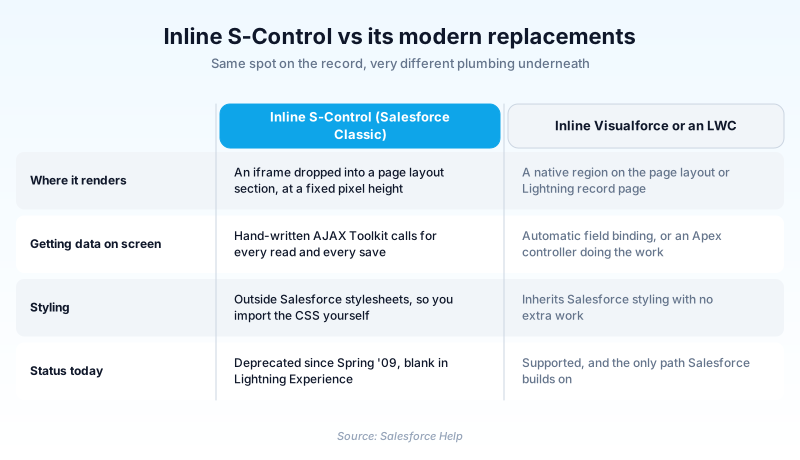
Visualforce pages supersede S-Controls. Salesforce labelled the family deprecated in Spring '09. Creation was blocked a year later, with Spring '10, and only for orgs that had never made one. The Metadata API still carries the Scontrol type, still marked Deprecated.
Existing S-Controls can still be viewed and edited in Salesforce Classic. Lightning Experience does not render them at all.
In plain English
“Picture a small window glued onto a form. Someone hand-wrote a tiny web page, and it showed up right there without any clicking. Salesforce stopped letting people build new ones years ago, and those still work only in the old interface.”
Worked example
A regional equipment dealer on Salesforce Classic has an inline S-Control in a section of the Account page layout named Service Coverage. The panel is 200 pixels tall and uses the AJAX Toolkit to count Case records where AccountId matches the current account and Status equals Escalated, then draws a red badge. When the dealer switches its service team to Lightning Experience, the Service Coverage section renders as empty white space with no error. The admin rebuilds the badge as a Lightning Web Component, drops it onto the Account record page in the Lightning App Builder, and deletes the S-Control from Setup.
From deprecation notice to an empty layout section
What the inline placement actually did
Salesforce stored your markup and served it back inside an iframe on the record detail page. You chose the section and set a pixel height. Inside the frame, JavaScript called the AJAX Toolkit for every read and every save, because nothing bound to a field on its own. The frame sat outside Salesforce stylesheets, so matching the surrounding page meant hand-imported CSS.
Deprecated, not deleted
Deprecated at Salesforce means frozen, not deleted. The Metadata API has exposed the Scontrol type since API version 10.0, and the Tooling API returns Scontrol records, so the metadata stays readable over the API. No removal date has been announced. Whatever ran in 2008 still runs.
Lightning Experience is the real end date
For any given org the feature dies the day Lightning Experience goes on. The Setup node is Classic only, so an admin who works entirely in Lightning never turns up S-Controls under Quick Find, and the family vanishes from the org audit. Migration is a rewrite, not a move.
The two replacement paths
The quickest swap is an inline Visualforce area on the same layout. Visualforce generates markup on the platform and binds inputs to fields. It inherits Salesforce styling, and a save that breaks a uniqueness or required-field rule errors on its own. An s-control raised it only if you coded the check. The durable answer is a Lightning Web Component on a Lightning record page, built in the Lightning App Builder.
Trust & references
Cross-checked against the following references.
- S-Control Deprecation (opens in new tab)Salesforce Developers
- About S-Controls (opens in new tab)Salesforce
- How Do Visualforce Pages Compare to S-Controls? (opens in new tab)Salesforce
- Scontrol (Metadata API Developer Guide) (opens in new tab)Salesforce
- View and Edit S-Controls (opens in new tab)Salesforce
Straight from the source - Salesforce's reference material on Inline S-Control.
Hands-on resources to go deeper on Inline S-Control.
About the Author
Dipojjal Chakrabarti is a B2C Solution Architect with 29 Salesforce certifications and over 13 years in the Salesforce ecosystem. He writes and edits salesforcedictionary.com, published by KineticBit Inc., to help admins, developers, architects, and cert/interview candidates sharpen their fundamentals. More about Dipojjal.
Test your knowledge
+5 pts / dayQ1. Where did an Inline S-Control appear to the user?
Q2. In which release did Salesforce label S-Controls as deprecated?
Q3. An org with working inline S-Controls switches its users to Lightning Experience. What happens to those layout sections?
Discussion
Loading discussion…