
HTML S-Control
An HTML S-Control is a deprecated Salesforce feature that stored raw HTML, JavaScript, and CSS on the platform and rendered it inside a Salesforce Classic page.
Definition
An HTML S-Control is a deprecated Salesforce feature that stored raw HTML, JavaScript, and CSS on the platform and rendered it inside a Salesforce Classic page. It was the original way to put custom code into the Salesforce user interface, years before Visualforce existed.
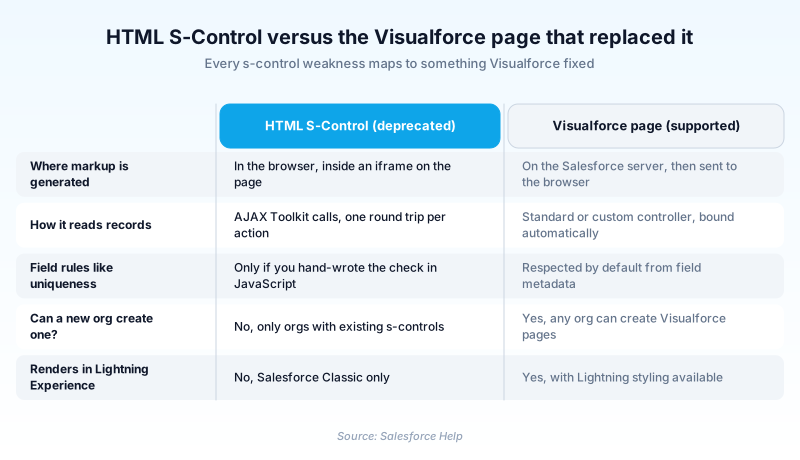
The content ran in the browser inside an iframe. To read or write records, its JavaScript called back through the AJAX Toolkit, a wrapper over the SOAP API, so every interaction cost a round trip.
Visualforce superseded it. The Metadata API still lists the Scontrol type as deprecated, and no org without an existing s-control can make one. Old controls remain editable, but they render in Salesforce Classic only and are invisible in Lightning Experience.
In plain English
“Picture a small web page taped into a window on a bigger web page. It could show whatever you wanted, but it had to ask the bigger page for every piece of information. Salesforce built a proper replacement and stopped handing out new ones.”
Worked example
A regional insurance brokerage built an HTML S-Control in 2007 called AccountRiskPanel. It sat in a section on the Account detail page, read Type and BillingState through the AJAX Toolkit, and drew a color-coded risk badge. It worked in Salesforce Classic for a decade. When the admin moved 40 users to Lightning Experience, the panel vanished, because s-controls do not render there. The rewrite was not a port: the AJAX Toolkit calls became an Apex method, and the badge became a Lightning Web Component placed on the Account record page.
How s-controls worked, and why Visualforce replaced them
The first way to change the Salesforce UI
Salesforce shipped with a fixed interface and no framework for extending it, and the s-control filled that hole. Its contentSource was HTML for pasted-in markup, URL for an external page, or Snippet for code reused inside other s-controls. Admins wired them to custom buttons, custom links, page sections, and web tabs.
Everything happened in the browser
An s-control had no server-side rendering on the platform, and Salesforce documentation is blunt about the cost: every call to the API required a round trip to the server. There was no component library and no data binding, and nothing inherited Salesforce styling. Field uniqueness was your problem to enforce.
Merge fields in, Apex out of reach
Merge fields were the platform's one convenience. Salesforce substituted them into the markup before the browser saw it, so the code could hand a billing address to a mapping API. Calling Apex was another matter: the Visualforce guide calls that path indirect, through webService methods over the API. A Visualforce page binds to a custom controller instead.
Finding every place one is wired in
Retiring one is an inventory job first. The same s-control can be attached to a button, a page layout section, and an email template at once. Setup has no combined list, but it does have a shortcut: open the s-control and click Where is this used?
Trust & references
Cross-checked against the following references.
Straight from the source - Salesforce's reference material on HTML S-Control.
Hands-on resources to go deeper on HTML S-Control.
About the Author
Dipojjal Chakrabarti is a B2C Solution Architect with 29 Salesforce certifications and over 13 years in the Salesforce ecosystem. He writes and edits salesforcedictionary.com, published by KineticBit Inc., to help admins, developers, architects, and cert/interview candidates sharpen their fundamentals. More about Dipojjal.
Test your knowledge
+5 pts / dayQ1. Why does an HTML S-Control stop working when a user switches to Lightning Experience?
Q2. An org has never created an s-control. What can its admin do with the feature today?
Q3. What is the recommended target when rewriting an interactive HTML S-Control today?
Discussion
Loading discussion…