
Ant Migration Tool
The Ant Migration Tool is a retired Java and Apache Ant command-line utility that moved Salesforce metadata between a local directory and an org over the Metadata API.
Definition
The Ant Migration Tool is a retired Java and Apache Ant command-line utility that moved Salesforce metadata between a local directory and an org over the Metadata API. Salesforce retired it with the Spring '24 release and pointed everyone at Salesforce CLI instead.
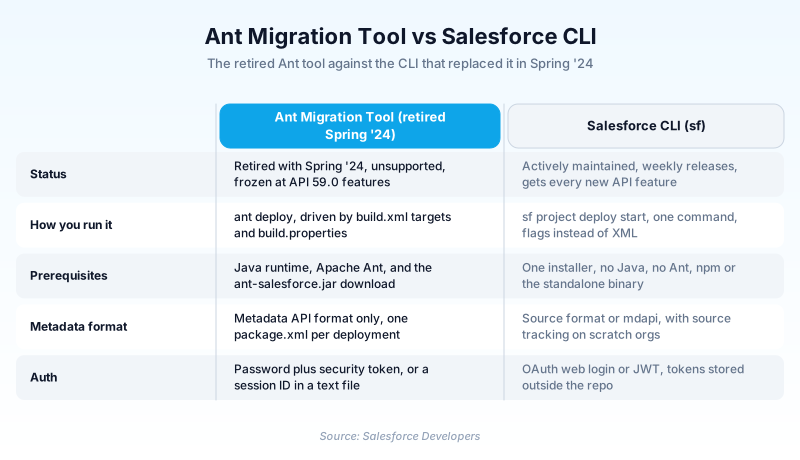
Retired does not mean switched off. The JAR still runs and still deploys, but Salesforce no longer updates it, supports it, or guarantees it keeps working. Anything added to the Metadata API after version 59.0, new metadata types included, is out of its reach.
Treat an ant deploy call in a live build script as debt with a due date.
In plain English
“Think of an old moving van a company once used to haul furniture between two houses. The company stopped servicing it and stopped making parts. It still starts in the morning. But nobody is coming to fix it when it dies.”
Worked example
A regional insurance carrier still deploys to production through a build.xml target called deployProd. It calls sf:deploy with deployRoot set to src, checkOnly set to false, and testLevel set to RunLocalTests. Credentials sit in build.properties: sf.username, sf.password with a 25-character security token appended, and sf.serverurl pointing at https://login.salesforce.com. In March the team lists a metadata type that shipped after API version 59.0 in package.xml, and the retrieve comes back without it. Nothing is wrong with the org. The tool just does not know the type exists.
What the tool did, and what retirement actually changed
How a build.xml deployment worked
The tool shipped as one JAR, ant-salesforce.jar, wired into build.xml with a taskdef pointing at antlib:com.salesforce. That gave you sf:retrieve, sf:deploy, sf:listMetadata, and sf:describeMetadata. A retrieve target set retrieveTarget to a local folder and aimed unpackaged at a package.xml manifest. A deploy target set deployRoot or zipFile, and Salesforce applied the payload as one transaction. checkOnly validated without saving. testLevel chose between NoTestRun, RunSpecifiedTests, RunLocalTests, and RunAllTestsInOrg. rollbackOnError defaulted to true, so one bad component took the whole deploy back out.
Why the credentials aged worse than the tool
Ant authentication is the strongest argument for porting. The documented options are a username and password with a security token appended, a session ID, or an OAuth access token, all read from build.properties. No browser login, no built-in JWT grant. In practice that meant a plaintext password in a file someone eventually committed, or a session ID that expired mid-release. Salesforce CLI covers both cases with sf org login web for people and sf org login jwt for pipelines, and the secret stays out of the repository.
Porting an Ant target to Salesforce CLI
The mapping is close to one for one. sf:retrieve becomes sf project retrieve start --manifest package.xml. sf:deploy becomes sf project deploy start, with --dry-run standing in for checkOnly and --test-level carrying the same four values. A validated deploy lands later through sf project deploy quick. Your package.xml keeps working untouched, so the manifest is never the hard part. The awkward bits are the Ant conditionals and property substitutions wrapped around the tasks, plus whatever your CI server does with the Java classpath. Budget hours, not weeks.
Trust & references
Cross-checked against the following references.
- Ant Migration Tool | Ant Migration Tool Guide (opens in new tab)Salesforce
- Moving on from the Ant Migration Tool to sf CLI (v2) (opens in new tab)Salesforce
- Deploying Changes to a Salesforce Org | Ant Migration Tool Guide (opens in new tab)Salesforce
- Entering Salesforce Connection Information | Ant Migration Tool Guide (opens in new tab)Salesforce
- Creating Retrieve Targets | Ant Migration Tool Guide (opens in new tab)Salesforce
Straight from the source - Salesforce's reference material on Ant Migration Tool.
Hands-on resources to go deeper on Ant Migration Tool.
About the Author
Dipojjal Chakrabarti is a B2C Solution Architect with 29 Salesforce certifications and over 13 years in the Salesforce ecosystem. He writes and edits salesforcedictionary.com, published by KineticBit Inc., to help admins, developers, architects, and cert/interview candidates sharpen their fundamentals. More about Dipojjal.
Test your knowledge
+5 pts / dayQ1. In which Salesforce release was the Ant Migration Tool retired?
Q2. A build.xml deploy target sets rollbackOnError to false so one bad component cannot sink the release. What happens when that target points at production?
Q3. Which Salesforce CLI command is the closest replacement for an sf:deploy task driven by a package.xml manifest?
Discussion
Loading discussion…