
Agentforce Assets
Agentforce Assets are the reusable subagents and actions that Salesforce keeps in a shared library and that you attach to an agent.
Definition
Agentforce Assets are the reusable subagents and actions that Salesforce keeps in a shared library and that you attach to an agent. The name is also a literal Setup page. Search Agentforce Assets in Quick Find and you land on two tabs, Subagents and Actions.
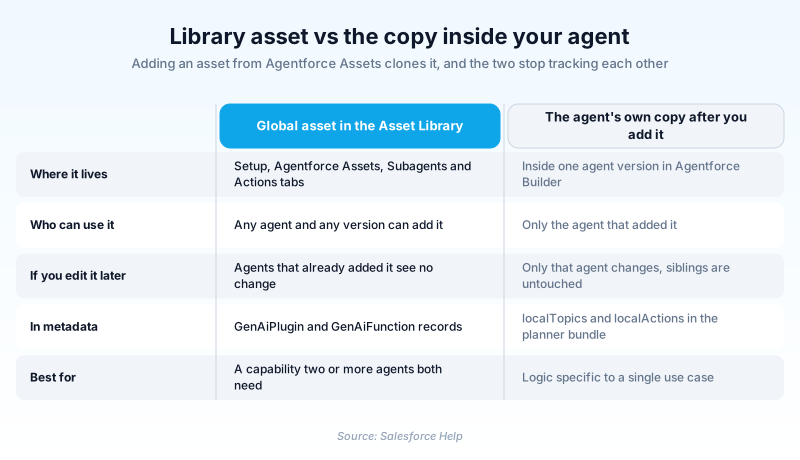
An asset is a template, not a live link. When an agent adds one, it takes its own independent copy. Editing the library version later changes nothing inside agents that already pulled it, and editing one agent's copy leaves every other agent alone.
Assets differ by origin. Standard assets ship with Agentforce and cover common ground like querying records or answering knowledge questions. Custom assets are the ones you build, either in the library so several agents can use them, or inside a single agent so only that agent sees them.
In plain English
“Picture a library of recipe cards. When you hand a cook a card, they get their own photocopy to scribble on. Fixing the card back in the library does nothing to the copy the cook already took. Agentforce Assets is that library, and the cooks are your agents.”
Worked example
A regional HVAC distributor builds an order status agent. In Setup they open Agentforce Assets, switch to the Actions tab, and create a custom action named Get_Order_Status that wraps an autolaunched flow taking Order_Number__c and returning Status and Promised_Date. Because they built it in the library rather than inside one agent, both the Customer Service Agent and the Field Tech Agent can add it. Two weeks later a developer widens the flow to also return Carrier_Tracking__c and updates the library action. Neither agent picks up the change. Each holds a copy taken at the moment it was added, so the team has to open both agents and re-add the action before customers ever see a tracking number.
What the asset library does, and where builders get caught out
Two tabs, and a Setup page that changed its name
Search Agentforce Assets in Setup Quick Find and you get two tabs, Subagents first and Actions second. The page was called Agent Actions until Salesforce rewrote its Setup labels to lead with Agentforce. Nothing about the feature moved, only the label and the search term you type. The second naming shift matters more. What the product called a Topic is now a Subagent. Help articles that still say Topic are generally filed under legacy builder documentation, and the old word survives in the metadata. If you learned Agentforce in 2024 or 2025, expect to translate as you read.
Adding an asset copies it, and the copy never phones home
The copy is a design choice, not an oversight Salesforce will fix later. A shared runtime link would let one instruction tweak in the library silently alter every agent in the org, with no review step in between. You give up central updates and get a predictable blast radius instead. The cost lands on you as bookkeeping. Nothing in the interface flags an agent holding a stale duplicate, and there is no update-available badge to click. So one library fix becomes a fan-out task: work out who took the thing, open each agent, add it again. Name library assets so you can search for them later, and keep your own note of who holds what, because the platform will not keep it for you.
Standard assets and the reference that lists them
Salesforce ships a large set of ready-made subagents and actions, and the Agentforce Standard Asset Reference in Help is the index. It is organised by product area: Agentforce Platform, Field Service, B2B Commerce, Communications, Education Cloud, IT Service, Automotive and more. Trailhead's employee-agent quick start is where most people first meet General CRM, the subagent that arrives with its action list already attached. Read the reference before you build anything. A surprising amount of what teams hand-roll already exists, particularly around record queries, knowledge retrieval and case handling.
Where you create an asset decides who can use it
You have two places to author a custom action or subagent, and the choice is not cosmetic. Build it on the Agentforce Assets page and it becomes a global asset, addable to any agent and any version. Build it inside one agent in Agentforce Builder and it stays local to that agent. Local suits logic genuinely specific to a single case, and it keeps the library from filling with one-offs. Global suits a capability two teams both need. A global asset can also be cloned down to a local one later, so you can diverge without disturbing the original.
Metadata, and the deployment order that trips teams up
Spring '26 reorganised how agents are stored, and package.xml now needs API version 66.0 or later. You will meet Bot for agent-level information shared across versions, BotVersion for conversation variables and welcome messages, GenAiPlannerBundle for a published version's runtime configuration, and AiAuthoringBundle for design-time artifacts. Inside a planner bundle, localTopics blocks describe each subagent and localActions blocks describe its cloned actions. Note the vocabulary lag there. Agents can now be reviewed as human-readable .agent scripts rather than sprawling XML, which makes pull requests survivable. The usual deployment failure is ordering: a planner bundle referencing library actions fails when those actions are missing from the target org.
How to work with the Agentforce Assets page
The page has no enablement switch of its own. Agentforce has to be on first, and Agentforce Assets is simply where the reusable building blocks live afterwards.
- Open the Agentforce Assets page
From Setup, enter Agentforce Assets in the Quick Find box and select it. It opens on the Subagents tab, with Actions beside it.
- Read the standard assets first
Open whatever sits closest to your use case and check its classification description, scope, instructions and attached actions. Half the custom work teams plan turns out to be redundant.
- Create the custom asset in the library
Build it here rather than inside one agent when two or more agents will need it. Write the action description for the reasoning engine, because that text decides whether the action gets invoked at all.
- Add it to an agent, then preview the routing
Adding the asset in Agentforce Builder copies it immediately, so treat that click as a snapshot. Preview real utterances and confirm your subagent wins over any standard one covering similar ground.
Global on the Agentforce Assets page and addable anywhere, or local to one agent in Agentforce Builder.
A standard Salesforce asset for common patterns, or a custom one when the standard cannot reach your data.
A flow for declarative work, Apex where a flow cannot express it, or a prompt template for generative output.
- Editing a library asset feels like it should update the agents using it. It does not, and nothing warns you the two have drifted.
- Older docs say Topic where the interface says Subagent, and the metadata kept the old word in localTopics and pluginType.
- A vague action description produces a well-built action the agent never calls. Describe the trigger conditions, not the implementation.
Prefer this walkthrough as its own page? How to Agentforce Assets in Salesforce, step by step
How organizations use Agentforce Assets
Publishes one Verify Policy Status action in the library so its claims, renewals and broker-facing agents all start from the same definition.
Uses the standard Education Cloud subagents untouched, and builds custom assets only where its student information system needs a lookup nothing standard covers.
Keeps agent assets in Git as .agent scripts and planner bundles, so instruction changes get reviewed in a pull request before production.
Trust & references
Cross-checked against the following references.
- Agent Actions (opens in new tab)Salesforce
- Add an Action to a Subagent from the Asset Library (opens in new tab)Salesforce
- The New Agentforce Metadata and Development Lifecycle (opens in new tab)Salesforce
- Deployment Errors When Deploying GenAiPlannerBundles Referencing Agentforce Asset Library Actions (opens in new tab)Salesforce
Straight from the source - Salesforce's reference material on Agentforce Assets.
Hands-on resources to go deeper on Agentforce Assets.
About the Author
Dipojjal Chakrabarti is a B2C Solution Architect with 29 Salesforce certifications and over 13 years in the Salesforce ecosystem. He writes and edits salesforcedictionary.com, published by KineticBit Inc., to help admins, developers, architects, and cert/interview candidates sharpen their fundamentals. More about Dipojjal.
Test your knowledge
+5 pts / dayQ1. What happens when you add an action from the Agentforce Asset Library to an agent?
Q2. In current Agentforce documentation and UI, what is a Topic now called?
Q3. You need one custom action available to three different agents. Where should you create it?
Discussion
Loading discussion…