
Action Strategy
An Action Strategy is the decision logic that picks which Recommendation records the Einstein Next Best Action component shows a user on a given page.
Definition
An Action Strategy is the decision logic that picks which Recommendation records the Einstein Next Best Action component shows a user on a given page. It starts from the current context: the record being viewed and the running user. From there it runs candidate recommendations through load, filter, branch, map and sort steps. What comes out is a short ranked list.
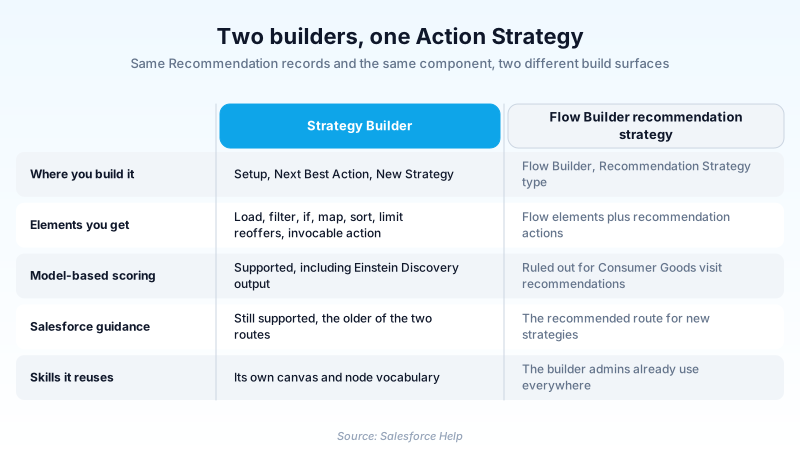
Salesforce documentation more often calls the same artifact a recommendation strategy, and there are two places to build one. Strategy Builder has its own canvas, reached from Setup by searching Next Best Action. Flow Builder builds the equivalent as a flow of type Recommendation Strategy, available since API version 54.0. Salesforce points new work there.
The strategy is only the deciding half. The Recommendation object holds the actual offers, each pointing at a flow, quick action or URL that fires when a user accepts it. No Recommendation records means no output, however clever the logic above them.
In plain English
“Think of a vending machine that only lights up the snacks you can afford and actually like. The snacks are already loaded in the machine. The strategy is the small set of rules deciding which ones light up for you, and in what order. Two people at the same machine can see different top picks.”
Worked example
A regional credit union puts the Einstein Next Best Action component on the Person Account record page and points it at a strategy called Retail_Cross_Sell. The strategy loads every active Recommendation, then narrows. Age__c of 55 or higher keeps the Schedule Retirement Review card. Total_Deposits__c above 25000 keeps the Certificate of Deposit offer, and a branch drops both when the account has an open complaint Case. A sort on Priority__c puts the retirement review first, and a Limit Reoffers element stops a declined card returning tomorrow. When the banker clicks Accept, the Action Reference on that Recommendation launches a screen flow that books the appointment and logs a Task.
How a strategy turns a pile of Recommendations into three cards
What the strategy gets handed at runtime
The strategy fires while the record page renders, and it starts with very little: the record underneath it and the user looking at it. Everything else you fetch yourself. If the decision depends on the account's open cases, or a score on another object, some element has to go and get it. That is the first performance trap: the work lands inside the user's wait for the page to paint.
The element vocabulary, and what each one is for
Strategy Builder ships a small fixed set of elements. The Metadata API lists them as recommendationLoad, filter, if, map, sort, recommendationLimit, invocableAction, union, mutuallyExclusive and actionContext. Load pulls candidates. Filter drops anything failing an expression. If splits the canvas so different audiences take different paths. Map rewrites a candidate's field values in transit, so one record renders as different copy for different people. Sort orders what survives. Then recommendationLimit, labelled Limit Reoffers in the canvas: it caps how often the same recommendation reappears, not how many cards come back.
The same decision, rebuilt as a flow
Since API version 54.0, Recommendation Strategy has been a flow process type, so the whole decision can live in Flow Builder. API 55.0 added limitRepetitions, the flow equivalent of Limit Reoffers. The real difference is versioning: a strategy flow carries flow versions, so you activate one and keep the last good one to fall back to. Strategy Builder has no equivalent, so a bad edit is undone by hand.
The Recommendation object is the menu, not the waiter
Recommendations are ordinary records. Each carries the name and description a user reads, an optional image, and an Action Reference pointing at whatever runs when the card is accepted. Without that reference the card is a nice sentence nobody can act on. What a user does with the card lands on a second object, RecommendationResponse, available from API version 51.0. That is what reporting reads later.
The model-based exception, and how far it actually reaches
The Flow Builder advice carries one documented exception, narrower than it usually gets repeated. A Trailhead unit on Consumer Goods Cloud visit recommendations says only a Next Best Action strategy can do model-based ones, not a flow. Salesforce scopes that to visit recommendations and has not published the same rule platform-wide. A model writes predictions onto rows in an insights object, and the strategy maps the score onto what it returns.
Wiring it up, then proving it works
The Einstein Next Best Action component is what asks a strategy for output, dropped onto a Lightning record page or an Experience Builder site page. It asks which strategy to run and which builder produced it, which is how both routes coexist. After launch, build a custom report type over the recommendation metrics and watch accepts against impressions from week one. That number separates a strategy that is running from one that is working. In Setup they look identical.
Build and ship an Action Strategy
These steps follow the Strategy Builder route. The Flow Builder route replaces steps two through four with a flow of type Recommendation Strategy.
- Create the Recommendation records first
Nothing renders until the menu exists. Each needs a name, the description a user actually reads, and an Action Reference pointing at what runs on accept.
- Open Strategy Builder and start a strategy
From Setup, enter Next Best Action in the Quick Find box, select Next Best Action, then click New Strategy. Choose an API name you can live with, since the component references it.
- Load, then narrow immediately
Add a load element to pull candidates, and put your cheapest, most selective filter directly after it. Everything downstream runs against whatever survives.
- Branch for audiences, then rank and suppress repeats
Use an if element to send segments down separate paths, then sort on the field that expresses priority. Add a Limit Reoffers element so an ignored card stops arriving every morning.
- Add the component and point it at the strategy
In Lightning App Builder, drag the Einstein Next Best Action component onto the record page, select your strategy, and tell it which builder produced it.
- Test against a record that should not match
Preview with one record that qualifies and one that clearly does not. Confirm the second returns nothing rather than everything, because an over-broad filter is the failure that ships quietly.
Flow Builder with the Recommendation Strategy flow type for new work, Strategy Builder when model-based scoring is involved.
The standard Recommendation object, or a custom object where a package defines its own recommendation records.
A Lightning record page for internal users, or an Experience Builder site page for customers and partners.
A static priority field for rule-based strategies, or a model-written score for predictive ones.
- An empty component is the default failure mode. When a filter drops every candidate there is no error, so everyone assumes the feature was never switched on.
- A callout buried in an invocable action runs inside page load, so a slow external system becomes a slow record page.
- A saved strategy is not automatically the live one. Confirm the component points at the version you just edited before calling the change shipped.
Prefer this walkthrough as its own page? How to Action Strategy in Salesforce, step by step
How organizations use Action Strategy
Surfaces deposit and retirement offers on Person Account pages, banded by balance and suppressed while a complaint case is open.
Shows contract renewals and spare part bundles on the Account page, ranked by a churn score written onto the record nightly.
Prompts fundraisers with the next stewardship step on Contact pages, with branches for major, recurring and lapsed donors.
Trust & references
Cross-checked against the following references.
- RecommendationStrategy Metadata Type (opens in new tab)Salesforce
- Flow Metadata Type, including the RecommendationStrategy process type (opens in new tab)Salesforce
- Strategy Builder Limit Reoffers Element (opens in new tab)Salesforce
- Recommendation Object Reference (opens in new tab)Salesforce
- RecommendationResponse Object Reference (opens in new tab)Salesforce
- Set Up Model-Based Visit Recommendations Using Einstein Discovery (opens in new tab)Salesforce
Straight from the source - Salesforce's reference material on Action Strategy.
Hands-on resources to go deeper on Action Strategy.
About the Author
Dipojjal Chakrabarti is a B2C Solution Architect with 29 Salesforce certifications and over 13 years in the Salesforce ecosystem. He writes and edits salesforcedictionary.com, published by KineticBit Inc., to help admins, developers, architects, and cert/interview candidates sharpen their fundamentals. More about Dipojjal.
Test your knowledge
+5 pts / dayQ1. Which builder does Salesforce recommend for new recommendation strategies?
Q2. A strategy runs without errors but the Next Best Action component renders empty. What is the most likely cause?
Q3. Salesforce's Consumer Goods Cloud guidance rules out a flow for one job. Which one?
Discussion
Loading discussion…