
Salesforce CLI Breaks CI/CD on May 27
Salesforce is redacting access tokens, passwords, and SFDX Auth URLs from 11 standard CLI commands starting May 27. CI/CD pipelines that pull credentials from sf org display will break. Here is what to fix and how long you have.

Your deployment pipeline runs sf org display at step 3 to grab the access token, pipes it into a curl call against the Tooling API at step 4, then runs Apex tests at step 5. On May 27, the access token field in step 3 comes back empty. Step 4 fails with a 401. Your nightly regression suite stops running. That is the breaking change.
The Salesforce CLI team announced on May 20, 2026 that 11 standard commands will stop returning sensitive credentials in their output starting May 27. Access tokens, passwords, and SFDX Auth URLs are the three data types being removed (Salesforce CLI GitHub Issue #3560). The change went out for public comment on the same day, and the production rollout is four days away. Salesforce Ben covered the announcement the next day under the headline "Urgent Salesforce Security Update Will Break Your CI/CD Unless You Act Now" (Salesforce Ben, May 21, 2026).
If your pipeline scripts pull credentials out of the JSON returned by sf org display, sf org login web, or any of the nine other affected commands, those scripts will start failing on Wednesday. There is a temporary workaround, but it expires in Summer 2026. The real work is migrating to the new dedicated credential commands.
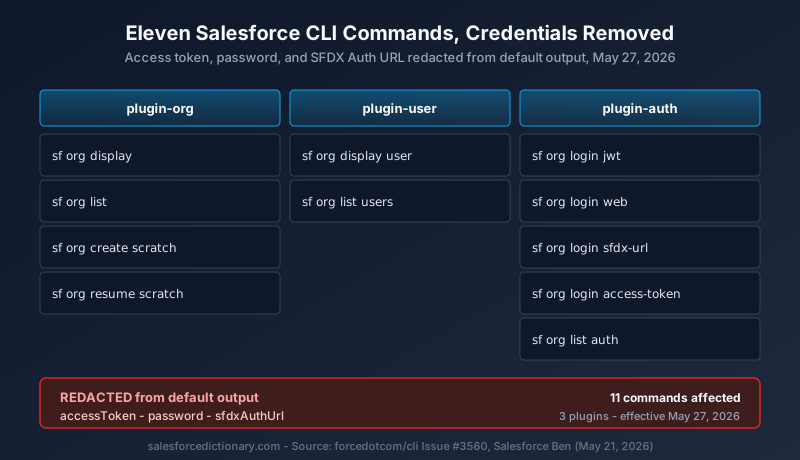
What is actually changing
Three sensitive data types are being removed from standard CLI output: the OAuth access token, the user password (where present), and the SFDX Auth URL. Today, running sf org display --target-org my-prod-org --json returns a JSON payload that includes an accessToken field with a live bearer token. After May 27, that field will be redacted in the default output. The same applies across the other ten commands.
The list of affected commands breaks down by plugin.
From plugin-org:
sf org displaysf org listsf org create scratchsf org resume scratch
From plugin-user:
sf org display usersf org list users
From plugin-auth:
sf org login jwtsf org login websf org login sfdx-urlsf org login access-tokensf org list auth
These eleven cover effectively every entry point a CI/CD pipeline or local developer script uses to read auth state out of the CLI. If a job authenticates to an org and then asks the CLI what the credentials look like, the answer changes on May 27.
The credentials themselves are not going anywhere. The CLI still stores them, still uses them on every subsequent command, and still keeps the org connection alive. What changes is whether the CLI hands them back to whoever asks. That distinction matters for the migration plan below.
Why Salesforce is doing this now
The framing in the GitHub issue and in Salesforce Ben's coverage points at AI coding agents, not human attackers. Mitch Spano from the Salesforce CLI team called out the specific risk on the issue thread: AI coding agents and automated copilots store execution logs in plain text by default. If an Agentforce-driven workflow or a GitHub Copilot Workspace task runs sf org display and prints the result, the access token gets written into the chat history, the agent log, and any downstream telemetry. That history is rarely encrypted, often replicated across services, and effectively impossible to scrub after the fact.
The shape of the threat has shifted. Five years ago, the question was whether a developer would paste a token into a Slack channel by accident. Today, the question is whether an autonomous agent will quietly store ten tokens an hour in a vector database that nobody is treating as a secrets store. The CLI's old behavior, returning the live token in plain text on every org display, was designed for a world where the human running the command was also the only consumer of the output. That world is gone.
The mitigation is to make the dangerous output opt-in, not opt-out. From May 27, you have to ask explicitly for a credential, and the command that asks is different from the command that does any other work. That gives security teams a single audit point: log all calls to the three new credential commands and you have a complete record of where tokens went.
The replacement commands
Three new dedicated commands ship in the same release. Each returns exactly one piece of sensitive data and nothing else.
sf org auth show-access-tokenreturns the OAuth access token.sf org auth show-sfdx-auth-urlreturns the SFDX Auth URL.sf org auth show-user-passwordreturns the scratch org user password.
Each accepts --target-org like the rest of the CLI. Each prompts for confirmation by default in interactive mode. For CI/CD use, you append --json to get a parseable payload, or --no-prompts to suppress the confirmation prompt entirely. Most pipeline scripts will want both flags together.
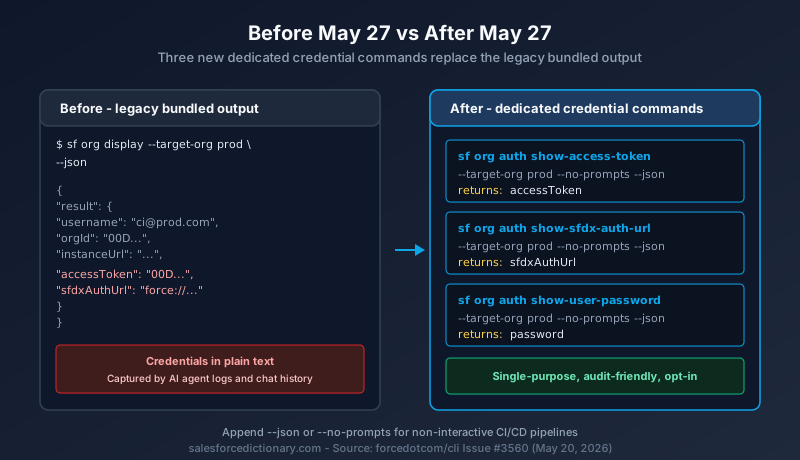
In practice, a pipeline step that today looks like this:
ACCESS_TOKEN=$(sf org display --target-org my-prod-org --json | jq -r '.result.accessToken')
becomes this:
ACCESS_TOKEN=$(sf org auth show-access-token --target-org my-prod-org --no-prompts --json | jq -r '.result.accessToken')
The structural difference is small. The semantic difference is large. The new command is single-purpose, easy to grep for in CI logs, and easy to gate behind a separate secrets-management policy. Security teams can require approvals on the credential commands without slowing down the dozens of other CLI calls that no longer return secrets.
The temporary workaround, and why you should not rely on it
Salesforce knows that four days is not enough time for every team to rewrite every pipeline. There is an escape hatch: set the environment variable SF_TEMP_SHOW_SECRETS=true and the old behavior comes back. Run the command, get the credentials in the response, ship the deployment.
The TEMP in the variable name is doing real work. Salesforce has committed to removing the flag in Summer 2026. The exact date has not been published, but the precedent across other CLI deprecations suggests a window of roughly twelve weeks. After that date, the variable is a no-op, and pipelines that still depend on it break the same way they would have broken on May 27.
Treat SF_TEMP_SHOW_SECRETS=true as a stopgap measured in days, not months. The right use of the flag is to ship a CI fix that unblocks a release on May 28 while the platform team writes the proper migration for the following sprint. The wrong use is to wire it into a Jenkins global config and forget about it until Q3.
The migration playbook
Five steps, in order.
Step 1: Inventory every place credentials get extracted. Grep across every CI configuration repository for the patterns sf org display, sfdx force:org:display, accessToken, sfdxAuthUrl, and any direct curl call that consumes CLI JSON. Add the legacy sfdx command equivalents to the search. Most organizations will find more matches than expected, including in shell aliases, ad-hoc developer scripts, and Slack-bot integrations that nobody owns.
Step 2: Classify each match. There are three categories. The first is pipeline scripts that genuinely need the access token (calls to the Tooling API, Bulk API, or any non-CLI HTTP endpoint). These need to migrate to sf org auth show-access-token. The second is scripts that need the auth URL for cross-environment authentication (typical for sandbox-to-CI handoff). These migrate to sf org auth show-sfdx-auth-url. The third is scripts that read the password (scratch org provisioning, automated test users). These migrate to sf org auth show-user-password. Anything that read the credential field for logging or debugging only is dead code and should be removed.
Step 3: Update the scripts. Replace the legacy command with the new credential command. Add --no-prompts for non-interactive runs. Keep --json if the script parses the response. Where the script was using sf org display for both connection metadata and the token, split it into two calls: one to sf org display for the metadata, one to sf org auth show-access-token for the token.
Step 4: Update the CLI version in your CI image. The new commands ship in the May 27 production release. Pipelines pinned to an older @salesforce/cli version will not have access to the replacement commands until they upgrade. Make the version bump part of the same change set as the script updates, so the rollback story is clean.
Step 5: Audit and log. Send the output of every credential command through your existing secrets-management telemetry. The new commands give you a clean single-purpose audit signal. Use it. Set up alerting on any unexpected invocation of sf org auth show-* outside of approved pipelines.
Timeline
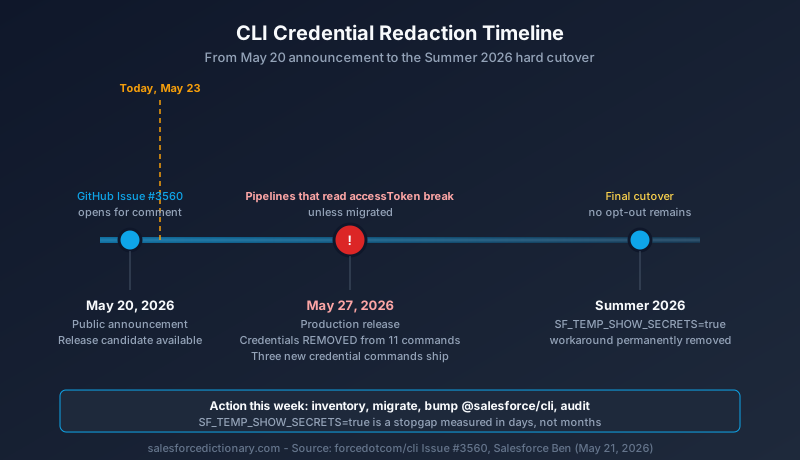
May 20, 2026: Public announcement. Release candidate available for testing.
May 27, 2026: Production release. Credentials removed from the 11 standard commands. The three new credential commands ship in the same release.
Summer 2026: The SF_TEMP_SHOW_SECRETS=true workaround is permanently removed. Date to be confirmed by Salesforce.
May 27 is also the production rollout date for Salesforce's step-up authentication on reports, covered in a separate Salesforce Dictionary article. And May 27 is when Salesforce holds its Q1 FY27 earnings call. Three substantial platform events on one Wednesday. The CLI change is the one that hits developer and DevOps teams directly. The other two are admin-facing and investor-facing.
What this does not change
A few things worth being precise about, since the rumor mill around breaking changes tends to expand the scope.
The CLI still authenticates the same way. sf org login web, sf org login jwt, and the other login commands still complete the same OAuth flows they always did. The CLI still stores credentials in the same encrypted local file. The change is purely about what those commands print when they finish, not about how authentication works.
Existing access tokens are not being invalidated. If your pipeline picked up a token last week and cached it, that token continues to work until it naturally expires. The redaction applies to future invocations of the affected commands.
Direct OAuth flows outside the CLI are unaffected. If you use a connected app with a JWT bearer flow handled entirely by your CI runtime (no CLI involved), nothing about the May 27 change touches that path.
And the standard non-credential output of every command stays the same. sf org display still returns org ID, instance URL, alias, username, API version, and the rest of the metadata. Only the three sensitive fields are being removed.
What to do this week
Tuesday: inventory every credential-extraction call in every CI repository. Open a tracking ticket per pipeline.
Wednesday: write the migration for the highest-traffic pipelines first. A production deployment pipeline that runs five times a day deserves more attention than a quarterly compliance script.
Thursday: test the new commands against a sandbox using the release candidate build. Confirm --json and --no-prompts behave as expected for non-interactive use.
Friday or Monday: roll the changes into the CI image and bump the @salesforce/cli version. Leave SF_TEMP_SHOW_SECRETS=true configured as a fallback only on pipelines you have not yet migrated, and put a calendar reminder for July to remove the flag.
Tuesday May 26: dry-run every pipeline against the release-candidate CLI to confirm nothing else regresses.
Wednesday May 27: production release lands. Watch the dashboards.
If you read one source on this beyond the GitHub issue itself, read the Salesforce Ben writeup (Urgent Salesforce Security Update Will Break Your CI/CD Unless You Act Now). It has the clearest practitioner framing of the change and a working before/after script comparison.
The broader context here is that Salesforce is treating agentic AI coding tools as a first-class threat model. Hosted MCP servers went GA in April 2026 (Salesforce Developers Blog). Agentforce-driven workflows now write production data on a daily basis. The CLI is the most direct surface where an AI agent can capture a long-lived bearer token, and Salesforce is closing that hole before the install base of agent-driven pipelines gets any bigger. Expect more changes of this shape over the next twelve months: opt-in credential exposure, narrower default scopes, and tighter audit logging on anything an AI tool can call.
The next step, if you have not already started, is to open your CI repositories and grep for sf org display. The migration is mechanical. The deadline is not.
About the Author
Dipojjal Chakrabarti is a B2C Solution Architect with 29 Salesforce certifications and over 13 years in the Salesforce ecosystem. He writes and edits salesforcedictionary.com, published by KineticBit Inc., to help admins, developers, architects, and cert/interview candidates sharpen their fundamentals. More about Dipojjal.
Share this article
Sources
- Upcoming Breaking Changes: Enhancing CLI Credential Security (Salesforce CLI GitHub, Issue #3560)
- Urgent Salesforce Security Update Will Break Your CI/CD Unless You Act Now (Salesforce Ben, May 21, 2026)
- Salesforce Hosted MCP Servers Are Now Generally Available (Salesforce Developers Blog, April 2026)
Related dictionary terms
Practise it
Five questions on Salesforce certifications
Exam-style questions with an explanation after each one. No account needed, and your answers build a weak-topic map once you have one.
Comments
No comments yet. Start the conversation.
Sign in to share your take on this article. Your account works across every page.