
Partial Page
Partial Page is the Visualforce technique where a user action refreshes only a named region of a page instead of reloading the whole thing.
Definition
Partial Page is the Visualforce technique where a user action refreshes only a named region of a page instead of reloading the whole thing. You give the target region an id, then point a command button, link or action component at that id through the reRender attribute. When the server response comes back, only that component and its children are redrawn.
The technique rests on a small set of Visualforce AJAX tags: reRender on apex:commandButton and apex:commandLink, apex:actionSupport for DOM events, apex:actionFunction for calls out of JavaScript, and apex:actionRegion to scope what the server processes. Salesforce still ships and documents all of them, most recently in the Summer '26 Visualforce Developer Guide at API version 67.0.
Partial Page is the older option. Lightning Web Components solve the same problem with reactive properties and automatic template re-rendering, so nothing new should be built around reRender. The term still matters because a large amount of Visualforce is in production and someone has to keep it working.
In plain English
“Think of a web page as a whiteboard. Normally, changing one line means wiping the whole board and rewriting everything. A partial page update erases only the line you care about and rewrites just that. Whatever else you had written stays exactly where it was.”
Worked example
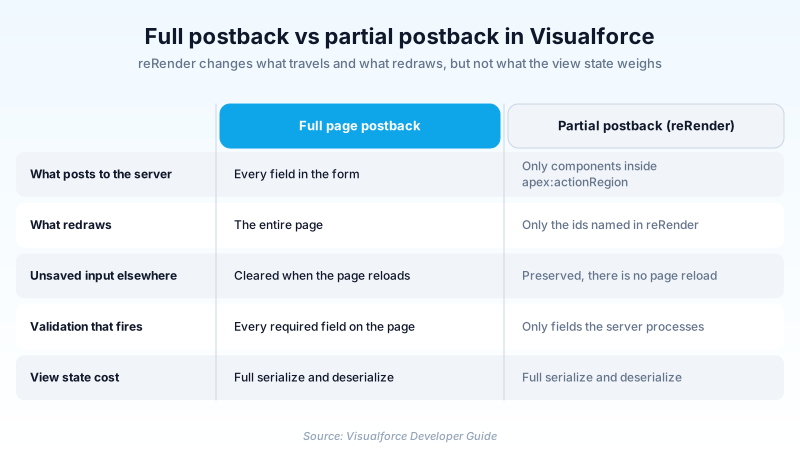
A field service company has a Visualforce page for logging site visits. The form holds an Account lookup, a Visit Type picklist, a long Notes textarea, and an equipment table underneath. When a technician sets Visit Type to Emergency Callout, two more fields need to appear: Response SLA and On-Site Contact. Without a partial update, changing the picklist posts the entire form, fires validation on every required field, and blanks the Notes text the technician already typed. The build instead wraps the picklist in apex:actionRegion, attaches apex:actionSupport with event set to onchange, and points reRender at the id of the outputPanel holding those two conditional fields. Only that panel redraws. The notes survive.
The mechanics of a Visualforce partial postback
reRender addresses component ids, not controller variables
The reRender attribute accepts a single component id, a comma-separated list of ids, or a merge expression that resolves to a collection of ids. Whatever it names gets redrawn with fresh server state and everything else is left alone. The usual pattern is to wrap the target in an apex:outputPanel with an explicit id, because a panel gives you a stable node to address. This is where most Visualforce frustration starts. Point reRender at an Apex variable name, or at an id living inside a component that was never rendered, and the controller method runs perfectly well on the server while the screen sits there looking broken.
apex:actionRegion controls what the server processes
reRender decides what comes back. apex:actionRegion decides what goes out. Salesforce defines it as an area that demarcates which components are processed by the server when an AJAX request is generated, and only the components inside the region body make that trip. The practical payoff is validation scope: a required field sitting outside the region is never processed, so it cannot block your small update with an error the user has no way to act on yet. The component also carries renderRegionOnly, which defaults to true and keeps everything outside the region out of the AJAX response. Set it to false when the response genuinely needs to touch a panel elsewhere on the page.
The four tags that can trigger one
apex:commandButton and apex:commandLink take reRender directly, which covers most Save and Refresh style controls. apex:actionSupport bolts AJAX onto a neighbouring component and fires on a DOM event such as onchange or onclick, which is how dependent picklists and conditional field reveals get built. apex:actionFunction declares a named JavaScript function that calls a controller method, for the cases where client-side code has to run first. One restriction catches people out: since API version 23, apex:actionFunction cannot sit inside an iteration component such as apex:pageBlockTable or apex:repeat. Declare it after the iteration and call it from a plain JavaScript function defined inside the loop.
What it does not fix
A partial postback still serializes and deserializes the entire view state, so it buys you no headroom against the 170 KB ceiling. If a page throws a view state error on save, the same page throws it on a two-field refresh. Those are separate repairs: mark controller variables transient when they only matter for the current request, trim SOQL down to the fields the page actually shows, paginate large collections, and use apex:outputText in place of apex:inputField for read-only data. There is also a flat limitation worth committing to memory, stated plainly in the documentation: you cannot use reRender to update content inside a table.
Getting off reRender without rebuilding the page
You do not have to rewrite a working page to stop extending its reRender chain. Salesforce documents a way in. Add apex:includeLightning at the top of the page, which pulls in the lightning.out.js library. Publish a Lightning Out app that extends ltng:outApp and names your component in an aura:dependency tag. Then call $Lightning.createComponent, passing the component name, its attributes, and the id of the DOM node to inject it into. That app has to live in the same org as the page, because the library loads from there. What you get is a boundary. The new section keeps its state in the browser and redraws itself, while the markup around it goes on posting back exactly as it did before. Retire the panel that keeps breaking, not the page.
How organizations use Partial Page
keeps a Visualforce quote builder from the Classic era running, using reRender on the line-item panel so that adding a product refreshes the totals block without discarding the discount justification the rep has already typed.
runs claim intake on a Visualforce page where setting Claim Type to Auto reveals the vehicle fields through apex:actionSupport, so agents only ever see the questions that apply to the claim in front of them.
Trust & references
Cross-checked against the following references.
- Implement Partial Page Updates with Command Links and Buttons (opens in new tab)Salesforce
- apex:actionRegion (opens in new tab)Salesforce
- apex:actionFunction (opens in new tab)Salesforce
- apex:actionSupport (opens in new tab)Salesforce
- Optimize the View State (opens in new tab)Salesforce
- Add a Lightning Web Component to a Visualforce Page (opens in new tab)Salesforce
Straight from the source - Salesforce's reference material on Partial Page.
- Use Ajax in a Page (opens in new tab)Salesforce
- apex:actionStatus (opens in new tab)Salesforce
Hands-on resources to go deeper on Partial Page.
About the Author
Dipojjal Chakrabarti is a B2C Solution Architect with 29 Salesforce certifications and over 13 years in the Salesforce ecosystem. He writes and edits salesforcedictionary.com, published by KineticBit Inc., to help admins, developers, architects, and cert/interview candidates sharpen their fundamentals. More about Dipojjal.
Test your knowledge
+5 pts / dayQ1. In a Visualforce partial page update, what does the reRender attribute actually name?
Q2. What is the main effect of wrapping form fields in apex:actionRegion?
Q3. Since API version 23, where can apex:actionFunction no longer be placed?
Discussion
Loading discussion…