
Invoice
An Invoice in Salesforce is a record that represents a billing document a company sends to a customer for products or services delivered.
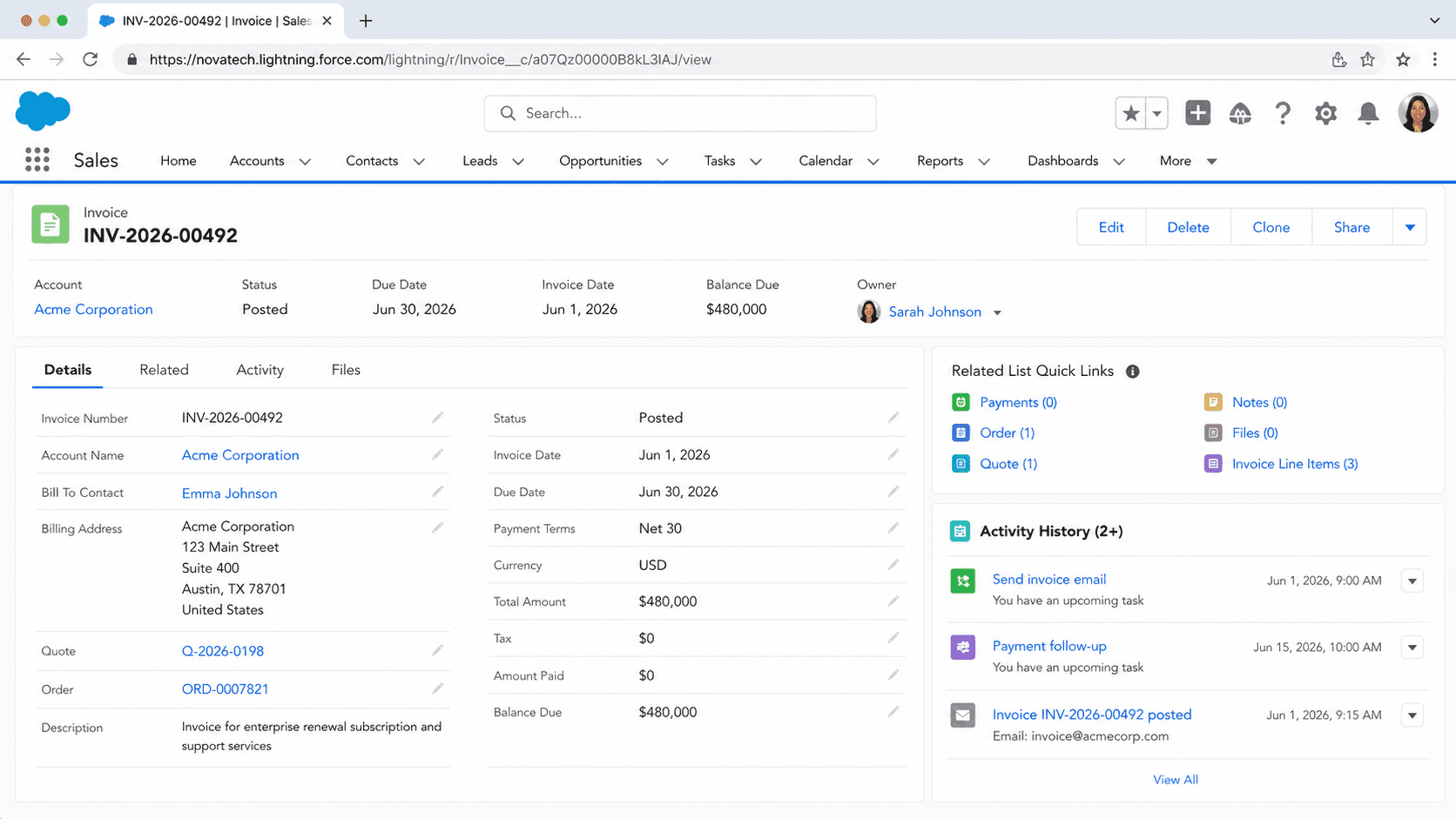
Definition
An Invoice in Salesforce is a record that represents a billing document a company sends to a customer for products or services delivered. It captures what the customer owes, when payment is due, and the line-by-line breakdown of charges. The standard Invoice object stores the invoice number, the billing account, the invoice date, the due date, the total amount, tax, and a status such as Draft or Posted. Each Invoice has child Invoice Line records, and each Invoice Line traces back to a source charge like an Order Product or a billing schedule.
The Invoice object is the native billing document in Revenue Cloud (the product line that absorbed the older Salesforce Billing package from the SteelBrick acquisition). It became a standard platform object available in API version 62.0 and later. Customers running Revenue Cloud generate invoices directly in Salesforce from activated orders. Many other orgs do not bill inside Salesforce at all. They integrate with an ERP or billing system such as NetSuite, SAP, or Stripe, then write the invoice and its payment status back into Salesforce so sales and service teams can see it.
How invoices get created and what they connect to
From a closed deal to a billing document
The usual chain starts with a won Opportunity. A Quote becomes an Order, often through the Generate Orders action in CPQ, and the Order is activated. Activation is the trigger that starts billing in Revenue Cloud. When an order activates, an invocable action runs and creates billing schedules for the order items by calling the billing APIs. Those billing schedules hold the total amount, the start and end dates for each product, the billing treatment, and the billing term unit. The schedules group into Billing Schedule Groups, and those groups become the raw material an invoice run turns into Invoices and Invoice Lines. The result is a clean trail from sale to bill: the Invoice points at the source Order, and each Invoice Line points at the Order Product it bills. That traceability is not a nicety. Finance and audit teams need to answer "why does this customer owe this amount" by walking back from the invoice to the order to the original quote. Breaking that chain, for example by hand-creating invoices that do not reference their source, creates reconciliation pain that surfaces months later at quarter close.
Manual invoices versus scheduled invoice runs
Salesforce gives you two ways to produce invoices. The first is manual. An admin or billing user invoices a single order on demand, useful for one-off charges, corrections, or a customer who asks for a bill early. The second is automated through an invoice scheduler. The scheduler kicks off an invoice run at a start time you set, then evaluates unbilled order products against criteria and creates an invoice with invoice lines for every matching product. The criteria matter. An order product is picked up when the order is activated with a matching invoice batch, when its Next Billing Date is on or before the run's Target Date, when Hold Billing is set to No, and when the processing status is Pending Billing. Schedulers run Daily, Weekly, Monthly, or Once, which lets a subscription business bill on the first of every month without anyone touching a record. The catch is that an invoice run updates several fields on the order products it touches, like billed amounts and next billing dates. That is why teams test invoice automation in a sandbox before trusting it in production, since a misconfigured run can bill the wrong period or skip products entirely.
The invoice status lifecycle
An Invoice moves through a defined set of statuses, and downstream automation usually hangs off those transitions. Draft means billing has not yet calculated the field values for the invoice or its lines. Initiated means the calculation is running. Error means the calculation could not finish, with the cause recorded in the error log. Post In Progress means the system is posting the invoice, and if that succeeds the status becomes Posted. Posted is the meaningful milestone: the invoice is fully calculated and ready to deliver to the customer. Canceled voids the invoice, and any associated credit notes get allocated automatically. Teams build process automation on these states. Posting an invoice can fire the email that sends it to the customer. A balance that ages past its due date can escalate to collections. A move to Paid can release revenue recognition. Because the status drives so much, treat it as a controlled field rather than something users edit freely. A stray manual status change can trigger a customer email or a collections action that should never have fired.
Why most enterprises bill outside Salesforce
This is the single most important design fact about invoices, and it surprises people new to the platform. A large share of enterprise orgs do not generate invoices in Salesforce. They bill in NetSuite, SAP, Workday, Oracle, or a homegrown finance system, because that system already holds the general ledger, the tax setup, and the statutory reporting the business runs on. In that world Salesforce is not the system of record for the invoice. The integration is two-way. Salesforce pushes Orders out to the ERP. The ERP generates the legal invoice. Then the invoice number and its status, such as Paid or Overdue, flow back into Salesforce so account teams have visibility without leaving the CRM. That round trip usually runs on MuleSoft, custom Apex callouts, or Salesforce Connect for live external access. The decision of where the invoice lives, Salesforce or the ERP, shapes every other choice on the project. Build a full native invoice model when the ERP is the source of truth and you create duplicate data, conflicting numbers, and an integration that nobody trusts.
Tax, payments, and revenue recognition around the invoice
An invoice rarely stands alone. Three systems cluster around it. Tax comes first. Few teams calculate tax by hand because rules change by jurisdiction, product type, and customer status. Salesforce orgs integrate a tax engine such as Avalara, Vertex, or Sovos that calculates tax per line and writes the amount back to the invoice. Manual tax entry breaks at scale and creates audit exposure. Payment is second. Gateways like Stripe, Adyen, or Braintree connect through AppExchange packages or middleware and report payment events back, which updates the invoice toward Paid. Prefer webhook-driven updates over polling, since a polling lag can fire an overdue notice after the customer has already paid. Revenue recognition is third. For subscription businesses each Invoice Line feeds revenue schedule entries that recognize revenue over the right period, which is what ASC 606 and IFRS 15 compliance depend on. Revenue Cloud automates much of this calculation. An external integration has to be designed carefully so the recognition trail still matches the company accounting policy, ideally with finance reviewing the model before go-live.
Where invoices appear across the product lines
The word invoice shows up in more than one Salesforce product, and the data model differs by context even though the concept is the same. Revenue Cloud is the main home for native invoicing, with the standard Invoice and Invoice Line objects plus billing schedules, credit memos, accounting periods, and legal entities that round out the billing data model. Order Management uses invoices for B2C and B2B commerce flows, where an invoice is raised against a fulfilled order. Industry clouds layer their own framing on top. Health Cloud handles patient billing, and Communications Cloud handles subscriber billing, each with object extensions suited to that vertical. The takeaway for an architect is to confirm which product you are actually working in before designing anything. An Invoice in Revenue Cloud, an invoice in Order Management, and an invoice surfaced from an external ERP are three different implementations of one business idea. Naming, fields, and automation all change with the context, so a pattern that works cleanly in one product can be the wrong shape in another.
How to automate invoice creation with an invoice scheduler
Automating invoice creation in Revenue Cloud means setting up an invoice scheduler so that activated orders get billed on a regular cadence without manual effort. Configure and test it in a sandbox first, because an invoice run updates billing fields on the order products it processes.
- Enable billing and prepare orders
Confirm Revenue Cloud billing is set up and that the orders you want billed are activated with the correct invoice batch and billing schedules in place.
- Create the invoice scheduler
In Setup, create an invoice scheduler record and choose a frequency of Daily, Weekly, Monthly, or Once, along with the start time and target date logic that matches your billing cycle.
- Define the run criteria
Make sure order products meet the run conditions: Next Billing Date on or before the Target Date, Hold Billing set to No, and processing status of Pending Billing.
- Run in a sandbox and review
Trigger an invoice run in a sandbox, then inspect the generated Invoices and Invoice Lines, the resulting statuses, and the updated billed amounts on the order products before going live.
How often the scheduler launches invoice runs: Daily, Weekly, Monthly, or Once.
The date the run compares against each order product Next Billing Date to decide what to bill.
A flag on the order product; set to No so the product is eligible for the run.
In multicurrency orgs, controls whether the run bills order products across every currency rather than just the matching one.
- An invoice run updates fields like billed amount and next billing date on the order products it touches, so always test in a sandbox first.
- Order products with Hold Billing set to Yes or a Next Billing Date after the Target Date are silently skipped, which looks like a bug but is expected behavior.
- Do not let users freely edit invoice Status; posting can fire a customer email and Canceled auto-allocates credit notes.
Prefer this walkthrough as its own page? How to Invoice in Salesforce, step by step
Trust & references
Cross-checked against the following references.
Straight from the source - Salesforce's reference material on Invoice.
Hands-on resources to go deeper on Invoice.
About the Author
Dipojjal Chakrabarti is a B2C Solution Architect with 29 Salesforce certifications and over 13 years in the Salesforce ecosystem. He writes and edits salesforcedictionary.com, published by KineticBit Inc., to help admins, developers, architects, and cert/interview candidates sharpen their fundamentals. More about Dipojjal.
Test your knowledge
+5 pts / dayQ1. What does an Invoice record represent in Salesforce Billing or Revenue Cloud?
Q2. Where does an Invoice sit in the Salesforce quote-to-cash sequence?
Q3. Which Salesforce product handles native Invoice creation out of the box?
Discussion
Loading discussion…