
Insurance Policy
An Insurance Policy in Salesforce is a record on the InsurancePolicy standard object, part of the Financial Services Cloud insurance data model.
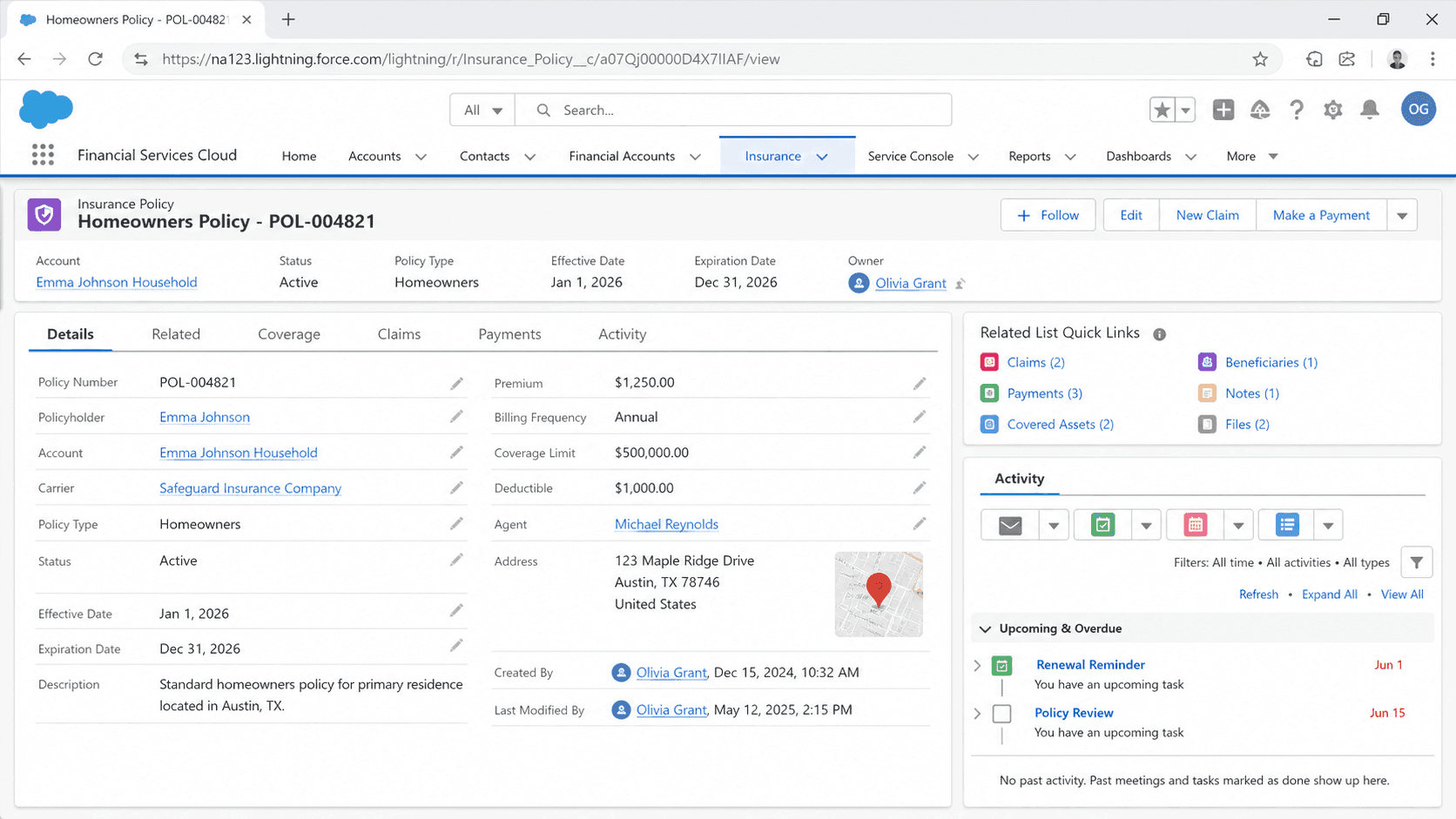
Definition
An Insurance Policy in Salesforce is a record on the InsurancePolicy standard object, part of the Financial Services Cloud insurance data model. It represents one insurance contract between a carrier and a policyholder. The Salesforce documentation describes the object as representing the type of insurance policy, such as auto, home, life, or annuity. A single record holds the policy number, the policy type, the named insured, the policy owner, the effective and expiration dates, the premium, and the policy status.
The object sits at the top of a small family of related records. Child and junction objects capture the insured items, the coverages and their limits, the people tied to the policy, and the transactions that change it over time. Carriers use this model for both personal lines (auto, home, life) and commercial lines (general liability, workers compensation, business owners). It replaced the older Asset-based approach that insurers relied on before Salesforce shipped a dedicated insurance object model.
How the InsurancePolicy object anchors the FSC insurance model
What the InsurancePolicy standard object stores
InsurancePolicy is a Salesforce standard object, so it ships with the Financial Services Cloud insurance package rather than being something you build by hand. The record carries the core contract data: the policy name or number, the policy type (auto, home, life, annuity, and commercial variants), the named insured, the policy owner, the effective date, the expiration date, the renewal date, the premium, and the status. Status tracking matters because reporting and automation both key off whether a policy is in force, lapsed, or cancelled. Because it is a standard object, it comes with field-level security, sharing, history tracking, and report types already wired in. You extend it with custom fields for product-specific attributes that a particular line of business needs, such as a vehicle identification number on auto or a construction class on a commercial property. Salesforce lists this object as available in the API from version 59.0 onward, which lines up with the harmonized insurance object model the company shipped to consolidate earlier, fragmented approaches. Using the supplied object also unlocks the FSC insurance Lightning components and the prebuilt page layouts that agents work from every day.
The child and junction objects that complete a policy
A real policy is more than one row of data, so the model spreads detail across related objects. InsurancePolicyAsset records the insured items, which could be a car, a home, or a piece of business equipment. InsurancePolicyCoverage records each coverage type with its limit and deductible, so a single auto policy can list bodily injury, collision, and comprehensive as separate coverage rows. InsurancePolicyParticipant is a junction object that associates the policy with Account records, capturing roles like policy owner, named insured, beneficiary, and lien holder. InsuranceClaim records claims filed against the policy and runs its own lifecycle. These relationships let one parent policy support complicated real-world shapes: a multi-vehicle household, a property with several structures, or a life policy with multiple beneficiaries. Because the children point back to the parent through lookups, an agent opening a policy sees everything in context on related lists or in a Lightning component grid. The structure also keeps reporting clean, since claim counts, coverage totals, and participant lists each live in their own queryable object instead of being crammed into one wide record.
Personal lines versus commercial lines
The same InsurancePolicy object serves two very different markets, and the difference shows up in configuration rather than in the object itself. Personal lines policies (auto, home, life) usually have one policyholder, one or two named insureds, and a fairly simple coverage list. Commercial lines policies (general liability, workers compensation, business owners) have a business as the policyholder, often many named insureds, and a denser coverage grid with sublimits and endorsements. Record types are the usual way to separate the two so that each market gets its own page layout, picklist values, and required fields. An auto layout surfaces the vehicle and driver detail an agent needs, while a workers compensation layout surfaces class codes and payroll exposure. Keeping the two on shared layouts tends to confuse users, because the fields that matter for one line are noise for the other. The object handles both because the variation lives in record types and field configuration, not in separate objects. This is part of why carriers consolidated onto the standard model: one object, many product lines, governed by metadata.
Renewals, endorsements, and policy transactions
Policies change constantly, and the model captures change through the InsurancePolicyTransaction object. Salesforce describes that object as representing a transaction tied to a change that affects the premium of an insurance policy, such as an endorsement, a renewal, or a cancellation. An endorsement is a mid-term change, like adding a driver or raising a coverage limit, and it usually adjusts the premium. A renewal extends coverage into a new term, and many carriers model it as a fresh InsurancePolicy record with a lookup back to the prior term so the history stays intact. A cancellation ends the policy before its expiration date. Tracking these as discrete transactions, rather than just overwriting fields on the policy, gives the carrier an auditable trail of what changed, when, and by how much the premium moved. That trail feeds billing, commission, and compliance reporting. Renewal processing is typically the highest-volume workflow in any insurance org, so carriers automate it early. Flow templates that ship with the FSC insurance package help generate renewal records and route them for review.
Claims, the agent console, and the household view
When a loss happens, an InsuranceClaim record links back to the policy and runs through its own stages, from first notice of loss through investigation, adjudication, and settlement. Joining claims back to the policy lets a carrier report on loss ratio, claim frequency, and severity by product line, which underwriters and actuaries watch closely. On the front line, the FSC insurance console gives agents a consolidated view of a policyholder. From an account record page, an agent can see policies, claims, events, and milestones in one place instead of jumping between screens. The model supports multi-producer policies, so more than one agent can be associated with a single contract, and it rolls policies up to the household level so a service rep sees every policy a family holds. Action items and quick actions sit on the policy record so common tasks, like filing a claim or starting an endorsement, are a click away. This console layer is configuration on top of the data model, and it is a large part of why carriers adopt the FSC insurance package rather than wiring the objects together themselves.
Why carriers moved off the Asset model
Before Salesforce shipped a purpose-built insurance object model, carriers stored policy data on the standard Asset object or on custom objects they designed themselves. That worked, but every carrier reinvented the same wheel, and partner solutions could not assume a common shape. Salesforce published an Asset-to-InsurancePolicy mapping to help teams migrate from the Asset-based pattern onto the harmonized InsurancePolicy model. The payoff is a shared vocabulary: a coverage is a coverage, a participant is a participant, and a claim is a claim, across every org that uses the model. That consistency lets the FSC insurance Lightning components, flow templates, and AppExchange integrations work without custom remapping at each carrier. It also smooths the path into Data Cloud, where a standard Insurance Policy data model object can ingest and unify policy data from multiple source systems. Most carriers keep a policy administration system as the system of record for the contract itself, then sync a working copy into Salesforce for service, sales, and claims. Deciding which system owns the data is the first architecture question, because it shapes every downstream sync, automation, and report.
How to create an Insurance Policy record
Most policy records arrive in Salesforce through an integration from a policy administration system, but admins and agents do create them by hand during setup, testing, or for lines managed directly in Salesforce. Here is how to create one once the FSC insurance package is enabled and your profile has access to the InsurancePolicy object.
- Open the Insurance Policies tab
From the App Launcher, open an FSC insurance app and find the Insurance Policies tab, or navigate to the InsurancePolicy object list view. Click New. If you use record types for personal and commercial lines, pick the right one first, because it drives the layout and field set you see next.
- Fill the core contract fields
Enter the policy name or number, choose the policy type, set the named insured and the policy owner, and capture the effective and expiration dates. Add the premium and set the status to the value that matches the contract, such as in force.
- Add the related detail
Save the policy, then use the related lists to add coverages, insured assets, and participants. Each coverage carries its own limit and deductible, and each participant carries a role such as beneficiary or named insured.
- Confirm it surfaces in the console
Open the policyholder account and confirm the new policy appears in the consolidated view. Check that any roll-up to the household and any related claim list behave as expected before handing the record to agents.
The human-readable identifier for the contract; carriers usually mirror the number from the policy administration system.
The line of business, such as auto, home, life, or annuity, which governs layouts and downstream reporting.
The policyholder, set as a lookup to an Account, often a Person Account for personal lines or a business Account for commercial.
The date coverage begins; paired with the expiration date it defines the policy term.
The current state of the policy, such as in force, lapsed, or cancelled, which automation and reports key off.
- Decide whether Salesforce or the policy administration system is the system of record before you let anyone hand-key policies, or you will create conflicting copies.
- Use separate record types for personal and commercial lines; shared layouts hide the fields each market actually needs.
- Coverages, assets, and participants live on related objects, so a policy with no children looks complete but reports as empty on coverage and claim metrics.
- The InsurancePolicy object is available in API version 59.0 and later, so very old API integrations may need an endpoint version bump to write to it.
Prefer this walkthrough as its own page? How to Insurance Policy in Salesforce, step by step
Trust & references
Cross-checked against the following references.
Straight from the source - Salesforce's reference material on Insurance Policy.
Hands-on resources to go deeper on Insurance Policy.
About the Author
Dipojjal Chakrabarti is a B2C Solution Architect with 29 Salesforce certifications and over 13 years in the Salesforce ecosystem. He writes and edits salesforcedictionary.com, published by KineticBit Inc., to help admins, developers, architects, and cert/interview candidates sharpen their fundamentals. More about Dipojjal.
Test your knowledge
+5 pts / dayQ1. What does an Insurance Policy record represent in Salesforce Financial Services Cloud?
Q2. What other objects belong to the broader insurance data model alongside Insurance Policy?
Q3. Where in the Salesforce ecosystem are Insurance Policy records typically used and licensed?
Discussion
Loading discussion…