
Einstein Prediction
An Einstein Prediction is a score a Salesforce machine learning model writes against one record, plus the reasons it landed there.
Definition
An Einstein Prediction is a score a Salesforce machine learning model writes against one record, plus the reasons it landed there. Each score comes from a prediction definition. The definition names the field being predicted and the field on the record where the result gets written.
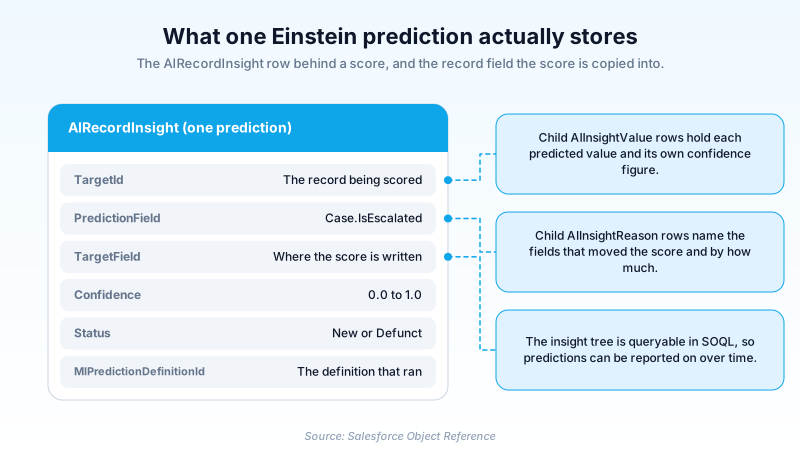
Salesforce keeps every prediction as an AIRecordInsight row, with child rows for the predicted values and the factors behind them. Einstein Discovery and Einstein Prediction Builder both write into that same structure. So a custom churn score and a standard opportunity score look identical to a report or a SOQL query.
Half of that pairing is going away. Salesforce has placed Einstein Prediction Builder on its Active Product and Feature Retirements list, with the timing set to order end date. The migration target it names is Data Cloud's Einstein Studio Model Builder. The AIRecordInsight objects are not retiring with it. Read this term as the data shape that survives, not the build tool that produced it.
In plain English
“Think of a weather app that says there is a 70 percent chance of rain, and then tells you it said that because of the clouds and the wind. An Einstein Prediction does the same thing for a business record. It puts a number on what is likely to happen next, and it keeps a short list of the reasons it chose that number.”
Worked example
Harborline Logistics wants to know which support cases are heading for escalation. Its admin built a prediction definition on Case, set the predicted field to Case.IsEscalated, and pointed the pushback field at a custom Escalation_Risk__c number field. Overnight, Einstein scores the open cases. Case 00042318 comes back with Escalation_Risk__c set to 81 and an AIRecordInsight row carrying a Confidence of 0.79. The child AIInsightReason rows name the drivers: Priority is High, the case has been reopened twice, and the account logged two escalations last quarter. The support team's assignment rule reads Escalation_Risk__c rather than the insight object. Anything above 75 lands in the senior queue before the customer calls again.
What a prediction looks like once it lands in your data model
The prediction definition holds the contract
MLPredictionDefinition is the metadata behind every prediction. It carries a developerName, a masterLabel, and two field pointers. predictionField names what is being predicted; pushbackField names where the score gets written. A status of Draft, Enabled or Disabled controls whether the definition is live. A priority value breaks ties when one AI application owns several definitions. The components use a .mlPrediction suffix, sit in an mlPredictions folder, and have been available since API version 50.0. That last detail matters more than it sounds. Because the definition is metadata, it deploys like any other component. A prediction assembled in a sandbox does not have to be rebuilt by hand in production.
Two places the answer shows up
A finished prediction lands in two spots, and confusing them causes most of the early pain. The pushback field is an ordinary field on the record. Reports, list views, formulas and automation all read it with no special handling. The AIRecordInsight row is the audit trail. It stores TargetId for the record scored, PredictionField for what was predicted, and TargetField for where the value went. Alongside those sit a Confidence between 0.0 and 1.0, a RunGuid and a RunStartTime. Build your process on the field. Read the insight when someone asks why the number says what it says.
Reasons are a queryable object, not a tooltip
Under each AIRecordInsight sit AIInsightValue rows, one per predicted value, and under those sit AIInsightReason rows. A reason carries FieldName, FeatureType, FeatureValue and a Contribution weight, which is the model stating how much that particular field moved the score. Because these are standard objects, you can query and report on them. That is how you answer a sceptical sales director without screenshotting a component. It is also the practical difference between a prediction and a black box. AIInsightFeedback and AIInsightAction complete the tree, recording what a user thought of a prediction and what was done about it.
The type field tells you which question was asked
Every definition carries a type drawn from a fixed list. BinaryClassification answers a yes or no question. Regression predicts a number. MulticlassClassification picks one outcome from several, and ScoringSpecificOutcome scores the likelihood of one named result. The same enumeration also covers language work such as LanguageDetection and intent classification. Those belong to features like Case Classification rather than to Prediction Builder. One consequence catches people out during reporting. Several Einstein features write into these same insight objects. A query that counts AIRecordInsight rows without filtering on MlPredictionDefinitionId or AiApplicationId will quietly mix a churn model in with case triage.
The license was the gate, and Salesforce is closing it
PredictionBuilderSettings exists only when the CRM Analytics Plus or Einstein Predictions license is enabled in the org. The type holds two switches, enablePredictionBuilder and isPredictionBuilderStarted, and it deploys as a single PredictionBuilder.settings file. The bigger problem is no longer whether the license exists. Salesforce is not renewing it. Einstein Prediction Builder sits on the Active Product and Feature Retirements list at the order end date stage. A retirement article published on 17 March 2026 spells out what that means. When your subscription ends, access stops and the associated customer data is deleted. Salesforce names Data Cloud's Einstein Studio Model Builder as the replacement and asks customers to migrate about sixty days ahead of that date. The insight objects themselves are not retiring. They appear in any org where an Einstein feature such as Case Classification is switched on, and Einstein Discovery keeps writing to them. So check the order end date before you check the license. A new process built on a Prediction Builder score in 2026 buys you a rebuild.
Scoring on a schedule versus scoring on demand
Most predictions arrive on a batch cadence. That suits a nightly risk number. It suits nothing that needs an answer inside a screen flow. The Einstein Prediction Service resources in Connect REST API cover the other case. They let you request predictions from deployed models programmatically. The same resources work with prediction definitions and models directly, and handle model refresh and bulk scoring jobs. If a score has to be current the moment a user opens the record, that is the surface to reach for. If a nightly figure is good enough, leave the batch job alone and spend the API calls elsewhere.
How organizations use Einstein Prediction
Runs an inherited slip-risk score on open opportunities and is rebuilding it in Model Builder before the subscription lapses.
Reads donor lapse scores from the pushback field, so the stewardship Flow outlives whichever tool produces the number.
Pulls the reason rows behind past claim routing decisions, because auditors ask why a file went to a field adjuster.
Trust & references
Cross-checked against the following references.
- Einstein Prediction Builder Retirement (opens in new tab)Salesforce
- Active Product & Feature Retirements (opens in new tab)Salesforce
- MLPredictionDefinition | Metadata API Developer Guide (opens in new tab)Salesforce
- AIRecordInsight | Object Reference for the Salesforce Platform (opens in new tab)Salesforce
- AIInsightReason | Object Reference for the Salesforce Platform (opens in new tab)Salesforce
- PredictionBuilderSettings | Metadata API Developer Guide (opens in new tab)Salesforce
- AIApplication | Object Reference for the Salesforce Platform (opens in new tab)Salesforce
- Einstein Prediction Service Resources | Connect REST API Developer Guide (opens in new tab)Salesforce
Straight from the source - Salesforce's reference material on Einstein Prediction.
Hands-on resources to go deeper on Einstein Prediction.
About the Author
Dipojjal Chakrabarti is a B2C Solution Architect with 29 Salesforce certifications and over 13 years in the Salesforce ecosystem. He writes and edits salesforcedictionary.com, published by KineticBit Inc., to help admins, developers, architects, and cert/interview candidates sharpen their fundamentals. More about Dipojjal.
Test your knowledge
+5 pts / dayQ1. Where does Salesforce store the individual factors that pushed an Einstein prediction score up or down?
Q2. What does the pushbackField on a prediction definition control?
Q3. Salesforce has listed Einstein Prediction Builder for retirement at the order end date. What does that mean for an org still using it?
Discussion
Loading discussion…