
Einstein Autofill Setup
Einstein Autofill Setup is the Salesforce Setup page where you switch on Einstein Autofill.
Definition
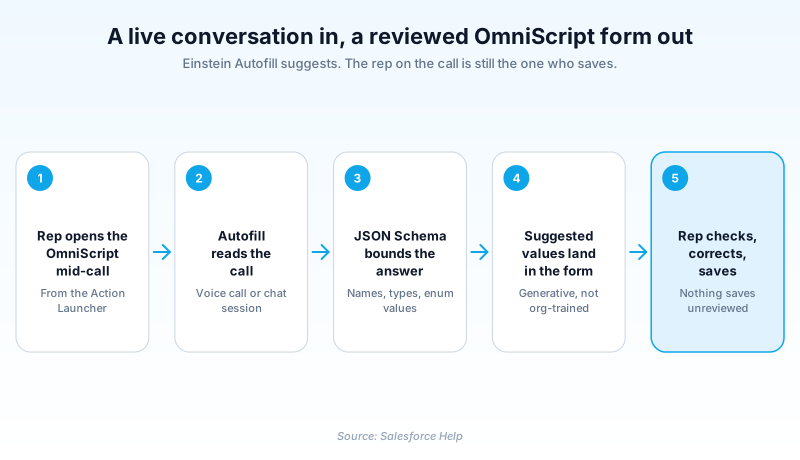
Einstein Autofill Setup is the Salesforce Setup page where you switch on Einstein Autofill. That feature reads a live call or chat and suggests values for an OmniScript form's fields. The page holds a single toggle.
That toggle is the smallest part of the job. Autofill runs only inside OmniStudio. Three other things decide whether it works. You add a component to an OmniScript. You create an Action Launcher entry so a rep can open that OmniScript mid-conversation. And you write a JSON Schema naming the form fields and the values each one accepts.
This is generative AI reading a conversation, not a model trained on your historical records. Salesforce keeps it in beta and in English (US) only. The help is blunt about the output needing a human check.
In plain English
“Picture a clerk on a phone call filling in a paper form while the customer talks. Einstein Autofill does the listening part. As the conversation happens, it writes its best guess into each box on the screen. The person on the call still reads every box and fixes what is wrong before saving.”
Worked example
A retail bank runs complaint intake through an OmniScript called Make a Complaint, opened from Action Launcher in the service console. A customer calls about a card charge she does not recognise. While she talks, Einstein Autofill reads the conversation and fills the form: the product question resolves to ATM / debit card, Complaint Type to Charges, and Complaint Subtype to Unauthorised Transaction(s). Subject and Description come back as free text drawn from what she said. Then she places the merchant and says the amount is simply wrong, so the rep switches Complaint Subtype to Dispute Over Charges. Every picklist value on that form, the correction included, came from an enum list in the JSON Schema. The model was never free to invent a category.
Setup is the easy part. Three other places decide whether it works
The Setup page is a switch, not a control panel
Open Einstein Autofill Setup expecting configuration and you will be disappointed. It enables the feature for the org and stops there. Nothing on it connects a form field to a suggestion, and there is no dial to adjust afterwards. The switch does nothing on its own. Autofill needs a generative AI setup behind it and a live channel in front of it, and each is separate Setup work. Miss either and you get silence, with no error pointing at what is missing.
It is an OmniStudio feature wearing an Einstein badge
Every help article for this feature sits in the Salesforce Industries documentation set, which is an honest signal about who it is for. Suggestions surface inside an OmniScript, never on a standard Lightning record page. Reps reach the OmniScript through Action Launcher, the console component that offers guided processes like Make a Complaint. Action Launcher itself carries its own add-on requirements. If your org does not already run OmniStudio, this is not something you switch on next sprint.
The JSON Schema is the part that decides quality
Autofill does not read your object metadata to work out what a form wants. You tell it, in a schema. The properties object is a map. Each key is a field name. The value behind it carries a type, a description, and an enum list where the field is a picklist or multi-select. Because the key is the field name, it has to match the OmniScript field exactly or the value never lands. The description is doing more work than it looks like: it is the instruction the model reads when deciding what a field means. Salesforce publishes a banking complaint example with the enums spelled out in full, more than thirty subtypes on one field alone. Skimp here and you get plausible nonsense in the right shape.
Generative AI, so no training run and no silent writes
Set this against Einstein Case Classification, which builds a model from your closed cases and can be told to write a field automatically. Autofill works nothing like that. Nothing trains on your records, and no mode commits a value without a person looking at it. The component can surface a confidence score, but a score is a hint for the rep rather than a threshold that gates a write. Salesforce puts it plainly in the help article: the tool uses generative AI, which is known to include inaccurate or harmful responses, and you take responsibility for the output you share.
Beta and English only, and what that should do to your plan
The Beta tag is still on every help page for this feature, and it is not decoration. Beta means it ships under the Beta Services Terms, a different commitment from a generally available feature. It is also supported only in English (US), which rules out most multilingual contact centres. Trial it with a small team on one high-volume form and keep the manual path working next to it.
Where it fits next to the other form-filling features
Several Salesforce features reduce typing, and they overlap less than the names suggest. A DataRaptor prefills an OmniScript from data you already hold, before the rep says a word. Prompt Builder lets you write a grounded prompt template and drop the result into a field or component. Agentforce agents can run a whole conversation and take actions on their own. Autofill sits in a narrower slot. The rep is mid-conversation with the form already open, and the job is to stop them retyping what they just heard.
Turn on Einstein Autofill and wire it to a form
Enabling the feature is a two-step procedure. Everything that decides whether reps see anything useful happens afterwards, in the OmniScript and its schema.
- Set up Einstein generative AI
Every suggestion is a model call, so generative AI has to be configured before Autofill has anything to ask. It is a prerequisite of the Setup page, not a step inside it.
- Flip the Setup toggle
From Setup, enter Einstein Autofill in the Quick Find box, select Einstein Autofill Setup, and turn on Einstein Autofill.
- Assign the full permission list
Reps need Omnistudio User, Prompt Template User and Access Einstein Autofill, plus Salesforce Voice or Live Message access. Access Einstein Autofill exists only for this feature, which is why it gets missed.
- Add the component to your OmniScript
Open the OmniScript that holds the form, add the Einstein Autofill Omniscript component, and configure the autofill elements from the properties panel.
- Write the schema and expose the form
Key the properties object by OmniScript field name, then create the Action Launcher action that opens the OmniScript. That action is how a rep reaches the form mid-conversation.
Gives Autofill a live call to read, for contact centres running voice through the console.
Gives Autofill a chat session to read, for teams whose intake happens in messaging.
- A property key that does not match the OmniScript field name produces no suggestion and no error. You find it by noticing an empty box.
- English (US) is the only supported language, so a pilot run in another locale is not a fair test.
- The output is generative, so plan the rollout as a review workflow rather than as an automation.
Prefer this walkthrough as its own page? How to Einstein Autofill Setup in Salesforce, step by step
How organizations use Einstein Autofill Setup
Fills the Make a Complaint OmniScript from the call itself, so product and complaint type come from the schema's enum lists rather than from typing.
Captures claim intake fields while the policyholder is still describing the incident, leaving the handler to correct rather than transcribe.
Turns a registration call into a partly filled intake form for staff to confirm before the record is created.
Trust & references
Cross-checked against the following references.
Straight from the source - Salesforce's reference material on Einstein Autofill Setup.
Hands-on resources to go deeper on Einstein Autofill Setup.
About the Author
Dipojjal Chakrabarti is a B2C Solution Architect with 29 Salesforce certifications and over 13 years in the Salesforce ecosystem. He writes and edits salesforcedictionary.com, published by KineticBit Inc., to help admins, developers, architects, and cert/interview candidates sharpen their fundamentals. More about Dipojjal.
Test your knowledge
+5 pts / dayQ1. What does Einstein Autofill use as its input?
Q2. Where do Einstein Autofill suggestions actually appear?
Q3. In the JSON Schema, what do the enum values on a property control?
Discussion
Loading discussion…