
Connect for Outlook
Connect for Outlook was a Salesforce desktop add-in for Microsoft Outlook that synced contacts, events, and tasks between a rep's mailbox and their Salesforce org.
Definition
Connect for Outlook was a Salesforce desktop add-in for Microsoft Outlook that synced contacts, events, and tasks between a rep's mailbox and their Salesforce org. It installed on the Windows machine itself and put a Salesforce toolbar inside the Outlook client. From there a rep could file an email against a Contact or Account without opening a browser.
It is retired. Salesforce ended support at the Winter '16 release, and the add-in stopped syncing anything from that point. The release note gave customers two ways out: Salesforce for Outlook, the newer desktop client, or Email Connect, then in beta.
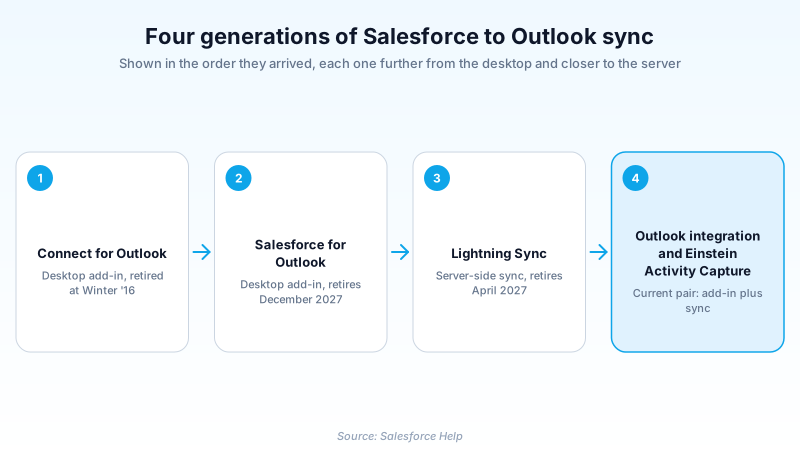
Three similar names cause most of the confusion here. Connect for Outlook came first and is gone. Salesforce for Outlook succeeded it and is itself scheduled to retire in December 2027. The supported combination today is the Outlook integration plus Einstein Activity Capture.
In plain English
“Connect for Outlook was a small program you installed on your work computer. It sat inside your email app and copied your address book, meetings, and to-do items back and forth with Salesforce. Salesforce switched it off more than a decade ago. If you still find it on a machine today, it is doing nothing.”
Worked example
Picture an admin at a regional insurance brokerage running a laptop refresh in 2026. On one old Windows image she finds Connect for Outlook still listed in Outlook's COM Add-ins dialog. Leftover from a 2012 rollout. A rep tells her his meetings "used to just show up" in Salesforce. They stopped when Salesforce ended support at Winter '16, and nothing has synced since. No Salesforce data was lost: the Events and Tasks created before the cutoff still sit on their Contact and Account records. Her fix is short. Uninstall the add-in, deploy the Outlook integration, then enable Einstein Activity Capture. Sync then runs server-side and stops depending on whether one laptop is switched on.
What Connect for Outlook did, and why the desktop model lost
What the add-in actually did
Connect for Outlook put a Salesforce toolbar in the Outlook window. A rep could file an open email as a Task against a Contact or Account and pick which record it landed on. Separately, a scheduled sync moved Outlook contacts, calendar entries, and tasks into Salesforce and back again. Each user chose their own sync direction and filters at install time. Field coverage was thin by current standards: name, email, phone, and mailing address. Beyond that, only whatever custom fields an admin had mapped for the whole org.
Why the desktop model lost
Every part of the sync ran inside the rep's own Outlook session, and that single choice caused most of the pain. Nothing moved while the laptop was asleep, offline, or logged out, so a week of phone-only work ended in a slow catch-up run. Conflicts resolved on a crude last-write-wins rule that quietly overwrote whichever side lost the race. The add-in also bound tightly to specific Windows builds of Outlook, so one Microsoft upgrade could break a whole department.
Four products, one lineage
Connect for Outlook was first. Salesforce for Outlook succeeded it, is still documented under a retiring label, and ends in December 2027. Lightning Sync arrived to handle server-side contact and event sync, and retires in April 2027. What Salesforce supports going forward is a pair. The Outlook integration is a Microsoft 365 add-in that renders Salesforce records in a side panel. Einstein Activity Capture moves email and calendar data server-side. Email Connect, the other Winter '16 option, already had that shape: a server-level sync plus a light add-in. Separating the interface from the sync engine is the correction to the original design.
If you find it in an org today
Treat it as dead software and remove it. Uninstalling changes nothing inside Salesforce, because Activity records written before the cutoff stay exactly where they are. Push the removal through whatever tool manages the fleet, then roll out the current pair. Budget time for mapping work, since none of the old per-user settings carry across. Watch the newer deadlines too. Microsoft retires Exchange Web Services in October 2026, and Salesforce advises upgrading Einstein Activity Capture connections to Microsoft Graph by August 2026.
Trust & references
Cross-checked against the following references.
- Salesforce Winter '16 Release Notes (Connect for Outlook: Now Retired) (opens in new tab)Salesforce
- Salesforce for Outlook Is Being Retired in December 2027 (opens in new tab)Salesforce
- Move from Salesforce for Outlook (Retiring) to the Next-Generation Products (opens in new tab)Salesforce
- Learn about the Feature Differences Between Salesforce for Outlook (Retiring) and the Next-Generation Products (opens in new tab)Salesforce
Straight from the source - Salesforce's reference material on Connect for Outlook.
Hands-on resources to go deeper on Connect for Outlook.
About the Author
Dipojjal Chakrabarti is a B2C Solution Architect with 29 Salesforce certifications and over 13 years in the Salesforce ecosystem. He writes and edits salesforcedictionary.com, published by KineticBit Inc., to help admins, developers, architects, and cert/interview candidates sharpen their fundamentals. More about Dipojjal.
Test your knowledge
+5 pts / dayQ1. Connect for Outlook stopped syncing contacts, events, and tasks at which point?
Q2. An admin uninstalls a leftover Connect for Outlook add-in from a rep's laptop. What happens to the Tasks and Events it synced years ago?
Q3. Why did Salesforce move Outlook sync off the desktop and onto the server?
Discussion
Loading discussion…