
Connect for Office
Connect for Office was a Salesforce desktop add-in for Microsoft Word and Excel, retired on March 4, 2017.
Definition
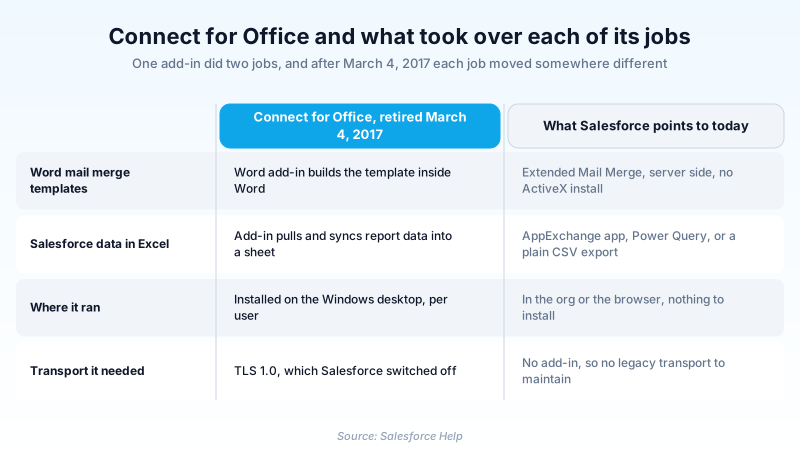
Connect for Office was a Salesforce desktop add-in for Microsoft Word and Excel, retired on March 4, 2017. It installed as two halves: a Word add-in for building mail merge templates, and an Excel add-in that brought report output down into a worksheet.
Nothing replaced it as a single product. Salesforce split the answer by use case: mail merge went to Extended Mail Merge, Excel work to AppExchange, Power Query or a CSV export.
The cause was transport security rather than strategy. The add-ins ran on Windows Vista, which cannot be configured for TLS 1.1 or higher, so disabling TLS 1.0 ended them.
In plain English
“Salesforce used to sell a small plug-in that put a Salesforce menu inside Microsoft Word and Excel. You could drop your records into a letter or spreadsheet without opening a browser. It stopped working in 2017 because the way it connected was no longer secure enough. You cannot install it today.”
Worked example
An admin at a 400-seat insurance brokerage inherits an old org and finds a shared folder of Word files full of guillemet-wrapped merge tokens like «Contact_FirstName» and «Account_BillingCity». Those are Connect for Office templates. To check whether anyone still depends on them, she opens Setup, exports Login History, and filters the export by the Application column, the method Salesforce gives admins for spotting add-in users. Nothing has come through the add-in since 2017. She rebuilds the two templates sales still asks for under Extended Mail Merge, then archives the other nine.
How Connect for Office worked, and what ended it
Two add-ins in one installer
The Word half added a Salesforce menu for building merge templates. The Excel half signed in from a spreadsheet and refreshed report rows in place. Salesforce's end of support notice describes the loss plainly: the add-in could no longer log in, or pull and sync data into Excel.
A calendar deadline, not a release
Most Salesforce retirements land in a seasonal release. This one did not. Anyone still on version 1.8.1.5 or earlier lost template creation and document generation on February 24, 2017, the deadline to move to version 1.8.1.6. Every support service for both add-ins and for Standard Mail Merge ended on March 4, 2017. If you see this dated to Winter '17, that is wrong.
Where each job went
Standard Mail Merge users were pointed at Extended Mail Merge, which merges multiple records, runs server side with no ActiveX install, and supports macOS. Word add-in users were told to type merge fields by hand or find something on AppExchange. For Excel, Salesforce named an AppExchange app, the Microsoft Power BI or Power Query connector, and a plain CSV export. The two thousand record ceiling belongs to the Microsoft connectors, not to CSV.
Why the name keeps surfacing
Two things keep it in circulation. Word templates outlive the tool that made them and sit in shared folders long after nobody can open them. And the Salesforce documentation style guide glossary still defines it as the product that integrates Salesforce with Word and Excel, with no hint that it is gone.
Trust & references
Cross-checked against the following references.
Straight from the source - Salesforce's reference material on Connect for Office.
Hands-on resources to go deeper on Connect for Office.
About the Author
Dipojjal Chakrabarti is a B2C Solution Architect with 29 Salesforce certifications and over 13 years in the Salesforce ecosystem. He writes and edits salesforcedictionary.com, published by KineticBit Inc., to help admins, developers, architects, and cert/interview candidates sharpen their fundamentals. More about Dipojjal.
Test your knowledge
+5 pts / dayQ1. When did Salesforce end support for both the Word and Excel add-ins from Connect for Office?
Q2. What technical change forced Connect for Office out of service?
Q3. A sales team still wants merged Word documents. Which feature did Salesforce point Standard Mail Merge users toward?
Discussion
Loading discussion…