
Approval Process Diagram
An Approval Process Diagram is the flowchart Salesforce used to generate from a classic approval process, drawn by a Setup feature called the Process Visualizer.
Definition
An Approval Process Diagram is the flowchart Salesforce used to generate from a classic approval process, drawn by a Setup feature called the Process Visualizer. One picture covered the whole process, from the criteria that let a record in to the actions that fired once it was approved or rejected.
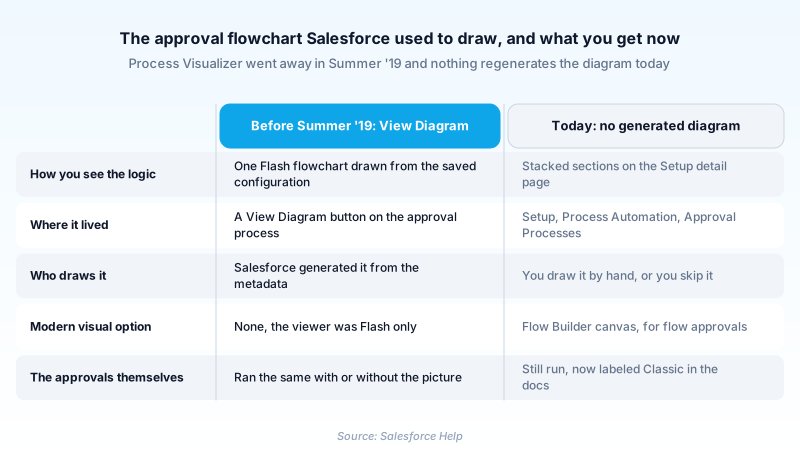
The feature is retired. Salesforce removed the Process Visualizer in Summer '19 because it ran on Adobe Flash Player, and Adobe retired Flash. There is no View Diagram button on an approval process today, and no replacement viewer ever shipped.
The approvals it pictured are alive and supported. Salesforce Help now labels them Classic Approval Processes. You read one from the stacked sections of its Setup detail page, not from a generated image.
In plain English
“Salesforce used to draw you a map of who has to say yes to something, and in what order. The tool that drew it ran on old technology that stopped working everywhere, so Salesforce removed it in 2019. The rules about who says yes still work. You just read them as a list now, or draw the map yourself.”
Worked example
A regional equipment distributor runs a discount approval on Opportunity. Entry criteria: Discount_Percent__c greater than 20. Step 1 assigns the request to the submitter's manager. Step 2 adds the VP of Sales when Amount is over 250,000. Final approval sets Approval_Status__c to Approved and removes the record lock. Before 2019 the admin clicked View Diagram, and the generated flowchart went straight into the finance review deck. In 2026 that button does not exist. The same admin opens Setup, then Process Automation, then Approval Processes. From the process detail page they capture the Approval Steps and Final Approval Actions sections by hand. The routing logic is unchanged. Only the drawing is gone, so the team redraws it in a diagramming tool each quarter.
Where the approval flowchart went
What the Process Visualizer drew
The Process Visualizer was a read-only viewer, not metadata you could edit. It read a saved approval process and painted it as one flowchart. Entry criteria sat at the top. Below it came a node per step, showing the assigned approver and any step filter, with lines for the approve and reject branches. Terminal nodes covered the actions that fired on final approval, final rejection, and recall. Because it rendered live configuration, the picture could not drift from what would actually happen at runtime. That was the whole appeal.
Flash took it down in Summer '19
Rather than rebuild the flowchart on a modern stack, Salesforce removed the entry point and left everything behind it alone. Approval data was untouched. The Jump Start Wizard and Standard Setup Wizard kept working. What never shipped was an off-ramp. There was no export and no static snapshot for the processes that already had a diagram. Whatever the picture held had to be read back out of Setup by a person, which is where the documentation problem starts.
The thing it pictured is now called Classic
Here is what has moved since. Salesforce Help no longer says approval process on its own. It says Classic Approval Process, because there is now a second kind. A Flow Approval Process is built as stages and steps in Flow Builder, and the docs recommend it as the modern option. Flow approvals get something the classic ones lost, a live canvas you can read while you build. It will not draw your existing classic processes for you. Setup is unchanged: Process Automation, then Approval Processes.
Documenting an approval without a generated picture
Because nothing regenerates the picture, approval documentation is now a manual job with an owner. Name a person, not a team. Note whether a step allows delegation, since that is the detail people leave out and later argue about. Keep the write-up beside the change ticket, not in someone's head. The failure mode is boring and common. A step gets added, nobody updates the notes, and eighteen months later an auditor asks why a 40 percent discount cleared with one signature.
Trust & references
Cross-checked against the following references.
Straight from the source - Salesforce's reference material on Approval Process Diagram.
Hands-on resources to go deeper on Approval Process Diagram.
About the Author
Dipojjal Chakrabarti is a B2C Solution Architect with 29 Salesforce certifications and over 13 years in the Salesforce ecosystem. He writes and edits salesforcedictionary.com, published by KineticBit Inc., to help admins, developers, architects, and cert/interview candidates sharpen their fundamentals. More about Dipojjal.
Test your knowledge
+5 pts / dayQ1. Why did Salesforce retire the Process Visualizer that generated the Approval Process Diagram?
Q2. In which release did Salesforce retire the Process Visualizer?
Q3. An admin wants a visual representation of a new approval they are building in 2026. What is the closest thing the platform offers?
Discussion
Loading discussion…