
After Conversation Work
After Conversation Work (ACW) is a timed wrap-up window in Salesforce Omni-Channel.
Definition
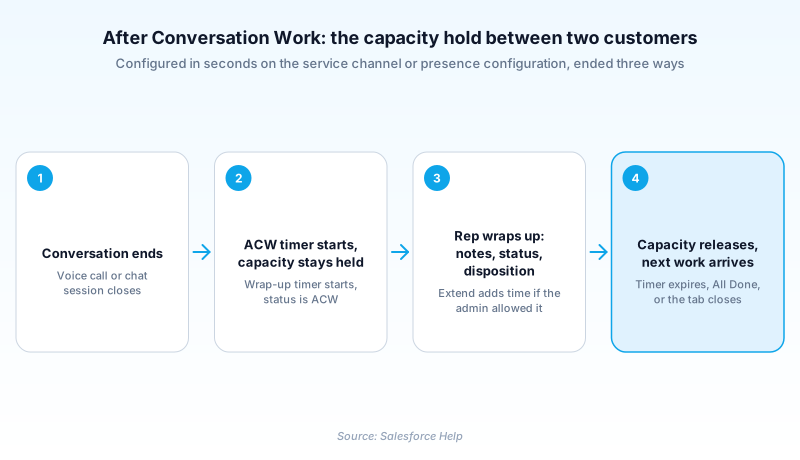
After Conversation Work (ACW) is a timed wrap-up window in Salesforce Omni-Channel. It holds a service rep's capacity for a set number of seconds once a voice call or messaging session ends. Nothing new routes to that rep while the clock runs. They finish notes, set the case status, and record a disposition without a fresh customer landing on top of them.
An admin turns ACW on per service channel or per presence configuration and sets a duration between 10 and 3,600 seconds. An Extend button can buy more, when the admin allows it. Capacity comes back at the timer, at All Done, or when the record tab closes. First one wins.
Salesforce documents ACW on conversation channels, Voice and Messaging, and that is where the setting turns up in Setup. Standard Omni-Channel reached its retirement release, Summer '26, so the ACW settings in an org today sit inside Enhanced Omni-Channel.
In plain English
“Think of a supermarket checkout. When one customer leaves, the cashier needs a moment to clear the belt and start a fresh receipt before waving the next person over. After Conversation Work is that moment, written into the software. The line is held back until the clock runs out or the cashier says they are ready.”
Worked example
A 40-seat appliance support team turns on After Conversation Work for its messaging channel and sets the timer to 120 seconds, with two optional 60 second extensions. A rep named Priya ends a WhatsApp session about a dishwasher that will not drain. The countdown starts. She sets Case Status to Escalated, picks a Case Reason of Product Defect, logs a Task for the field visit, and drops the pump part number WD-4471 into the case comments. She finishes at 78 seconds and clicks All Done, which releases her capacity early and lets Omni-Channel push the next chat. Had the customer sent a photo she needed to attach, one Extend click would have bought 60 more seconds.
Where ACW lives, what it holds, and how it ends
Two places to switch it on, and one place people look first
The setting sits on the service channel. In Setup, open Service Channels, edit a channel built on Voice or Messaging, and find the After Conversation Work Time section. Select Give agents wrap-up time after conversations and enter a value in seconds. The same block appears on Presence Configurations, the right home when the window should follow a group of reps rather than a channel. Where it does not live is the Routing Configuration. That record governs routing model, priority and capacity units, and plenty of admins lose twenty minutes there before checking the channel.
The timer holds capacity, not the tab
While ACW runs, the finished work item still counts against the rep's capacity. That is the point: Omni-Channel sees an occupied rep and skips them when placing the next call or chat. A live voice call consumes full capacity, and wrap-up extends that occupancy past the hangup. Three events can end it, and the first one wins. The timer expires. The rep clicks All Done. Or the rep closes the record tab in the console. That last one catches people out, because a rep tidying tabs mid-wrap-up gives capacity back before anything is saved.
Extensions are a pressure valve, not a second budget
Select Let agent extend timer and two more inputs appear: seconds added per extension, and how many extensions a rep may take. Reps then get an Extend button next to the countdown. Used well, this covers the genuinely messy interaction, the one where a customer sends a photo at the last second. Used badly, the extension becomes the real duration and the configured number becomes decorative. Watch the ratio. If most conversations end with an extension, raise the base window instead of making every rep click the same escape hatch.
Why the 3,600 second ceiling is not an invitation
You can set a full hour of wrap-up. Do not. Every second of it is a second the rep is unavailable, which surfaces in occupancy, in average handle time, and in queue depth during a spike. The honest way to pick a number is to measure: time how long dispositions and notes take across a sample, then set the window near the seventy-fifth percentile, not the worst case. Split it by channel too. Chat wrap-up runs shorter than voice, because the transcript already exists and nobody reconstructs what was said.
Fallback Mode quietly breaks it
Omni-Channel Fallback Mode is the degraded path that keeps work moving when primary routing is unavailable, and it does not support wrap-up time. The component renders without a countdown, and capacity is not released until the rep closes the tab. Nothing errors, which is the problem. Reps trained to trust the clock get no clock, and supervisors see people occupied for as long as their tabs stay open. If fallback is enabled in your org, brief the floor on what changes when it kicks in.
What wrap-up looks like from the supervisor seat
Command Center for Service, the supervisor tool previously called Omni-Channel Supervisor, shows presence status, assigned queues and open capacity per rep. Someone in wrap-up reads as occupied there, which is accurate but blunt: it cannot tell you whether the time went into a careful summary or into staring at the screen. Pair it with the AgentWork records underneath, which carry the timestamps you need to compare durations across reps and channels. Coaching works better as a duration conversation than a compliance one. A rep who needs 200 seconds when the median is 90 often has a page layout problem.
Set up After Conversation Work on a service channel
ACW is off until someone turns it on. The whole configuration is one section on one record, and it takes about two minutes.
- Open the service channel
In Setup, open Service Channels and edit a channel built on Voice or Messaging, the channel types Salesforce documents wrap-up time for.
- Turn on wrap-up time
In the After Conversation Work Time section, select Give agents wrap-up time after conversations, then enter a Duration (seconds) value from 10 to 3,600.
- Decide whether reps can extend
Select Let agent extend timer, then set how many seconds each extension adds and the maximum number of extensions a rep may take.
- Consider the presence configuration instead
The same settings live on Presence Configurations. Use that record when the window should follow a group of reps across channels.
- Expose the component to reps
Add the After Conversation Work component to the console so reps see the countdown and the All Done button. Without it they get the hold and no clock.
The master switch. Off means capacity releases the instant the conversation ends.
Required. Takes 10 to 3,600 seconds, applied to every rep on that channel.
Adds an Extend button, an extension length in seconds, and a cap on how many times a rep can use it.
- The extension length takes the same 10 to 3,600 range, so a 30 second timer can carry a 10 minute extension.
- Closing the record tab ends the window early, so a rep tidying tabs gets the next conversation immediately.
- Wrap-up is off on each service channel until someone selects it, so a Voice channel added later starts without it.
Prefer this walkthrough as its own page? How to After Conversation Work in Salesforce, step by step
How organizations use After Conversation Work
Runs 90 seconds of wrap-up on messaging and 150 on voice, then re-measures both numbers each quarter against actual disposition time.
Gives reps 300 seconds plus two extensions so claim documents can be attached and a follow-up date set before the router moves on.
Shortens the window during outages so capacity turns over faster, and coaches reps to click All Done once the disposition saves.
Trust & references
Cross-checked against the following references.
- Configure After Conversation Work Time (opens in new tab)Salesforce
- How After Conversation Work Affects Service Rep Capacity (opens in new tab)Salesforce
- After Conversation Work (Bring Your Own Channel for CCaaS) (opens in new tab)Salesforce
- Standard Omni-Channel Retirement (opens in new tab)Salesforce
Straight from the source - Salesforce's reference material on After Conversation Work.
Hands-on resources to go deeper on After Conversation Work.
About the Author
Dipojjal Chakrabarti is a B2C Solution Architect with 29 Salesforce certifications and over 13 years in the Salesforce ecosystem. He writes and edits salesforcedictionary.com, published by KineticBit Inc., to help admins, developers, architects, and cert/interview candidates sharpen their fundamentals. More about Dipojjal.
Test your knowledge
+5 pts / dayQ1. Where does an admin configure the After Conversation Work timer?
Q2. A rep's ACW timer is set to 180 seconds. At 40 seconds the rep closes the record tab in the console. What happens?
Q3. What happens to After Conversation Work when Omni-Channel runs in Fallback Mode?
Discussion
Loading discussion…