
Salesforce Field Service: Complete 2026 Guide (Work Orders, Dispatcher, Mobile & Agentforce for Field)
Work orders, service appointments, the scheduling engine, dispatcher console, mobile app, parts logistics, and Agentforce-for-field - the canonical 2026 guide.
If you're stepping into a [Field Service](/terms/field-service) implementation from a core Service Cloud background, the data model alone takes a few weeks to internalize. This guide is the canonical mental map: what Field Service is, how its objects fit together, how the scheduling engine works, what the mobile app does, what changed in 2026 with Agentforce, and the implementation roadmap that doesn't blow up at month four.
What Field Service is (and isn't)
Field Service is:
- A vertical SKU built on the Salesforce Platform.
- A field-work-specific data model (Work Order → Service Appointment → Service Resource).
- A scheduling engine (constraint solver) that auto-assigns appointments to technicians.
- A Dispatcher Console - purpose-built UI for the dispatcher role.
- A mobile app (Field Service Mobile) for technicians, with offline support.
- An optional Optimization Engine (formerly OFSC) for advanced multi-day routing.
Field Service is not:
- Pure Service Cloud. Service Cloud handles cases and call-center work; Field Service handles dispatched on-site work.
- A standalone routing app. It assumes a Salesforce CRM foundation underneath.
- A free upgrade. Field Service is a separate license tier with technician-seat pricing.
- Just for the trades. Healthcare home-visits, IT field installs, utility line work, equipment rental delivery - anything dispatched goes here.
The data model
The five objects you must internalize.
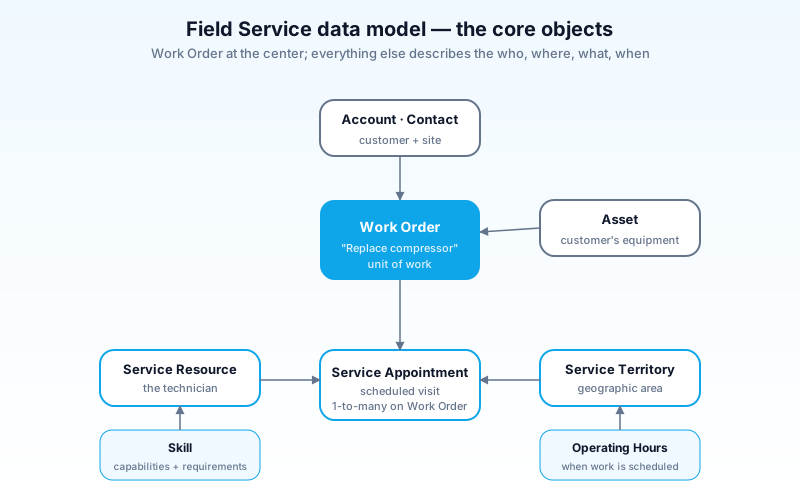
- Work Order - the unit of work. "Replace the compressor at 123 Main St." Tied to an Account, Contact, optional Asset.
- Work Order Line Item - sub-tasks within a Work Order. A Work Order can have multiple Line Items.
- Service Appointment - the scheduled visit. Has a time window, an assigned resource (or unassigned), location, status. One Work Order can spawn many Service Appointments (e.g., a 3-day install).
- Service Resource - the human or thing doing the work. Usually a User; can also be equipment.
- Service Territory - geographic area. Resources belong to territories; appointments are scheduled within them.
- Skill - the capabilities a resource has and an appointment requires. Used by the scheduling engine.
- Asset - the customer's installed equipment. Work Orders are typically against an Asset.
- Operating Hours - when a resource works, when a territory is open, when a customer is available.
The relationships matter:
- A Work Order has many Service Appointments (multi-visit jobs).
- A Service Appointment has at most one assigned Service Resource.
- A Service Resource has many Skills and belongs to one or more Service Territories.
- A Service Appointment requires zero or more Skills.
The scheduling engine resolves: "for this appointment requiring skills X and Y, in territory T, with a 4-hour SLA - which Resources are eligible, and when can we slot it?"
The scheduling engine
The technical heart of Field Service. A constraint solver that maximizes a chosen objective - "minimize travel time", "maximize SLA compliance", "balance load across resources" - under hard constraints (skills, territory, hours, time windows).
Three modes:
Manual scheduling
A dispatcher opens the Dispatcher Console, drags an unassigned appointment onto a resource's timeline. Used for high-touch work, VIP customers, complex jobs.
Scheduling Service (rule-based)
The dispatcher (or an automation) calls a "Schedule" action. The engine evaluates all eligible resources against the appointment's constraints and picks the best per the configured policy:
- "ASAP" - schedule as soon as the resource is free.
- "Resource priority" - favor higher-tier resources first.
- "Minimize travel" - pick the resource closest to the appointment.
- "Customer preference" - honor "preferred technician" relationships.
Optimization (multi-pass)
Heavier mode. Reschedules a whole territory's day to optimize globally. Run nightly or on demand.
- In-Day Optimization - re-shuffles today's plan as new appointments arrive.
- Schedule Optimization - solves a longer planning horizon (3–7 days).
Use Optimization for territories with 50+ technicians. Smaller orgs do fine with Scheduling Service.
The Dispatcher Console
The UI dispatchers live in. Looks like an air-traffic-control screen.
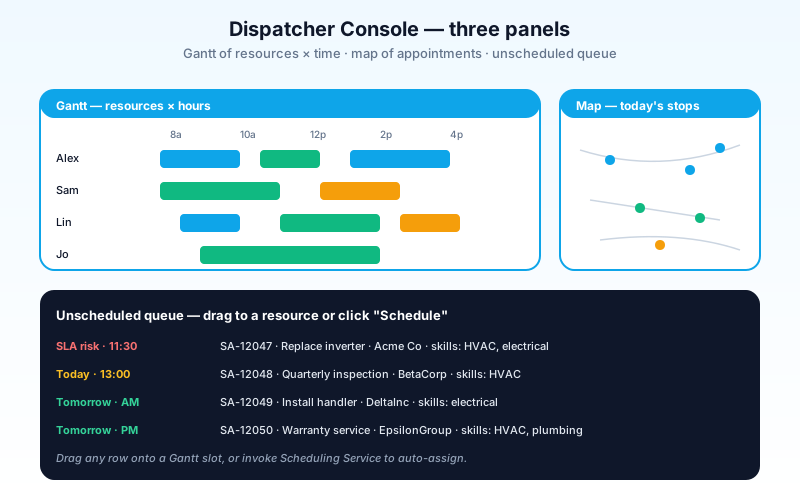
Three panels:
- Gantt chart - rows are resources, columns are time. Drag to schedule, resize to adjust duration, color-code by status.
- Map - geographic view of today's appointments. Click an appointment, see the route.
- Appointment list - unscheduled queue, filtered/sorted however the dispatcher needs.
Customizations:
- List filters - different dispatchers see different views (urgent only, by SLA, by skill required).
- Appointment grade indicators - colors signal priority, lateness risk, customer tier.
- Map layers - show traffic, weather, customer locations as overlays.
Dispatcher Console is a separate licensed product within Field Service. Not every Field Service user has it.
The mobile app
Field Service Mobile (iOS + Android). What the technician carries.
Core capabilities:
- Offline-first - full work order data cached locally; sync when connectivity returns.
- Today's schedule with map and turn-by-turn navigation.
- Work order details - instructions, asset history, customer notes.
- Capture - photos, signatures, parts used, time spent.
- Forms - branded forms (inspection checklists, install verification) authored in Salesforce.
- In-app messaging - chat with dispatcher.
- Service Reports - generate the customer's signed work record.
The offline story is what differentiates it. A technician at a basement install with no signal still gets full functionality; the next time they hit network, everything syncs in the background.
Parts logistics
For organizations that carry parts inventory. Tracks:
- Product (the SKU) and Product Item (the inventory record at a specific location).
- Service Resource → Vehicle assignment (a tech's truck is a "location").
- Inventory transfers between warehouse, depot, and trucks.
- Parts request workflow when a tech needs a part not on their truck.
- Returns for unused or warrantied parts.
This is a significant module. If you don't carry parts, skip it; it's optional.
How Agentforce for Field works (2026)
The 2026 layer reshapes several Field Service workflows.
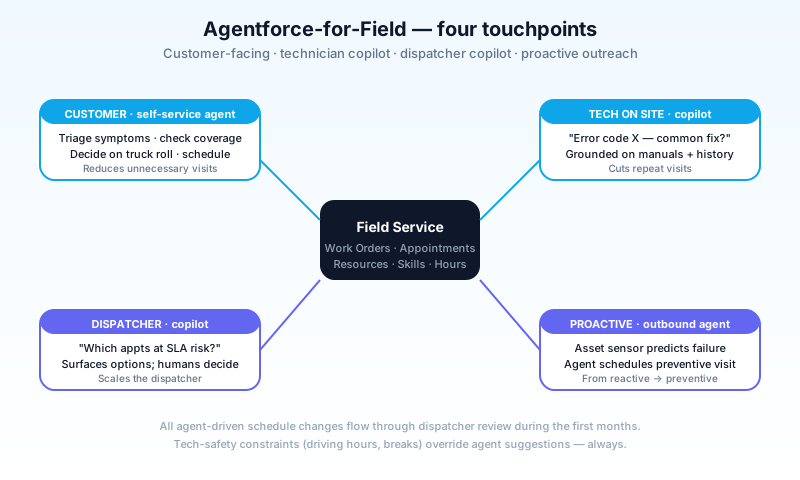
Customer self-service agent
A customer texts or calls. The agent triages: gather symptoms, check coverage, decide whether a truck roll is needed, and either resolve remotely or schedule the appointment.
- Reduces unnecessary truck rolls (cost: $100–$300 per visit).
- Schedules into Field Service via the same scheduling engine.
- Hands off to a human dispatcher when out of scope.
Technician copilot
A technician on site asks the agent: "I'm seeing this error code on the controller. What's the most common fix?" The agent grounds against the manufacturer's manuals, the customer's asset history, and prior similar jobs.
- Reduces "second visit" rate.
- Captures the resolution to feed back into the knowledge base.
Dispatcher copilot
The dispatcher asks: "Which appointments are at risk of breaching SLA today?" The agent reasons over the current schedule, recent updates, and traffic data.
- Surfaces decisions; doesn't make them.
- Pairs with manual override.
Outbound proactive agent
When sensors signal an asset will fail, an agent reaches out to schedule preventive service before the customer notices.
Critical constraints:
- Asset identity matters. Wrong-asset matches in healthcare-equipment field service are costly. Tighten resolution rules.
- Tech safety overrides. Agent suggestions cannot push a technician into unsafe schedules (back-to-back without breaks, exceeding driving-hour regulations).
- Audit and trust. Every agent-driven schedule change is logged for dispatcher review.
Implementation roadmap
The pattern that works for new Field Service implementations.
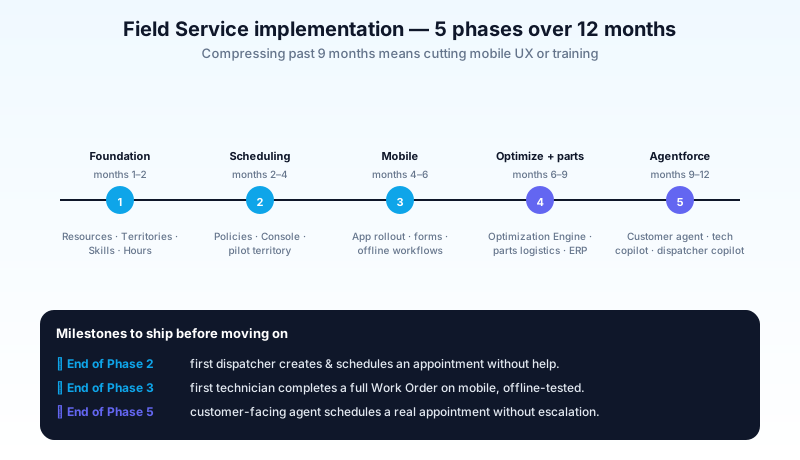
Phase 1: Foundation (months 1–2)
- Stand up a sandbox; enable Field Service.
- Configure Service Resources, Territories, Skills, Operating Hours.
- Migrate or stand up basic Asset records.
- Define your Work Order and Service Appointment data model extensions.
Phase 2: Scheduling (months 2–4)
- Build scheduling policies for your top 3 appointment types.
- Train dispatchers on the Dispatcher Console.
- Pilot with one territory and 5 technicians.
- Iterate the policies based on dispatcher feedback.
Phase 3: Mobile (months 4–6)
- Roll out Field Service Mobile to pilot technicians.
- Build branded forms (inspection checklists, install verification).
- Train technicians on offline workflows.
- Measure: time-on-site, parts usage accuracy, signature capture rate.
Phase 4: Optimization + parts (months 6–9)
- Add Optimization Engine if territory size warrants it.
- Stand up parts logistics if applicable.
- Integrate with ERP for parts master data and reorder.
Phase 5: Agentforce + analytics (months 9–12)
- Deploy customer-facing scheduling agent.
- Deploy technician copilot in mobile.
- Stand up dispatcher copilot.
- Build leadership dashboards: SLA compliance, first-visit resolution, technician utilization.
This is a 12-month roadmap for a serious Field Service implementation. Trying to compress to 4 months means cutting the mobile UX or skipping training - both visible in churn metrics within a year.
Common pitfalls
- Pattern 1: Treating Field Service as Service Cloud + map. Field Service has a fundamentally different data model. Don't shoehorn it into a customized Case object.
- Pattern 2: Over-customizing the data model day one. The standard objects cover ~80% of real cases. Extend; don't replace.
- Pattern 3: Wrong skills granularity. Too few skills (everyone can do everything) makes scheduling meaningless. Too many skills (37 sub-categories per appliance brand) makes scheduling impossible. Aim for 8–20 skills per implementation.
- Pattern 4: Ignoring Operating Hours. Forgetting to set holiday calendars or different territory hours produces appointments scheduled when no one's available.
- Pattern 5: Custom mobile UI from day one. The standard Field Service Mobile app is good. Build branded forms and customizations on it; don't replace it.
- Pattern 6: Single dispatcher policy. Different appointment types have different scheduling priorities. Build policies per type, not one global policy.
- Pattern 7: No offline test path. A test plan that only covers connected scenarios will miss bugs that hit techs in the field. Test offline → reconnect → conflict-resolve every release.
- Pattern 8: Manual scheduling forever. Some teams never enable Scheduling Service because manual feels safer. You forfeit the engine's value. Pilot with one territory.
- Pattern 9: Skipping parts logistics planning. If you carry parts, decide early whether Field Service will own inventory or just consume it from the ERP. Bolt-on later is expensive.
- Pattern 10: Trusting agent suggestions blindly. Agentforce surfaces options; humans schedule. Don't let agents push appointments without dispatcher confirmation in the early months.
Frequently asked questions
How is Field Service different from Service Cloud? Service Cloud handles call-center cases (digital, phone, chat). Field Service handles dispatched on-site work. Most Field Service customers also use Service Cloud - Service routes the case, Field Service executes the truck roll.
Is Field Service the same as Field Service Lightning (FSL)? Yes - "FSL" is the legacy name. Salesforce dropped "Lightning" branding from product names in 2024. The product is the same.
Can technicians use Field Service Mobile without a Salesforce license? No - every technician needs a Field Service license (a special edition that bundles platform + Field Service capabilities). Pricing is per-technician.
Does the scheduling engine handle multi-day jobs? Yes - break the work into multiple Service Appointments under one Work Order. The engine schedules each appointment independently with constraints linking them.
Can I use Field Service for non-traditional field work (e.g., home health visits)? Yes. The data model is generic enough for any dispatched on-site work. Many healthcare and elder-care orgs use it.
How does Field Service integrate with MuleSoft? Common patterns: ERP sync (parts, customer data), telematics ingestion (vehicle locations), and external scheduling-conflict checks. MuleSoft Field Service connectors are mature.
Does Agentforce work in offline mobile? Limited. The agent needs network for inference. Cached responses can serve some lookups offline, but real-time agent reasoning requires connectivity.
What's the typical implementation cost? For a 100-technician deployment: 6–12 months of services + tooling + license. Six-figure to low-seven-figure ranges are typical. Smaller deployments (under 30 techs) are proportionally cheaper but have similar fixed configuration costs.
What to read next
- Field Service, Work Order, Service Appointment, Dispatcher Console - the dictionary entries.
- Sales Cloud vs Service Cloud (2026) - the foundation Field Service sits on top of.
- What Is Agentforce 360? - the agent platform powering Agentforce-for-Field.
Field Service is one of the most operationally complex Salesforce specialties. The data model is rich, the scheduling engine is powerful, and the mobile UX is what your technicians live in every day. Get the foundation right; the rest compounds.
About the Author
Dipojjal Chakrabarti is a B2C Solution Architect with 29 Salesforce certifications and over 13 years in the Salesforce ecosystem. He writes and edits salesforcedictionary.com, published by KineticBit Inc., to help admins, developers, architects, and cert/interview candidates sharpen their fundamentals. More about Dipojjal.
Share this article
Sources
Related dictionary terms
 Our appAdWake up sharp. Not just awake.The alarm that rings through Silent and DND — free on iOS & Android.Get WakeSharp →
Keep reading

Salesforce Sales Cloud vs Service Cloud: Which Do You Need in 2026?
Sales Cloud and Service Cloud share a platform but solve different problems. Here is the 2026 comparison. Features, pricing, decision scenarios, and how Agentforce fits both.

What Is Agentforce 360? The Complete 2026 Guide for Salesforce Admins, Developers & Architects
Agentforce 360 is Salesforce's 2025 rebrand of its agentic-AI platform - built on the Atlas Reasoning Engine, Einstein Trust Layer, and Data 360. Here's the complete admin + dev + architect guide.


Comments
No comments yet. Start the conversation.
Sign in to join the discussion. Your account works across every page.