
The 30 Most Common Salesforce Errors (and How to Fix Them)
From 'Too many SOQL 101' to 'Mixed DML Operation' - what each error means, why it happens, and the precise fix.
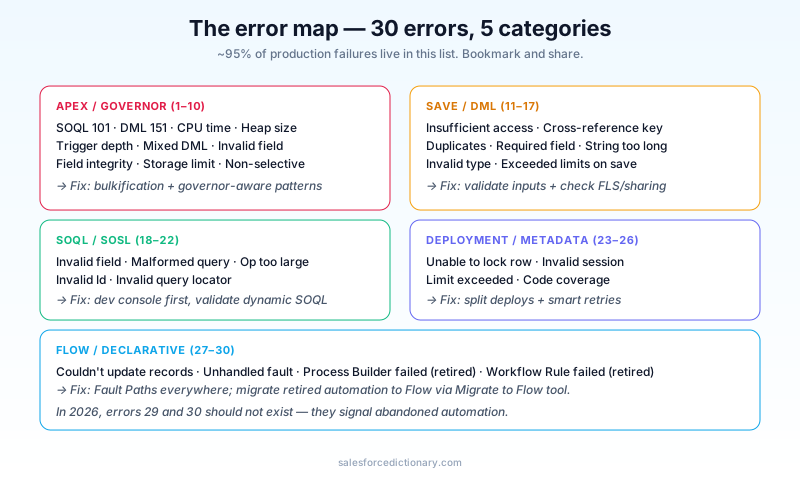
If you've been on Salesforce more than a year, you've seen these. If you're new, save this article - every one will eventually find you. They're grouped by category, with the fix that actually works (not just "check your code").
Apex / governor errors (Errors 1–10)
1. Too many SOQL queries: 101
What it means: You exceeded the per-transaction SOQL limit (100 sync, 200 async).
Most common cause: SOQL inside a loop.
Fix: Move the query outside the loop, build a Map<Id, ...>, look up by key inside the loop. See Governor Limits Cheat Sheet for the canonical pattern.
2. Too many DML statements: 151
What it means: You exceeded the 150-statement DML limit.
Most common cause: update record; inside a loop.
Fix: Collect changed records into a List<SObject>. Call update myList; once.
3. Apex CPU time limit exceeded
What it means: Your transaction used more than 10,000ms of CPU (sync) or 60,000ms (async).
Most common causes: Deeply nested loops; complex formulas re-evaluating per record; recursive triggers; large JSON parses.
Fix: Profile with Limits.getCpuTime() to find the hot spot. Often the answer is bulkification, but sometimes you genuinely need to move work to async Batch Apex.
4. Apex heap size too large
What it means: You exceeded 6 MB sync / 12 MB async heap.
Most common cause: A query returning hundreds of thousands of rows; a giant JSON parse; storing intermediate results in big maps.
Fix: Stream rather than materialize - use Database.QueryLocator with batch scope; drop unused fields from SELECT; null out intermediate references when done.
5. Maximum trigger depth exceeded
What it means: Triggers fired triggers fired triggers ~16 levels deep.
Most common cause: Trigger updates the record, which fires the trigger again. Infinite recursion.
Fix: Static Set<Id> recursion guard. See Apex Trigger Framework.
6. Mixed DML Operation
What it means: A single transaction tried to DML both setup objects (User, Group, PermissionSet) and non-setup objects (Account, Contact, etc.).
Most common cause: Trigger that creates a User and updates an Account in the same transaction.
Fix: Move one of the operations to async with @future or Queueable.
@future
public static void createUserAsync(...) { ... }
7. INVALID_FIELD_FOR_INSERT_UPDATE
What it means: You tried to set a field that's not writable in this context (formula field, system field, etc.).
Most common cause: Including Id, CreatedDate, or a formula in your update payload.
Fix: Remove the unwritable field from the SObject before DML. Use clone(false) to drop system fields.
8. FIELD_INTEGRITY_EXCEPTION
What it means: A field's value violated platform integrity (bad cross-reference, wrong type, etc.).
Most common cause: Setting a Lookup field to an Id that doesn't exist or is the wrong object type.
Fix: Validate Ids before DML. Check the field's Schema.SObjectField describe to confirm acceptable target types.
9. STORAGE_LIMIT_EXCEEDED
What it means: Your org is at its data or file storage limit. Most common cause: Years of accumulated records you forgot you had. Fix: Delete old records (with care!), archive to Big Objects or external storage, or buy more storage.
10. Non-selective query against large object
What it means: SOQL on a 1M+ row object without using an indexed field in the WHERE clause.
Most common cause: WHERE Status = 'Open' on a 5M-row Case object - Status isn't indexed.
Fix: Add filter on an indexed field (Id, Name, FK, custom external IDs) first to narrow the result set, then apply the non-indexed filter. Or request the platform to index the field via custom indexing.
Save / DML errors (Errors 11–17)
11. INSUFFICIENT_ACCESS_OR_READONLY
What it means: The running user can't write the record (FLS, sharing, or owner).
Most common cause: Apex running with sharing and the user lacks access to the parent record.
Fix: Check the user's FLS and sharing path. If it's a system-level operation that should bypass sharing, switch to without sharing (and audit carefully).
12. INVALID_CROSS_REFERENCE_KEY
What it means: A foreign key (Lookup or Master-Detail) references a record that doesn't exist or is in a different org. Most common cause: Pasting an Id from a sandbox into production code, or a soft-deleted record. Fix: Validate Ids before DML; use Schema.getGlobalDescribe to confirm the Id's object type matches the field.
13. DUPLICATES_DETECTED
What it means: A duplicate rule blocked the save.
Most common cause: A matching rule found an existing record with the same name/email.
Fix: Either use the duplicate rule's "Allow with alert" instead of "Block," or call Database.insert(record, dmlOptions) with allowDuplicateRule=true for system-level operations.
14. REQUIRED_FIELD_MISSING
What it means: A required field was blank.
Most common cause: Forgetting that universally required fields apply at the database level, not just the page layout.
Fix: Check the object's required fields via Schema.getGlobalDescribe() and ensure your code sets them all.
15. STRING_TOO_LONG
What it means: You're trying to write more characters than the field allows.
Most common cause: Concatenating without a length check.
Fix: Truncate before writing: field = String.valueOf(value).left(maxLength);
16. INVALID_TYPE
What it means: Wrong SObject type passed to a method or DML.
Most common cause: A List<Account> passed where the method expected List<Contact>.
Fix: Match types exactly. If you're working generically, use List<SObject>.
17. EXCEEDED_LIMITS_ON_SAVE
What it means: A save would exceed the maximum number of records or relationships allowed. Most common cause: Too many junction records, too many list view criteria, etc. Fix: Check the specific limit - it's usually documented in the Salesforce Limits help article.
SOQL / SOSL errors (Errors 18–22)
18. INVALID_FIELD
What it means: SOQL referenced a field that doesn't exist on the object.
Most common cause: Typo in the field API name; field deleted but query not updated.
Fix: Verify the API name in Object Manager. Use Schema.getGlobalDescribe() to validate dynamic queries.
19. MALFORMED_QUERY
What it means: Your SOQL/SOSL syntax is wrong.
Most common cause: Unmatched parentheses, missing FROM, or wrong join syntax.
Fix: Run the query in Developer Console → Query Editor first. The error there is usually clearer than the runtime error.
20. OPERATION_TOO_LARGE
What it means: A query would return too many rows.
Most common cause: A query without LIMIT against an unfiltered large object.
Fix: Add LIMIT, narrow with WHERE, or chunk via Batch Apex.
21. INVALID_ID_FIELD
What it means: The Id you passed has the wrong format or wrong record-type prefix. Most common cause: Passing a 15-character ID where 18 is expected (case-sensitivity issue), or a sandbox ID in production. Fix: Always use 18-character IDs. Strip whitespace before comparison.
22. INVALID_QUERY_LOCATOR
What it means: A QueryLocator was used after it expired or in the wrong batch context.
Most common cause: Trying to resume a Batch Apex start() result from a separate transaction.
Fix: Don't pass QueryLocator between transactions. Re-create it in each batch as needed.
Deployment / metadata errors (Errors 23–26)
23. Unable to lock row
What it means: Two transactions tried to lock the same record.
Most common cause: Concurrent updates to the same Account or Master-Detail parent.
Fix: Implement retry logic in Apex (Database.update(records, false) with handling), or serialize via Queueable chains.
24. INVALID_SESSION_ID
What it means: Your API session has expired or is invalid. Most common cause: Forgetting to re-authenticate in long-running integration jobs. Fix: Catch the exception and re-authenticate. For named credentials, use them - they handle refresh automatically.
25. LIMIT_EXCEEDED (deployment)
What it means: Your Change Set or metadata deploy exceeded a deployment limit (file count, file size, test runs, etc.).
Most common cause: Trying to deploy too much at once.
Fix: Split the deployment into smaller chunks. Use DevOps Center or sf project deploy for source-driven deployments, which handle this better than Change Sets.
26. Code coverage requirement not met
What it means: Tests covered less than 75% of new Apex on production deployment.
Most common cause: Test classes that don't exercise all branches.
Fix: Run sf project deploy report --test-level RunSpecifiedTests and review coverage. Add tests for uncovered lines. Don't game the metric - meaningful tests beat coverage padding.
Flow / declarative errors (Errors 27–30)
27. The flow couldn't update the records
What it means: A Flow Update Records element failed - usually validation or sharing.
Most common cause: Validation rule blocked the update or running user lacks access.
Fix: Add a Fault Path to the Flow that surfaces the actual error. Check the running context ($User.Profile) - Flows often run in system context but Update Records can hit user permission issues.
28. An unhandled fault has occurred
What it means: A Flow error wasn't caught by a Fault Path. Most common cause: No Fault Path on the failing element, or the failing element doesn't support Fault Paths. Fix: Add Fault Paths to elements that can fail (Get Records, Update Records, Apex actions). Salesforce's "Default Behavior on Element Error" can be set globally.
29. Process Builder process failed (legacy but still seen)
What it means: A Process Builder failed - usually due to a downstream error or the process is on a retired feature. Most common cause: Process Builder is retired in 2026; it should be migrated to Flow. Fix: Run Migrate to Flow. Don't try to fix Process Builder errors - replace them with record-triggered Flows.
30. Workflow rule firing failed (legacy but still seen)
What it means: A Workflow Rule action failed. Most common cause: Workflow Rules retired in 2025; you shouldn't have any active. Fix: Same as Process Builder - migrate to Flow. Run audit queries against the metadata API to find all active rules.
Debugging strategy
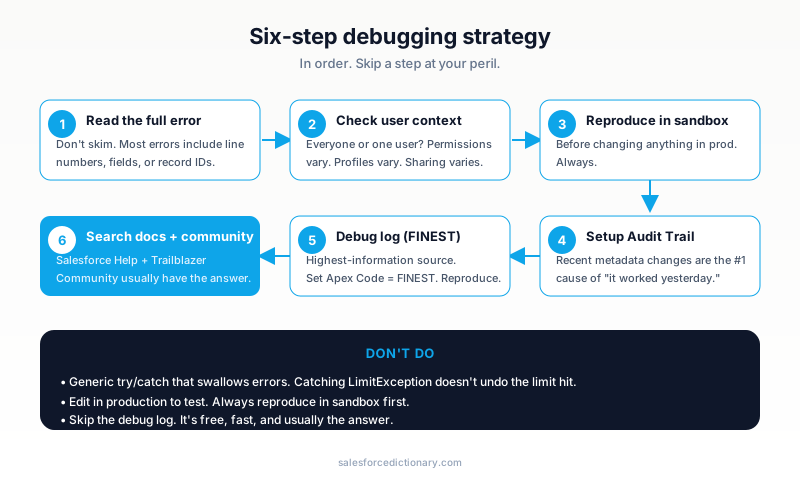
When you hit an error you've never seen before, work through this checklist:
- Read the full error. Most errors include the line number, field, or record ID. Don't skim.
- Check the user context. Is this happening for everyone, or just one user? Permissions vary.
- Reproduce in a sandbox. If you can, do this before changing anything in prod.
- Check the Setup Audit Trail. Recent metadata changes are the #1 cause of "it worked yesterday."
- Look at the debug log. Set log level to
Apex Code: FINESTand reproduce. The trace usually reveals what's actually happening. - Search Salesforce Help and Trailblazer Community. Most errors have someone else hitting them years ago, with the answer in a forum thread.
When the error is from Agentforce
Agent Actions surface platform errors back to the agent. The agent then has to decide: ask the user, retry, or escalate. If your action throws INSUFFICIENT_ACCESS_OR_READONLY, the agent will helpfully say "I can't update this record" - but the fix is in your code, not in the agent.
Two implications:
- Test agent-invoked Apex paths with low-privilege users. Most errors that trip up agents are permission errors that worked fine for sysadmin during dev.
- Log meaningful errors. Agent traces in Observability show the error string verbatim. "Email validation failed: pattern mismatch" tells the next debugger what happened. "Error" doesn't.
Errors specific to 2026
Some errors that cropped up with the Agentforce 360 launch:
AGENT_EXECUTION_FAILED- an Action threw an unhandled exception. Check the Apex class.TOPIC_ROUTING_AMBIGUOUS- Atlas couldn't decide between two Topics. Add example utterances or set Topic priority.TRUST_LAYER_REJECTED- the Trust Layer blocked the response (toxicity, retention violation, etc.). Review the trace.ZERO_COPY_FEDERATION_TIMEOUT- Data 360's federated query took too long. Move to ingestion or narrow the query.
These follow the same fix pattern as the older errors: read the message, check the trace, search the docs.
Common debugging mistakes
- "I'll just add try/catch." Don't. Catching
LimitExceptiondoesn't undo the limit hit. Catching everything generic hides the actual issue. - Skipping the debug log. It's the single highest-information source. Use it first.
- Editing in production to test. Always reproduce in a sandbox first.
- Asking AI before reading the docs. AI is helpful, but the actual error message + Salesforce Help + Stack Overflow usually solves it faster.
Frequently asked questions
Why do governor errors only show up in production? Production has more data and more concurrent users than your sandbox. A trigger that works fine on 50 records explodes at 5,000.
Can I disable validation rules during a data load? You can use a custom permission to bypass them per-user, but the cleaner pattern is to test data with the rules and fix the data, not bypass the rules.
What's the difference between an "exception" and an "error"?
In Apex, an exception is something you can catch (with try/catch); an error is the user-facing message. Most exceptions become errors if uncaught.
Where do I see the actual stack trace?
Setup → Debug Logs → click any log → look for EXCEPTION_THROWN events. The line numbers refer to the deployed source, which may not match what you're looking at locally.
Should I send errors to an external monitoring tool? For high-traffic orgs, yes. Apex doesn't natively integrate with Sentry/Datadog, but you can write an exception handler that POSTs to a webhook. Or use Event Monitoring + a streaming pipeline.
What to read next
- Governor Limits Cheat Sheet - the limits behind the most common errors.
- Apex Trigger Framework - the patterns that prevent errors 1–6.
- Validation Rules - 20 Examples - the declarative side.
Save this page. Share with your team. The next time someone files a "weird error" ticket, paste the URL and watch the resolution time drop.
About the Author
Dipojjal Chakrabarti is a B2C Solution Architect with 29 Salesforce certifications and over 13 years in the Salesforce ecosystem. He writes and edits salesforcedictionary.com, published by KineticBit Inc., to help admins, developers, architects, and cert/interview candidates sharpen their fundamentals. More about Dipojjal.
Share this article
Sources
Related dictionary terms
 Our appAdWake up sharp. Not just awake.The alarm that rings through Silent and DND — free on iOS & Android.Get WakeSharp →
Keep reading

The Apex Trigger Framework: Best Practices for Bulk-Safe, Scalable Triggers (2026)
The complete 2026 trigger framework guide. Logic-less triggers, bulk safety, recursion control, framework comparison (Kevin O'Hara vs interface vs virtual), and CRUD/FLS enforcement.

Salesforce Flow vs Apex in 2026: A Decision Matrix for Admins, Developers & Consultants
Flow vs Apex is not a religious war anymore. Here is the 2026 decision matrix. Capability gaps, governor limits, the 70/30 rule, and 12 worked scenarios with the right answer for each.
Salesforce Governor Limits Explained: The 2026 Cheat Sheet (with Examples)
The canonical 2026 cheat sheet: SOQL/DML/CPU/heap limits, sync vs async, the most-hit limits in production, and 10 patterns to keep your org out of the red.


Comments
No comments yet. Start the conversation.
Sign in to join the discussion. Your account works across every page.