
Salesforce CPQ: Complete 2026 Guide (Configure, Price, Quote → Revenue Cloud)
The data model, configuration rules, pricing engine, quoting workflow, contracts and amendments, the migration to Revenue Cloud, and Agentforce-for-quoting.

If you've quoted complex products in any B2B context, you know the failure modes: wrong configurations, wrong prices, wrong discounts, contracts that don't match what was sold. CPQ is the system that prevents those, by encoding what's quotable, at what price, with what discount, requiring what approval - into the platform.
This is the canonical 2026 guide. Data model, configuration, pricing, quoting workflow, contracts, the Revenue Cloud transition, and how Agentforce reshapes it.
What CPQ is (and isn't)
CPQ is:
- A rules-driven quoting engine for complex products.
- A product catalog with bundles, options, and dependencies.
- A pricing engine with discount tiers, schedules, and dynamic logic.
- A contracting and renewal mechanism - quotes become contracts that auto-generate renewals.
- A managed package historically; today part of Revenue Cloud.
CPQ is not:
- For simple catalogs. If you sell five SKUs at fixed prices, you don't need CPQ.
- An ERP. It quotes; it doesn't manage manufacturing or fulfillment.
- A free upgrade. CPQ is licensed per user with material per-seat cost.
- The full revenue lifecycle alone - billing, revenue recognition, and order management are separate Revenue Cloud modules.
When you actually need CPQ
You need CPQ when:
- Products are configurable. Bundles with options, dependencies between options, version-aware constraints.
- Pricing is non-trivial. Volume tiers, customer-specific pricing, discounts that compound, multi-currency.
- Approvals matter. Discounts above 20% need VP approval; certain combinations need legal sign-off.
- Renewals are recurring revenue. Subscriptions, license renewals, multi-year contracts.
- Quote-to-cash needs a single source of truth. Sales generates the quote, the contract drives the invoice.
Without those, you can probably get by with native Opportunity + Product + Quote and skip the complexity.
The data model
The five objects you must internalize.
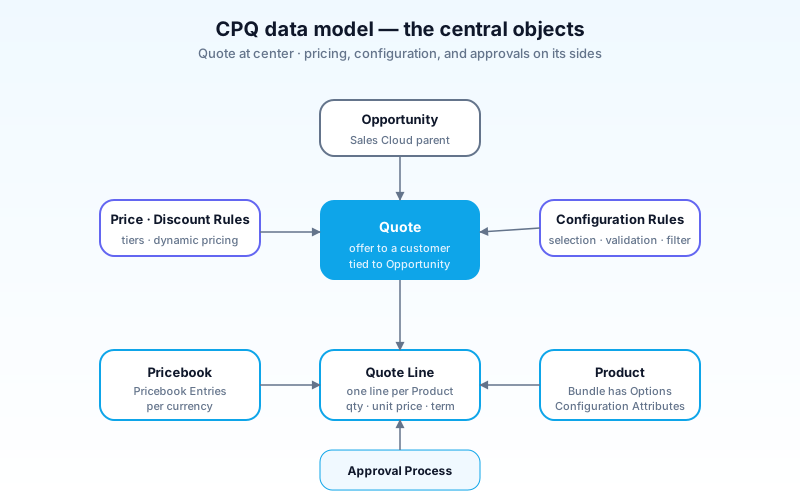
- Quote - the offer to a customer. Tied to an Opportunity, has a primary Account/Contact, an effective date, an expiration date.
- Quote Line - one line item on the quote. Each represents a Product at a quantity and price.
- Quote Line Group - optional grouping of related lines (a "site" group, a "year 1" group).
- Product - what's sold. Standard or bundle.
- Bundle Product - a parent Product whose options are individual Products related via Product Option records.
- Product Option - links a child Product to a parent Bundle Product, with constraints (required/optional, quantity).
- Configuration Attribute - a question asked during configuration ("How many users?", "Which support tier?").
- Pricebook + Pricebook Entry - pricing per Product per currency.
- Discount Schedule - quantity-based or term-based discount tiers.
- Price Rule - calculated/dynamic pricing logic.
- Configuration Rule - what configurations are valid (e.g., "if A is selected, B is required").
- Approval - Salesforce native approval processes, often layered over Quote DiscountTotal or specific configurations.
The relationships:
- A Quote has many Quote Lines.
- A Quote Line is for one Product at a quantity, with a price.
- A Bundle Product has many Product Options (child products).
- A Product has Pricebook Entries for each pricebook + currency.
- Configuration Rules and Price Rules modify the Quote at runtime.
CPQ adds ~30 standard objects on top of core Sales Cloud. The data model is verbose because it has to express any sellable configuration.
Product configuration
The interactive UI where the rep (or customer-facing agent) builds the deal.
Bundles and options
A Bundle Product like "Enterprise Suite" might have options:
- "Core licenses" (required, qty configurable)
- "Premium support" (optional, choose Standard / Premium / Enterprise)
- "Storage add-on" (optional, qty in TB)
- "SSO module" (optional, requires Premium support)
The rep clicks "Configure", picks options, sees real-time price updates.
Configuration Rules
Encode the "you can't sell X without Y" logic:
- Validation Rules - "If Premium support is selected, SSO module is required."
- Selection Rules - "Adding 'Healthcare Bundle' auto-selects 'HIPAA compliance module'."
- Filter Rules - "Customer segment 'Government' restricts catalog to FedRAMP-authorized SKUs."
Rules execute during configuration. Bad rules feel slow; good rules feel like the system is helping.
Configuration Attributes
Questions asked during configuration that influence options:
- "How many users?" → drives "Core licenses" quantity automatically.
- "Which industry?" → filters "Industry Pack" options to just that industry.
Attributes shouldn't be visible fields on the Product; they're dynamic input collected at quote time.
The pricing engine
CPQ's pricing model is layered. Each layer can adjust the price.
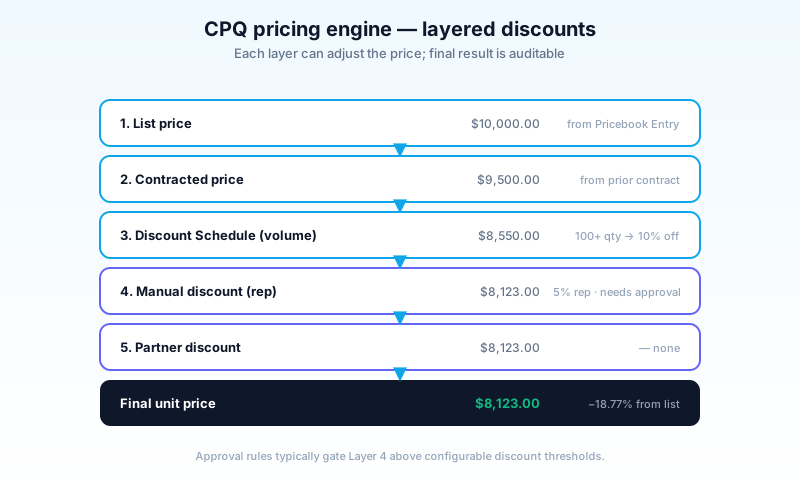
The layers (in order):
- List price - from Pricebook Entry.
- Contracted price - customer-specific price from a prior contract or active agreement.
- Discount Schedule - volume tiers ("buy 100+, get 20% off").
- Manual discount - rep-applied discount on the Quote Line.
- Partner discount - channel partner adjustment.
- Customer-segment discount - applied via Price Rule.
- Final unit price - what the customer sees.
Each layer is auditable. Approval rules typically gate manual discounts above thresholds.
Price Rules
Where dynamic logic lives. Examples:
- "If quantity > 1000, apply 15% discount automatically."
- "If sum of all support add-ons > $50k, free up to one Standard option."
- "If product is from 'Premium' family AND customer is 'Strategic', add 5% list-price uplift."
Price Rules use Lookup Queries (queries against custom objects holding pricing data) and Price Conditions (when does this rule fire). Powerful, but easy to over-configure.
The quoting workflow
End-to-end:
- Opportunity created in Sales Cloud.
- Quote created from the Opportunity (manually or via automation).
- Configure products - add bundles, configure options, validate rules.
- Apply pricing - discounts, partner deals.
- Generate Quote Document (PDF) - branded, includes T&Cs.
- Submit for approval if discount thresholds breached.
- Send to customer - via DocuSign / Adobe Sign or via Salesforce Files.
- Customer signs.
- Mark Primary - promotes Quote to win.
- Create Contract - converts Quote Lines to Subscription records on a Contract.
- Order created - for downstream billing.
- Renewal - auto-generated quote 90 days before contract end.
Steps 6–11 are where most CPQ value lands. Without CPQ, these are spreadsheets, email threads, and missed renewals.
Contracts, amendments, renewals
The recurring-revenue muscle.
Contracts
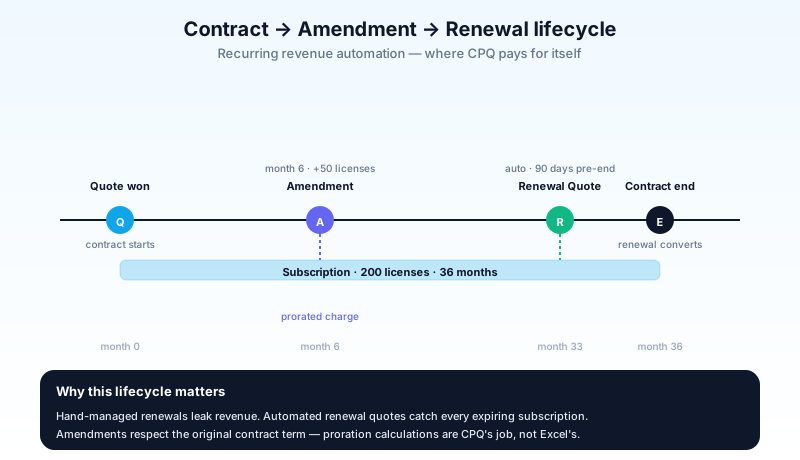
When a Quote is won, CPQ creates a Contract with Subscription records - one per recurring Quote Line. The Contract has a start, end, and term length.
Amendments
Mid-contract changes - customer adds 50 more licenses in month 6. CPQ creates an Amendment Quote that:
- Pre-loads existing subscriptions.
- Lets the rep add/modify/cancel.
- Calculates prorated charges for the remainder of the term.
The Amendment becomes a new Contract or extends the existing one (configurable).
Renewals
Near term-end, CPQ generates a Renewal Quote that:
- Pre-loads expiring subscriptions.
- Applies the renewal pricing rules (uplift, churn risk discount).
- Routes to the renewals team for processing.
Renewals automation is one of the biggest ROI drivers - automated renewal quotes catch subscriptions that would otherwise lapse silently.
CPQ vs Revenue Cloud - the 2024–2026 transition
Salesforce consolidated CPQ + Billing + new RLM under the Revenue Cloud umbrella. As of 2026:
- Revenue Cloud - the umbrella product line.
- Revenue Lifecycle Management (RLM) - the new core. Native (not a managed package). Built on the Salesforce Platform with a modernized data model.
- CPQ (Salesforce CPQ) - still available; still a managed package; still actively supported. Many existing customers haven't migrated yet.
- Billing - Salesforce Billing module on top of CPQ; will eventually be unified under RLM.
The migration story:
- New customers in 2026 should typically start on RLM, not legacy CPQ.
- Existing CPQ customers can stay on CPQ; Salesforce committed to multi-year support. Migration to RLM is a project, not a click.
- Hybrid orgs exist (CPQ for some product lines, RLM for others) but increase architectural debt.
If you're picking today, ask: are you a new build, or extending an existing CPQ implementation? New = RLM. Existing = stay until you have a real reason to migrate.
Industries CPQ - Vlocity / OmniStudio
Salesforce Industries (Communications, Media, Energy & Utilities, Insurance) ships Industries CPQ - separate from core CPQ. Built on OmniStudio.
Differences:
- Different data model (Catalog, Cart, Decomposition).
- Different UI (Cart-based, OmniScript-driven).
- Built for high-volume B2B2C and B2C scenarios (telecom orders, insurance policies).
- Co-exists in some orgs with core CPQ - you'd never use both for the same line of business, but a multi-LOB enterprise might have both.
For a deeper look at the Industries stack, see the OmniStudio guide.
How Agentforce reshapes quoting (2026)
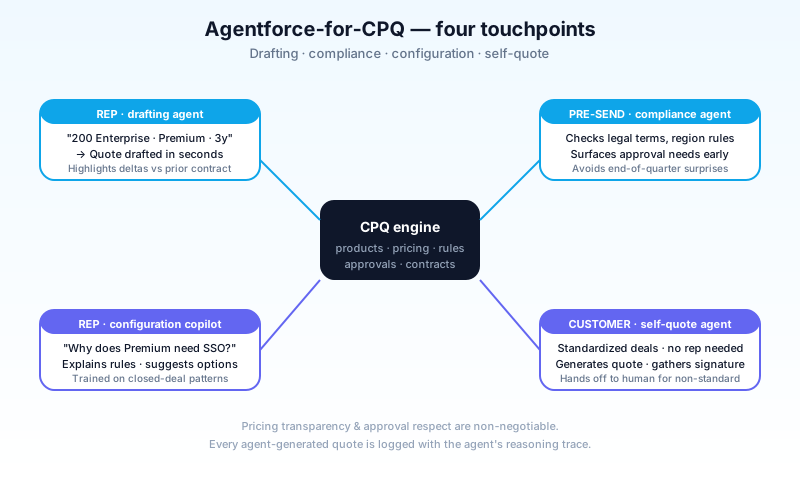
The 2026 layer transforms several CPQ workflows.
Quote drafting agent
Rep types: "Draft a quote for AcmeCorp - 200 Enterprise licenses, Premium support, 3-year term." Agent:
- Pulls AcmeCorp's account, prior contracts, contracted pricing.
- Builds the Quote with the right products and configurations.
- Highlights discrepancies (asked for 200, last contract was 250 - confirm).
- Returns a draft Quote ready for review.
Compliance & risk agent
Before a quote goes out:
- Checks against governance rules (legal terms, regional restrictions).
- Flags configurations that historically caused churn.
- Surfaces approval requirements early so the rep isn't surprised.
Configuration copilot
For complex products:
- Walks the rep through the configuration interactively.
- Recommends options based on similar deals that closed.
- Explains why a chosen option requires another.
Customer-facing self-quote
For lower-value standardized deals:
- Customer chats with an agent to spec their needs.
- Agent generates a quote, presents pricing, gathers signature.
- Hands off to a human only for non-standard requests.
Critical constraints:
- Pricing transparency. An agent that surprises a customer with a hidden discount or added fee erodes trust fast.
- Approval respect. Agents cannot bypass approval thresholds. Discounts above the threshold still need humans.
- Audit. Every agent-generated quote and modification is logged with the agent's reasoning trace.
Common pitfalls
- Pattern 1: Treating CPQ as a fancy product picker. CPQ's value is rules + pricing + contracts. If you're only using the configurator, you're paying for 100% and using 30%.
- Pattern 2: Over-configuring rules early. Start with the rules that prevent the worst errors. Add more as patterns emerge. Day-one rule explosions are unmaintainable.
- Pattern 3: Skipping Discount Schedules. Volume tiers in formulas everywhere - you'll regret it. Use Discount Schedules; they're auditable and reusable.
- Pattern 4: Custom Apex when CPQ standard works. CPQ has many extension points; Apex is the last resort. Heavy Apex CPQ extensions are a known migration pain.
- Pattern 5: Ignoring contract amendments. Built-in amendment workflow is rich - most teams use 30% of it. Map your real amendment scenarios; configure to fit.
- Pattern 6: No renewal automation. Hand-managed renewals leak revenue. Automate the renewal quote even if humans review every one.
- Pattern 7: Pricing logic in Apex that should be in Price Rules. Hidden Apex pricing is a knowledge silo. Push to declarative Price Rules where possible.
- Pattern 8: One Quote Document template for everything. Different deal types need different docs. Build per-segment templates.
- Pattern 9: Approval routes that go to one person. Vacations, role changes, departures - single-point approval routes break. Use queues and delegation.
- Pattern 10: Treating RLM migration as "lift and shift". It's a re-architecture. Plan months, not weeks.
- Pattern 11: Skipping training. Reps avoid CPQ if it slows them down. Invest in onboarding; the first 4 weeks set adoption for years.
Frequently asked questions
How long does a CPQ implementation take? Small (under 100 users, simple catalog): 3–4 months. Mid (100–500 users, complex catalog): 6–9 months. Large (1k+ users, multi-currency, multi-region): 12–18 months.
Is Industries CPQ better than core CPQ? For specific industries (telecom, media, utilities, insurance), yes. For generic B2B, no - core CPQ (or RLM) is more straightforward.
How does CPQ integrate with MuleSoft? Common patterns: pricing-data sync from ERP, contract export to billing system, renewal-data ingest from BI. MuleSoft CPQ accelerators cover most.
Can I use CPQ without Sales Cloud? Technically possible; rare. CPQ assumes Opportunity, Account, Contact. Without Sales Cloud you'd be re-inventing those.
What's the difference between Subscription and Asset? Subscription is the recurring-revenue line on a Contract. Asset is the customer's installed inventory. They can co-exist (a Subscription can spawn Assets for fulfillment).
How does CPQ handle multi-currency? Each Pricebook Entry has currency-specific pricing. Quotes inherit Account currency. Cross-currency reporting works but requires governance.
Can Agentforce auto-approve quotes? Within configured thresholds yes; above threshold no. The Agent surfaces approval status, doesn't bypass it.
What's the typical pricing model for CPQ? Per-user/month, with tiered editions. CPQ Plus adds Billing or advanced features. Pricing is enterprise-tier; expect serious sticker per seat.
Is the managed package version of CPQ being deprecated? Not deprecated, but new investment goes to RLM. Existing CPQ customers should plan their RLM evaluation in 2026–2027.
What to read next
- Salesforce CPQ, Approval Process, Sales Cloud - the dictionary entries.
- Sales Cloud vs Service Cloud (2026) - the platform CPQ sits on top of.
- OmniStudio Explained - the layer beneath Industries CPQ.
CPQ is one of the highest-ROI Salesforce specialties when implemented well - and one of the worst when over-customized. Start with the rules that prevent the worst errors. Add complexity when patterns demand it. Don't fight Revenue Cloud's direction - it's where new investment is going.
About the Author
Dipojjal Chakrabarti is a B2C Solution Architect with 29 Salesforce certifications and over 13 years in the Salesforce ecosystem. He writes and edits salesforcedictionary.com, published by KineticBit Inc., to help admins, developers, architects, and cert/interview candidates sharpen their fundamentals. More about Dipojjal.
Share this article
Sources
Related dictionary terms
 Our appAdWake up sharp. Not just awake.The alarm that rings through Silent and DND — free on iOS & Android.Get WakeSharp →
Keep reading

OmniStudio Explained: FlexCards, OmniScripts, DataRaptors & Integration Procedures
OmniStudio is the low-code stack inside Salesforce Industries Cloud. Here's the complete pillar guide - FlexCards, OmniScripts, DataRaptors, Integration Procedures, plus when to pick it over Flow + LWC.

Salesforce Sales Cloud vs Service Cloud: Which Do You Need in 2026?
Sales Cloud and Service Cloud share a platform but solve different problems. Here is the 2026 comparison. Features, pricing, decision scenarios, and how Agentforce fits both.


Comments
No comments yet. Start the conversation.
Sign in to join the discussion. Your account works across every page.