
25 Salesforce Formula Functions Every Admin Should Master (2026)
Logic, text, date, number, and cross-object functions, with working examples for validation rules, formula fields, default values, and Flow.

A junior admin shows you a validation rule that blocks every save on the Opportunity object, not just the ones with Stage equal to Closed Lost. You open it and see IF(Stage = 'Closed Lost', Loss_Reason__c, false). They used the wrong function. The rule should use ISPICKVAL for the picklist comparison, not equality, and the condition should be an inverted check. Two-line fix. But the bigger fix is teaching the team the twenty-five functions they will reach for every week. This guide is that teaching, in one place.
If you have stared at the formula editor wondering which function to reach for, this is the catalog. Twenty-five functions, what each does, and a real-world example. Keep this open in a tab; come back when you forget syntax. The list is opinionated. These twenty-five cover roughly 90 percent of what production-quality Salesforce orgs need, and the rest is either trivial (math operators, simple string concatenation) or specialized enough to warrant the full Salesforce reference.
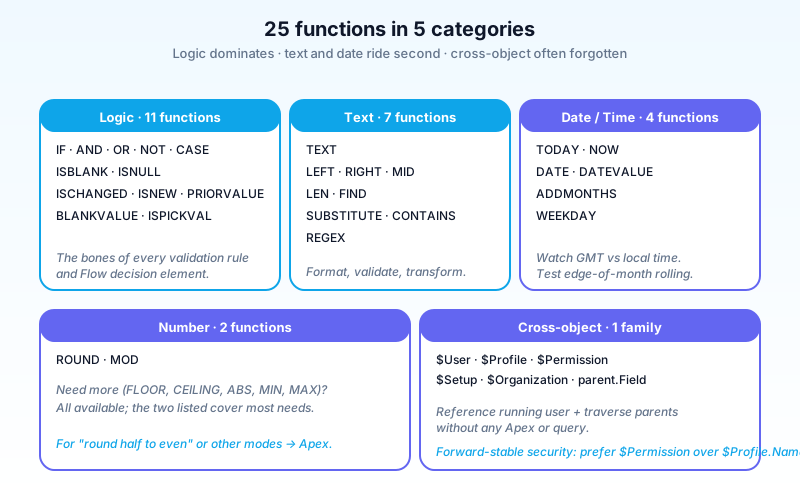
How to read this list
Each entry has:
- Function. The name.
- Syntax. The call signature.
- What it does. One sentence.
- Real example. A working snippet.
- Common pitfall. The gotcha.
Examples are kept under eight lines. All work in formula fields and validation rules; some work in Flow formulas with minor adjustments. When the Flow context differs, the entry calls it out.
Logic functions: the workhorses
1. IF
IF(logical_test, value_if_true, value_if_false)
The single most-used formula function. Conditional branching.
IF( Amount > 100000, "Large Deal", "Standard")
Pitfall: nesting IFs more than three deep becomes unreadable. Reach for CASE instead.
2. AND
AND(logical1, logical2, ...)
True when ALL arguments are true. Up to 50 arguments; 3 to 5 in practice.
AND( Stage = "Closed Won", Amount > 50000, IsDeleted = false )
Pitfall: Always returns false if any argument is null or blank. Wrap nullable fields in BLANKVALUE() or test explicitly.
3. OR
OR(logical1, logical2, ...)
True when ANY argument is true.
OR( Stage = "Closed Won", Stage = "Closed Lost" )
Pitfall: Same null behavior as AND.
4. NOT
NOT(logical)
Inverts a boolean.
NOT( ISPICKVAL(Status, "Inactive") )
Pitfall: Avoid NOT(NOT(x)). Just use x. Common cargo-culting in legacy formulas.
5. CASE
CASE(expression, value1, result1, value2, result2, ..., else_result)
Cleaner than nested IFs when matching one expression against many values.
CASE( Industry,
  "Technology", 5,
  "Finance", 4,
  "Retail", 3,
  "Other", 1
)
Pitfall: Only matches exact equality. For ranges, use IF.
6. ISBLANK / ISNULL
ISBLANK(field)
ISNULL(field)
ISBLANK works for text and number; ISNULL is older and only works for numbers (where blank is not zero). Use ISBLANK by default in 2026.
IF( ISBLANK(Email), "No Email Provided", Email)
Pitfall: ISBLANK("") returns true; ISBLANK(0) returns false (zero is not blank).
7. ISCHANGED
ISCHANGED(field)
True if the field changed during the current save. Used heavily in validation rules, workflow rules, and Flow trigger conditions.
AND( ISCHANGED(Stage), ISPICKVAL(Stage, "Closed Won") )
Pitfall: Does not work on insert (record was just created, nothing to compare). Combine with ISNEW() if you need both.
8. ISNEW
ISNEW()
True if the record is being inserted (vs updated). No arguments.
AND( ISNEW(), ISBLANK(Account__c) )
Pitfall: Returns true only during the initial insert transaction. Subsequent updates return false.
9. PRIORVALUE
PRIORVALUE(field)
The field's value before the current save. Pairs with ISCHANGED for "what was the old value?" logic.
AND( ISCHANGED(Stage), PRIORVALUE(Stage) = "Negotiation/Review" )
Pitfall: Returns the new value during insert (since there is no prior value).
10. BLANKVALUE
BLANKVALUE(expression, substitute_expression)
Returns the substitute when the first argument is blank. Cleaner than nested IF/ISBLANK.
BLANKVALUE(Description, "No description provided")
Pitfall: Common confusion with NULLVALUE. Same idea, but NULLVALUE is for numbers only and is older. Use BLANKVALUE.
11. ISPICKVAL
ISPICKVAL(picklist_field, "literal value")
The way to compare picklist values. Do not use = with picklists; it does not always behave as expected.
ISPICKVAL(Stage, "Closed Won")
Pitfall: The literal string must match the API name of the picklist value, not the label. With translation enabled, this matters.
Text functions: when fields meet humans
12. TEXT
TEXT(value)
Converts a number, date, datetime, picklist, or currency to text.
"Order #" & TEXT(Order_Number__c)
Pitfall: For picklists, returns the API name (not label). Useful but surprising for new admins.
13. LEFT / RIGHT / MID
LEFT(text, num_chars)
RIGHT(text, num_chars)
MID(text, start_num, num_chars)
Substring operations.
LEFT(Account.Name, 3)
MID(Phone, 7, 4)  // last 4 digits of (xxx) xxx-xxxx
Pitfall: Indices are 1-based, not 0-based.
14. LEN
LEN(text)
Length of a text value.
IF( LEN(Description) > 500, "Long", "Short")
15. FIND
FIND(search_text, text, start_num)
Position of the first occurrence (1-based). Returns 0 if not found.
FIND("@", Email)
Pitfall: Case-sensitive. Use LOWER() if you need case-insensitive.
16. SUBSTITUTE
SUBSTITUTE(text, old_text, new_text)
Replace all occurrences.
SUBSTITUTE(Phone, "-", "") // strip dashes
Pitfall: Replaces ALL occurrences. For "first only", use FIND plus LEFT/MID.
17. CONTAINS
CONTAINS(text, compare_text)
True if compare_text appears anywhere in text.
CONTAINS(Account.Name, "Inc")
Pitfall: Case-sensitive. Wrap both arguments in LOWER() for case-insensitive search.
18. REGEX
REGEX(text, regex_pattern)
True if the text matches the pattern. Modern Salesforce (Spring '20+) supports it.
REGEX(Phone, "\\d{3}-\\d{3}-\\d{4}")
Pitfall: Backslashes must be escaped (\\d not \d). Patterns can be expensive. Keep them tight.
Date and time functions
19. TODAY / NOW
TODAY()
NOW()
TODAY() returns a Date (no time). NOW() returns a DateTime in GMT.
IF( CloseDate < TODAY(), "Past Due", "Upcoming")
Pitfall: NOW() is GMT. For local-time logic, do timezone math explicitly. Do not trust the user's perceived "today" without conversion.
20. DATE / DATEVALUE
DATE(year, month, day)
DATEVALUE(text_or_datetime)
Construct a date from parts, or convert a text/datetime to a date.
DATE(2026, 12, 31)
DATEVALUE(NOW())
Pitfall: DATE(2026, 13, 1) errors at runtime. Validate inputs.
21. ADDMONTHS
ADDMONTHS(start_date, num_months)
Add (or subtract) months.
ADDMONTHS(CloseDate, 12) // anniversary date
Pitfall: End-of-month rolling. ADDMONTHS(DATE(2026,1,31), 1) returns 2026-02-28, not 2026-03-03. Usually what you want, but worth knowing.
22. WEEKDAY
WEEKDAY(date)
Returns 1 (Sunday) through 7 (Saturday).
IF( WEEKDAY(CloseDate) = 1 || WEEKDAY(CloseDate) = 7, "Weekend Close", "Weekday Close")
Pitfall: Sunday equals 1, not Monday. Locale-fixed.
Number functions
23. ROUND
ROUND(number, num_digits)
Standard rounding (5 or higher rounds up).
ROUND(Amount * 0.0875, 2) // tax to 2 decimals
Pitfall: For "round half to even" or other rounding modes, you need Apex. Formula ROUND is half-up only.
24. MOD
MOD(number, divisor)
Remainder after division.
MOD(Quantity, 12) // how many over a full dozen
Pitfall: Negative numbers behave per IEEE rules. MOD(-5, 3) returns -2, not 1.
25. $User cross-object reference
$User.field
$Profile.Name
$Permission.permission_name
$Setup.custom_setting__c.field__c
$Organization.field
Reference the running user's properties without joining anything.
IF( $User.UserRoleId = "00E5x000003abcd", "Manager-only field", null)
IF( $Profile.Name = "System Administrator", "Admin View", "Standard View")
Pitfall: $Profile.Name matches the profile name as configured in your org. Case-sensitive. Document the magic strings or risk drift on profile rename.
Putting it together: patterns that combine functions
The real value is not knowing each function; it is combining them. The five patterns below cover most of the formula work I see in production orgs across every industry. Memorize the shape and you will recognize the new requirement as a variant of one you have built before.
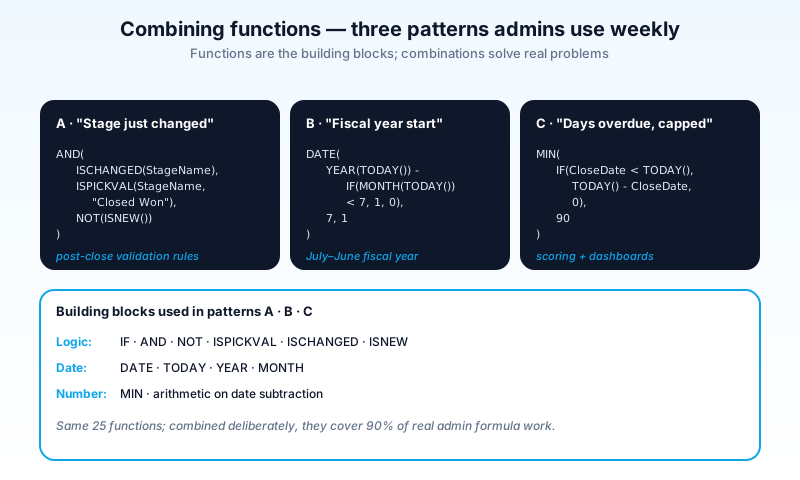
Pattern A: "stage just changed to Closed Won"
AND(
  ISCHANGED(StageName),
  ISPICKVAL(StageName, "Closed Won"),
  NOT(ISNEW())
)
Used in validation rules to enforce post-close requirements; in Flow trigger conditions; in workflow entry criteria.
Pattern B: "fiscal-year start date"
DATE(YEAR(TODAY()) - IF(MONTH(TODAY()) < 7, 1, 0), 7, 1)
For an org with a July-June fiscal year. Pattern: nest DATE inside arithmetic on YEAR/MONTH.
Pattern C: "phone formatted as (xxx) xxx-xxxx if 10 digits"
IF(
  LEN(SUBSTITUTE(SUBSTITUTE(SUBSTITUTE(Phone, "-", ""), "(", ""), ")", "")) = 10,
  "(" & MID(Phone, 1, 3) & ") " & MID(Phone, 4, 3) & "-" & MID(Phone, 7, 4),
  Phone
)
Strip non-digits, check length, reformat. Unwieldy but standard. If you find yourself writing this pattern more than once, hoist it into a Flow formula resource or an Apex helper.
Pattern D: "is the running user the record's owner?"
$User.Id = OwnerId
Useful for hiding fields from non-owners via formula-driven page layouts (with Dynamic Forms).
Pattern E: "days overdue, capped"
MIN(
  IF( CloseDate < TODAY(), TODAY() - CloseDate, 0),
  90
)
Returns 0 to 90 days overdue. Common in scoring logic and dashboards.
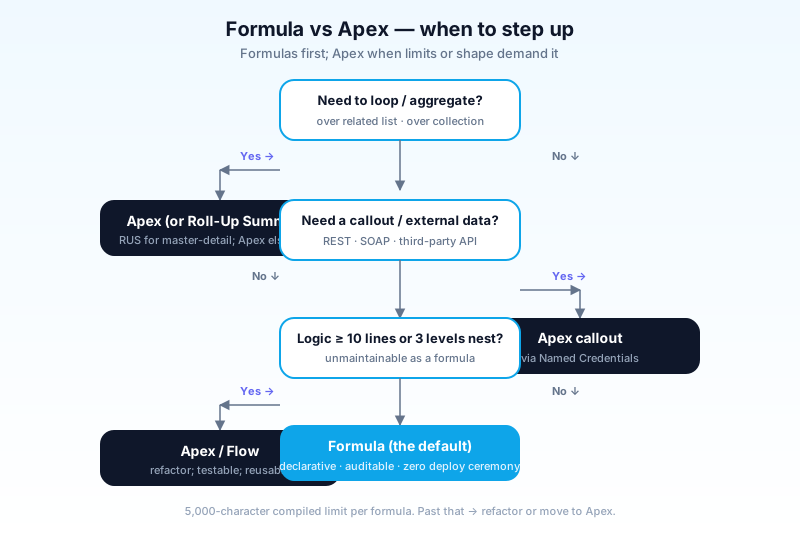
When to reach for Apex instead
Formulas have hard limits:
- 5,000 character limit per formula (compiled).
- No loops. Cannot iterate over related lists.
- Limited cross-object (only direct lookups plus parent traversal).
- No callouts. Cannot fetch external data.
- Synchronous only. Recalculates on every record view.
When to step out of formulas:
- Logic is more than 10-15 lines or 3 levels of nesting.
- You need a list-aggregate that is not a roll-up summary.
- You need to look up related records the formula cannot reach.
- The formula performance affects page-load time materially.
For most admin work, formulas suffice. Reach for Apex when you cannot avoid it. The other tell is testability: if your business needs unit-test coverage on the calculation, Apex gives you a real test class and formulas give you "insert a record and assert on the output" workarounds.
How Agentforce interacts with formulas (2026)
A modern angle: agents can read formula field values directly. No special API. The tip:
- Name your formula fields semantically.
Days_To_Close__cworks for an agent;dtc__cdoes not. - Document the formula in the Help Text. Agents pick up the help text as context for understanding the field.
- Avoid over-clever formulas. If the agent cannot summarize what it does, your future-self cannot either.
Agents make readable formulas more valuable than ever. The orgs investing in Agentforce in 2026 are also investing in formula-field hygiene, because the field-naming and help-text habits that help an agent reason about a record also help humans read the data.
Common pitfalls
- Pattern 1: Picklist comparison with
=. UseISPICKVAL. The=works in some contexts and not others; the inconsistency burns hours. - Pattern 2: Null silently breaks AND/OR. A null in any argument produces a null result. Test edge cases with nullable fields.
- Pattern 3: Date formulas in user's local time. TODAY() and NOW() are server-side. For user-local logic, do explicit timezone math.
- Pattern 4: Reading the API name vs label of picklists.
TEXT(Stage)returns the API name. Many admins discover this only after deploying. - Pattern 5: 5,000-character formula limit. Long formulas break silently when you push them past the limit. Refactor early.
- Pattern 6: REGEX without escaping.
\ddoes not work; you need\\d. Common typo. - Pattern 7: ISCHANGED on insert. Always returns false on insert. Combine with
OR(ISNEW(), ISCHANGED(field))for "new or changed" logic. - Pattern 8: PRIORVALUE on insert. Returns the current value (since no prior). Do not trust it on inserts.
- Pattern 9: Cross-object formulas degrading page load. Excessive parent.Field traversal slows record-detail pages. Profile your worst offenders.
- Pattern 10: $Profile.Name as the security gate. Profile names change. Use Permission Set checks via
$Permissionfor forward-stable security.
A maintenance habit that pays for itself
The single best practice for formula fields, validation rules, and Flow formulas combined: keep a one-page formula inventory per object. Each row captures the formula's name, the function it serves, the business owner, and a quick "what breaks if this changes" note. Update it whenever you add or modify a formula. A year from now, when a salesperson asks why a field reads "Past Due" on a record that is not actually past due, the inventory tells you which formula owns the decision in three seconds rather than an afternoon of debugging.
The same inventory is the input your future Agentforce work will rely on. An agent that can summarize "this Account is high-touch because the formula for Engagement_Score__c uses days-since-last-activity weighted against open-case count" is more useful than one that just reads the number. Document the formula and the agent gets the explanation for free.
Frequently asked questions
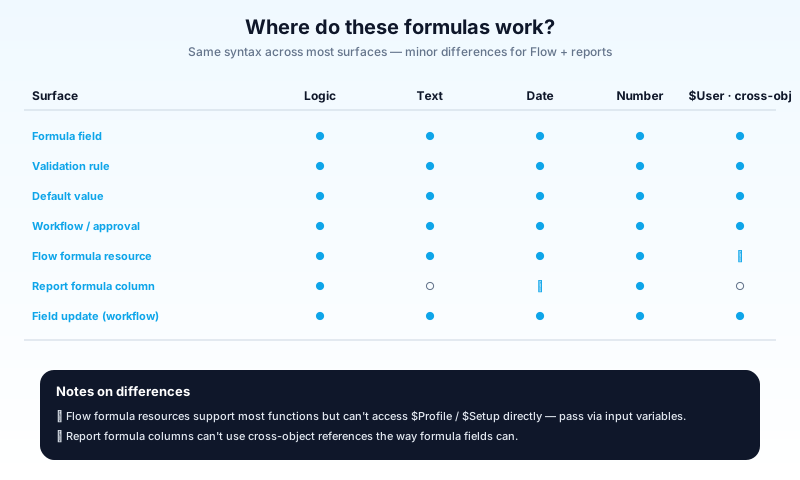
Where do these formulas work? Formula fields, validation rules, default values, workflow rules, approval entry criteria, Flow formula resources (with minor differences), report formula columns.
What is the difference between formula syntax in formula fields vs Flow?
Largely identical. Flow has some additional functions (for example, GETRECORDIDS) and excludes some that do not make sense (for example, field-level ISCHANGED in subflow context).
Can I unit-test formulas? Not natively. The closest pattern: insert known records, verify formula field outputs. Some teams use Apex test methods that assert on formula field values.
How do I debug a complex formula? Build it incrementally. Use a developer console anonymous block to evaluate sub-expressions. Or paste pieces into a "Calculate" formula sandbox field.
What is the order of evaluation? Standard mathematical precedence: parentheses, unary, multiplication and division, addition and subtraction, comparison, AND, OR. Wrap with parentheses if in doubt.
Are formula fields stored? No. They are calculated on read. So they do not take up storage but do count against compiled-formula complexity limits per object.
Can I reference record types in a formula?
Yes. RecordType.Name or RecordType.DeveloperName (use DeveloperName for forward stability).
How do I get the running user's locale?
$User.LocaleSidKey or $User.LanguageLocaleKey.
What about negative number formatting? Use IF plus ABS:
IF( Amount < 0, "(" & TEXT(ABS(Amount)) & ")", TEXT(Amount))
Can Agentforce generate formulas for me? Yes. Agentforce in Setup includes a formula assistant. Treat it as a starting point; always test, especially for edge cases involving nulls, picklist API names, and timezone math.
What to read next
- Formula Field, Validation Rule, Flow, Approval Process: the dictionary entries.
- Salesforce Validation Rules: 20 Real-World Examples: these functions in the wild.
- The Complete 2026 Guide to Record-Triggered Flows: where formulas drive Flow decisions.
Master these 25 and you will handle 90 percent of real formula work. Combine them deliberately. Refactor when nesting gets ugly. Reach for Apex when formulas hit their ceiling, and document everything you build, because the next admin to inherit your formulas will be very grateful.
One final piece of advice for the team that builds formulas at scale. Treat the formula bar like code, even though it does not feel like code. Use comments inside long formulas (the /* ... */ syntax works). Version them through metadata, not through the UI. Review every change in a PR before it lands in production. The orgs that treat formulas as second-class get a different kind of technical debt than the orgs that treat triggers as second-class, but the cost is the same: a year from now, somebody has to come back to it and the work is harder than it had to be.
About the Author
Dipojjal Chakrabarti is a B2C Solution Architect with 29 Salesforce certifications and over 13 years in the Salesforce ecosystem. He writes and edits salesforcedictionary.com, published by KineticBit Inc., to help admins, developers, architects, and cert/interview candidates sharpen their fundamentals. More about Dipojjal.
Share this article
Sources
Related dictionary terms
 Our appAdWake up sharp. Not just awake.The alarm that rings through Silent and DND — free on iOS & Android.Get WakeSharp →
Keep reading

The Complete 2026 Guide to Record-Triggered Flows in Salesforce
Record-triggered flows are the Salesforce automation default in 2026. This is the complete tutorial: before-save, after-save, scheduled paths, gotchas, and 5 worked examples.

Salesforce Validation Rules: 20 Real-World Examples Every Admin Should Know
20 production-ready Salesforce validation rule formulas with explanations. Covering email, phone, close-date logic, record-type-specific rules, cross-object formulas, and more.


Comments
No comments yet. Start the conversation.
Sign in to join the discussion. Your account works across every page.